Posts Tagged ERS8600
Avaya ERS 8600 Software 7.0 Draft Release Notes
Posted by Michael McNamara in AVAYA, EthernetRtngSwitch, Nortel on February 25, 2010
You’ll recall that back in December 2009 I wrote a post about the upcoming release of 7.0 software the the Ethernet Routing Switch 8600. At that time the software was in Controlled Availability (CA) and wasn’t expected to transition to General Availability (GA) until March 2010.
It seems that Nortel/Avaya are starting to get their ducks in a row as a draft version of the release notes hit Nortel’s support website over the past few days.
Here’s one known issue that grabbed my eye while browsing the release notes;
MLT/SMLT limitation(s)
Q01971344
In the case of a full-mesh SMLT configuration between 2 Clusters running OSPF (more likely an RSMLT configuration) because of the way that MLTs work in regards to CP generated traffic, it is highly recommended that the MLT port (or ports) that form the square leg of the mesh (versus the cross connect) be placed on lowered number slot/port, than the cross connections. The reason for this is because CP generated traffic is always sent out on the lowered numbered ports en active. Using this recommendation will keep some OSPF adjancey up if all the links of the IST fail. Otherwise the switches which have a failed IST could lose complete OSPF adjancey to both switches in the other Cluster and therefore become isolated.
Cheers!
Ethernet Routing Switch 8600 Software Release v5.1.2.0
Posted by Michael McNamara in AVAYA, EthernetRtngSwitch, Nortel on February 17, 2010
Avaya has released v5.1.2.0 software for the Ethernet Routing Switch 8600. I know there were quite a few users waiting for this release. Please feel free to post back here to let us all know how your making out with 5.1.2.0 if you happen to deploy it.
You can find a copy of the release notes here but you’ll obviously need to visit the Avaya/Nortel site to download the software.
Here are some of the bullet points from the release notes;
Switch management
- The SNMP trap for rcIpBgpPeerLastError will now be sent with a proper byte string length such that the last bye will no longer be lost. This could previously cause operational issues with some SNMP management stations. (Q02092718)
- ERS 8600 will no longer observe system instability associated with configuration changes to switch parameters involving SNMP settings. (Q02094258)
- Previously the ERS 8600 was applying a local Access Policy to IPv6 routed SSH packets. Now the system will route these packets and apply Access Policies to only local destination policy type (SSH, Telnet, HTTP) IPv6 packets. This will no longer cause inappropriate connection issues to remote hosts. (Q02070640-01)
- ERS8600 has been modified to now allow proper communication with NetQOS Management Device. (Q02049612-01)
Platform
- With both filtering and ingress mirroring enabled on the ERS8600, system instability could be seen under certain traffic conditions. This is now resolved. (Q02078239-01)
- For non-routed VLANs, SLPP will now use a source MAC address equal to the Base Mac Address of the ERS8600 plus the ID of the VLAN. This will ensure that received SLPP packets are processed against the correct non-routed VLAN when a loop is present in the network and avoid erroneous warning messages. (Q02081719)
- IP fix traffic from the switch to an external collector will no longer be sent with an improper QoS marking of QOS=7, but instead sent with QOS=0, now placing these packets into the proper default egress queue. Previously this traffic could potentially interfere with other system management traffic leading to the potential for system instability when IPFix was enabled. (Q02044640-01)
- High CPU utilization on an I/O line card co-processor will no longer result in a loss of messaging synchronization with the SSF CPU, which previously could have led to system instability. (Q02085085)
- ERS 8600 will no longer show instability in tLogger task while writing to the PCMCIA card with clilogging enabled. (Q02006689-01)
- ERS 8600 R and RS module card ports will now initialize multicast and broadcast bandwidth limiting values properly when these features are enabled. (Q02074960)
- ERS 8600 will now properly handle any broadcast destination MAC IPX packets of type RIP or SAP. Previously this could cause and issue for routing IPX for E/M modules (R/RS modules do not support IPX Routing). (Q01997486-04)
- Packet throughput performance for jumbo frames at line rate has been improved for the 8612XLRS modules. (Q02075673)
- Filter pattern definitions for HTTP packet streams will no longer impact other protocol traffic. (Q02089688)
- Users will now be able to connect to an ERS 8600 using Secure Copy (SCP) with access-level rwa when access-strict true is also configured. Previously SSH worked, but SCP did not. (Q01767930-01)
- ERS 8600 will no longer encounter link flapping upon reboot of an OM1400 edge device running SFFD when connected to 8630GBR ports. (02014236-01)
- ERS8600 will now properly forward DHCP packets with the DHCP-relay agent configured as the VRRP virtual IP when the DHCP request has the broadcast flag set. Best practice recommendation still continues to be to configure the DHCP-relay agent IP address as the VLAN physical address and not the VRRP IP address. (Q02059607-01)
- Reliability of R and RS series line card recovery after CPU resets (normally seen during switch software upgrades) has been improved due to enhancements in SSF CPU to I/O module co-processor message communication and synchronization. (Q02091485/ Q01997485)
- ERS 8600 will no longer silently drop packets when the number of ACEs with debug count enabled is such that system resources are at their maximum, but instead the filters will now all function properly. (Q02045086)
RSTP/MSTP
- Enhanced MSTP/RSTP logging information which was previously added in release 4.1.3.0 was not present in any 5.x code. This functionality has now been properly added. Q02053232)
- The VLAN interface on an ERS8600 in RSTP/MSTP mode will no longer be brought up unless a port first becomes active in the VLAN. This matches the existing VLAN interface behavior in STP mode. (Q02083039)
- Packet loss on an MLT with RSTP enabled will no longer been seen after a CPU reset/switchover with HA mode enabled or after a complete switch re-boot. (Q02003158-01)
- ERS 8600 will properly retain the MLT path-cost configuration over reboots when configured for RSTP/MSTP mode. (Q02048253)
- ERS8600 will now properly show the MSTP CIST port pathcost info when “show port info mstp” is executed. (Q02048252)
IP Unicast
- The configured filter action is now properly observed for ACL’s configured to match UDP source and destination port ranges between 32752 and 32767. (Q02076252-01)
Static Routes
- ERS 8600 will no longer encounter system (DRAM) memory exhaustion with DHCP-relay configured on a Layer 2 VLAN or at the port level for a non-brouter port. (Q02076879)
BGP
- ERS 8600 will now properly learn the default routes from eBGP peers even after the failover or toggling of the physical port connection. (Q02094999)
IP Multicast
- ERS 8600 will no longer observe periods of sustained high CPU utilization associated with the forwarding of multicast traffic. (Q02067852)
- ERS 8600 will now properly recover its DVMRP status for an ATM interface when a Port/Fiber Fault occurs, and is then restored. (Q02041428)
MLT / SMLT
- Connectivity to NLB servers single homed to one ERS8600 in an IST pair will now function properly for SMLT connected devices when using an nlb-mode of unicast or with arp multicast-mac-flooding enabled. Configurations using nlb-mode of multicast were not affected. (Q02037778-01)
- SLPP will now disable the correct SMLT port when a loop is detected on an SMLT link where the smlt-id configured is not the same as the mlt-id value configured. (Q02089994)
- On ERS8600, FDB and ARP entries will point correctly to SMLT after IST peer reboots. Previously entries learnt on SMLT ports could very occasionally point incorrectly to the IST. (Q02091486)
RSMLT
- With ICMP redirect enabled on RSMLT peer switches, packets destined to the RSMLT-peer’s MAC address will now be forwarded correctly and not dropped as ICMP-redirect packets. (Q02091034)
- In RSMLT environments, ERS8600 will no longer add the RSMLT-peer’s MAC address to its Router MAC table. This will result in packets destined to the IP interface of RSMLT-peer to forward properly. (Q02091350)
VLACP
- ERS 8600 will now always bring down a port via VLACP within the configured timeout value when its VLACP peer goes down. Previously one end of the link would take an extra timeout cycle before downing the port in some scenarios. (Q02088710)
- In scenarios where a port was taken down by VLACP and then the far end switch is rebooted or VLACP recovered to recover the port, Persistent VLACP port flapping will no longer occur. (Q02088709)
- On E-mode enabled switches in full mesh SMLT topologies, protocol traffic will now flow properly on the second MLT link when the first MLT link is disabled. (Q02089615)
VRRP
- Disabling and re-enabling the IST session on an IST switch pair with VRRP configured between them will no longer result in both switches reporting VRRP mastership. (Q02104773)
Cheers!
Nortel ERS 8600 Software 7.0 – Coming Soon
Posted by Michael McNamara in EthernetRtngSwitch, Nortel on December 28, 2009
It would seem that Nortel will be releasing software 7.0 for the Ethernet Routing Switch 8600 in the very near future. I had a meeting with Nortel two weeks ago under a non-disclosure-agreement where we reviewed the upcoming 7.0 software release. I won’t violate the NDA but I will say that the majority of information provided appears to be readily available in documentation now posted to Nortel’s support website.
Let me answer your first burning question… what happened to version 6.x? Well it seems that the MERS (Metro Ethernet Routing Switch) product already had a 6.x version and there was work underway to merge the software code between the ERS and MERS products so the decision was made to skip straight to 7.x for both the ERS and MERS products. I should point out that the MERS product was NOT included in the sale to Avaya but instead falls under the MEN (Metro Ethernet Networking) division. I believe a few folks have erroneously reported that MERS is now a part of Avaya but I don’t believe that this the case, I will need to follow-up on that point with some Nortel/Avaya folks.
In my discussions with Nortel, and as evidenced by the documentation now avaialble, there was a focus on bringing a number of features (BPDU filtering, DHCP snooping, ARP inspection, IP source guard, IGMP querier, etc) available on the ERS 4500,5500,5600 series switches over to the ERS 8600. There was also a focus on delivering a software release that could truly run in an IPv6 environment including such features as IPv6 RSMLT, IPv6 VRRP, BGP+, IPv6 RADIUS and IPv6 DHCP relay.
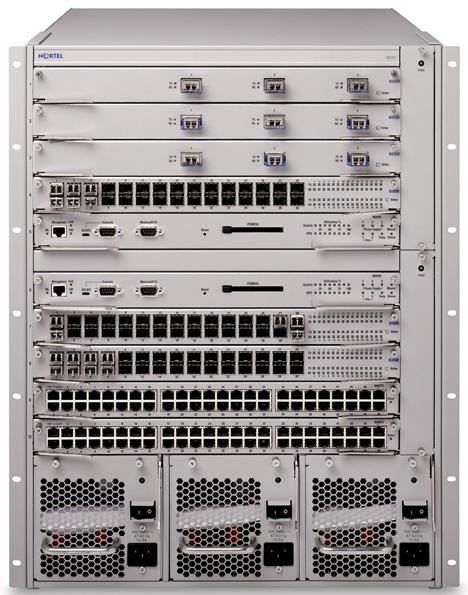
Nortel has released an document entitled, Nortel Ethernet Routing Switch 8600 5.1 to 7.0 Release Delta, that highlights the majority of changes and features being introduced into the upcoming 7.0 software release. While the majority of the changes are software based there are two new hardware changes. The re-introduction of a 3 slot chassis (8003-R pictured above) and the 8695SF/CPU (pictured to the right) which is just an 8692SF/CPU with the SuperMezz permanently attached to the card.
Some of the new features include the following items;
- 8003-R 3-slot chassis
- 8695 SF/CPU
- Enterprise Device Manager (EDM)
- IP Multinetting
- BPDU Filtering
- DHCP snooping
- Dynamic ARP Inspection
- IP Source Guard
- IGMP Layer 2 querier
- Multicast VLAN Registration (MVR)
- PIM-SSM with SMLT
- Key Health Indicator (KHI) enhancements
- Route Switch Processor Packet Tracing
- ERCD Records Dump
- IPv6 RSMLT
- IPv6 VRRP
- BGP+
- IPv6 RADIUS
- IPv6 DHCP Relay
- Singular Record Operations
- show debug generic
I should note right up front that the 7.0 software release drops support and functionality for a number of legacy modules. Classic modules, including E and M modules, are not supported with release 7.0, and therefore must be removed before you perform an upgrade. You must also remove the nonsupported 8691 SF/CPU module and the 8692 SF/CPU module without SuperMezz (the 8692 SF/CPU module is supported if equipped with SuperMezz).
In previous releases the legacy modules were not supported but actually continued to work and function properly. In this release the modules will not work in any capacity.
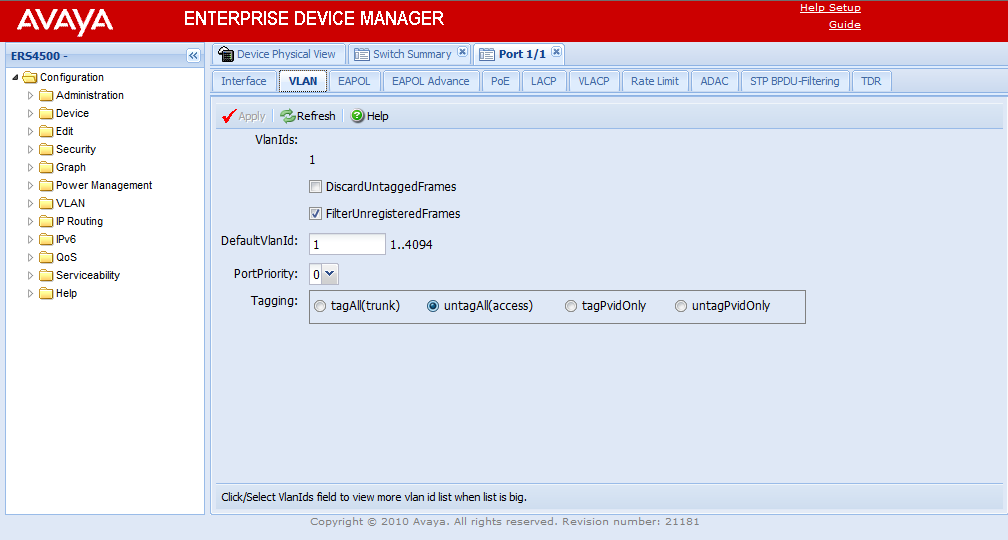
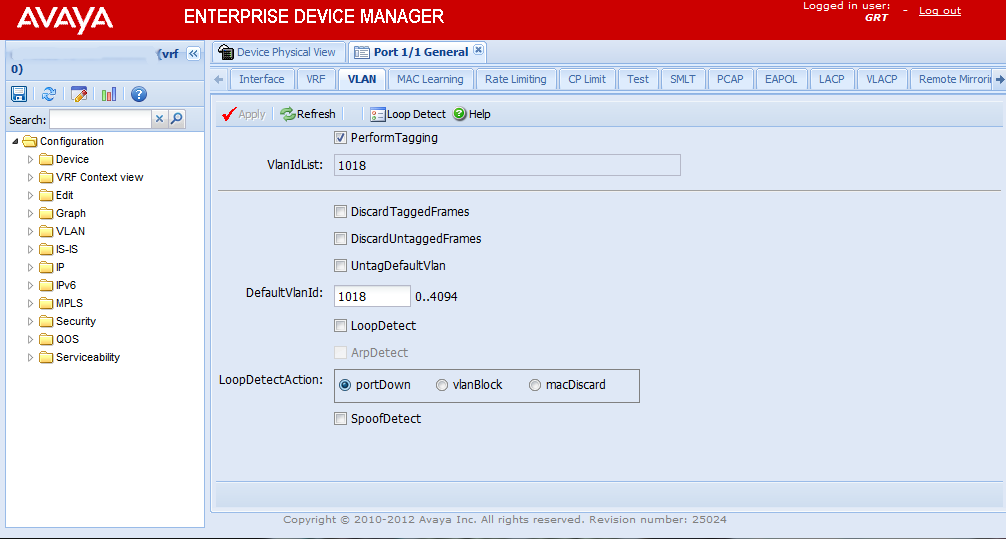
As by a few users here and in the forums Nortel’s Java Device Manager (JDM) is going to be replaced by Enterprise Device Manager (EDM). EDM is a Web-based graphical user interface (GUI) for element management and configuration of the Ethernet Routing Switch 8600. EDM is an embedded application on the Ethernet Routing Switch, and the EDM Web server is the switch itself. You do not have to install any additional client software and there is no operating system dependency. EDM comes with each Ethernet Routing Switch and enables you to directly manage your switch. To access EDM, you must enable the Web server on the Ethernet Routing Switch 8600. By default, the Web server is disabled.
In my discussions with Nortel there’s not going to be any legacy support for JDM within the 7.0 software release. This essentially means you’ll need to use both tools to manage your network. I’m hopeful that Nortel/Avaya won’t abandon SNMP similar to what Cisco did with the Nexus product and their rush to XML.
I’m personally still searching for a stable code base to run my ERS 8600 switches. I’m hopeful that 5.1.1.1 (or 5.1.2 which I also hear could be released soon) is going to provide that stability. I’ve personally had fairly good success with 4.1.8.3 but I’m hoping to improve upon that with 5.1.1.1 and so far so good but definitely too early to tell just yet.
Cheers!
Update: December 29, 2009
The Ethernet Routing Switch 8600 software release 7.0 has entered Controlled Availability (CA) for the next 60 days. Nortel customers that wish to deploy the software must fill out a request form found on the Nortel support website. Nortel customers that deploy 7.0 during the controlled availability will have direct access to GNPS during which time performance and customer feedback will be closely monitored to ensure that it is ready for General Availability (GA). Additionally you can only run 7.0 software on switches that have an 8692SF/CPU with Mezz and R/RS modules only.
Upgrade Nortel Ethernet Routing Switch 8600 to v5.1.1.1
Posted by Michael McNamara in EthernetRtngSwitch, Nortel on December 12, 2009
This week I took on the task of upgrading a pair of Nortel Ethernet Routing Switch 8600s from 4.1.8.0 to 5.1.1.1 software. I used the opportunity to ‘test’ out the upgrade process and procedure for a much larger site that I will be upgrading next week.
The site that I upgraded has two ERS 8600 switches (dual 8692SF w/Mezz) running 15 VLANs, OSPF, VRRP, IST/SMLT, 15 edge ERS 5520 switches, 150 IP phones, 300 personal computers, printers, etc. It’s a fairly small site but it’s all IP telephony with a CS1000B.
The site that I will be upgrading next week has two ERS 8600 switches (dual 8692SF w/Mezz) running 80 VLANs, OSPF, VRRP, BGP, PIM-SM, IST/SMLT, 36 edge switches/stacks, 50 IP phones, 4000+ personal computers, printers, etc. This site is a much larger site with running a lot more VLANs along with BGP and PIM-SM.
With all the issues I’ve run into these past 12 months regarding the ERS 8600 switch I must admit that I was pleasantly surprised. Nothing blew up, nothing broke (knock on wood), and everything just seemed to work – there’s a surprise. I thought I would share the steps I took and the process I used. I will readily admit that I don’t have any RS blades in my environment so customers with RS blades might want to think twice before upgrading to 5.1.1.1 software (this is based on my discussions with other Nortel customers and their experience with 5.1.1.1 and RS blades).
I’ll also need to follow-up late next week and let everyone know how the larger upgrade went.
How did I do it?
Well I did it remotely but with access to the serial ports of all four CPUs (8692SFw/Mezz). I had to make a few configuration changes before I performed the upgrade, these are outlined in the release notes but I’ll touch on them here.
- Enable System Monitor (JDM, Edit Chassis -> System Flags and then look under “System Monitoring”)
- Reconfigure the SNMPv3 trap hosts with a retry value of 0 (read the release notes!)
I also took the opportunity to enable Jumbo Frame support with the ERS 8600 switch because that configuration change requires a reboot to take effect. (config sys set mtu 9600)
With those configuration changes saved I set out to copy the software up to the primary CPUs and then across to the standby CPUs. I took the extra precaution of copying all the software and configuration files from the FLASH to the PCMCIA card just in case something came up that I need them there.
I started the process by upgrading the standby CPU (8692SFw/Mezz) on B switch first. From the primary CPU on the B switch I issued the following commands;
config bootconfig choice primary image-file /flash/p80a5111.img config bootconfig choice secondary image-file /flash/p80a4180.img save bootconfig save config
With the configuration files changed and saved I connected to the standby CPU (peer telnet) and issued the command to upgrade the boot software on the standby CPU;
boot /flash/p80b5111.img
I watched the console as the CPU restarted and upgraded the boot flash;
################ 8K CPU BOOT FLASH Update ################ File obj-boot/p80b5111-mpc740.romH found in loaded image File size: 786624 bytes Number of flash sectors to be programmed: 7 WARNING: You are about to re-program your Boot Monitor FLASH image. Do NOT turn off power or press reset until this procedure is completed. Otherwise the card may be permanently damaged!!! Press <Return> to stop monitor upgrade.... Erased 7 sectors of bootflash Programmed BOOTFLASH Image Verifying new BOOTFLASH Image 786624 matches, 0 mismatches Updating Fileheader Erased 1 sectors of bootflash Fileheader update complete Verifying new Fileheader 512 matches, 0 mismatches Update complete! Press return to reboot
The CPU then started to load the 5.1.1.1 software for the first time;
Copyright (c) 2009 Nortel, Inc. CPU Slot 5: PPC 745 Map B Version: 5.1.1.1 Creation Time: Sep 30 2009, 15:13:36 Hardware Time: DEC 11 2009, 02:16:31 UTC Memory Size: 0x10000000 Start Type: cold SMART MODULAR TECH SMART 221 CF The /pcmcia device mounted successfully, but it appears to have been formatted with pre-Release5.1 file system code. Nortel recommends backing up the files from /pcmcia, and executing dos-format /pcmcia to bring the file system on the /pcmcia device to the latest ERS8600 baseline. open_file:can't open "/pcmcia/pcmboot.cfg" 0x380003 S_dosFsLib_FILE_NOT_FOUND /flash/ - Volume is OK The /flash device mounted successfully, but it appears to have been formatted with pre-Release5.1 file system code. Nortel recommends backing up the files from /flash, and executing dos-format /flash to bring the file system on the /flash device to the latest ERS8600 baseline. Loaded boot configuration from file /flash/boot.cfg Attaching network interface lo0... done. Press <Return> to stop auto-boot... Loading /flash/p80a5111.img ... 12606133 to 43734492 (43734492) Starting at 0x1000000... SMART MODULAR TECH SMART 221 CF Booting PMC280 Mezz HW. Please wait..... The BootCode address is 0xe000100 3303 . Mezz taking over console and modem..... Mezz CPU Booted successfully Initializing backplane net with anchor at 0x4100... done. Backplane anchor at 0x4100... .. Mounting /flash: .done. License File <license.dat> does not exist License File <license.dat> does not exist License File <license.dat> does not exist CPU6 [12/10/09 21:18:23] SW INFO Trial Period will expire in 60 days Ethernet Routing Switch 8600 System Software Release 5.1.1.1 Copyright (c) 1996-2009 Nortel, Inc. File does not exist Critical Log file created CPU6 [12/10/09 21:12:11] SW INFO System boot CPU6 [12/10/09 21:12:11] SW INFO ERS System Software Release 5.1.1.1 CPU6 [12/10/09 21:12:11] SW INFO Waiting for cpu in slot 5 ... 2 seconds CPU6 [12/10/09 21:12:13] SW INFO CPU card entering warm-standby mode... CPU6 [12/10/09 21:12:16] SW INFO Loading configuration from /flash/config.cfg ************************************************** * Copyright (c) 2009 Nortel, Inc. * * All Rights Reserved * * Ethernet Routing Switch 8010 * * Software Release 5.1.1.1 * **************************************************
With that the standby CPU was upgraded to 5.1.1.1 software and I was set to upgrade the primary CPU which would cause the switch to fail over to the standby CPU. When I issued the boot /flash/p80b5111.img command on the primary CPU the standby CPU (slot 5) became the master and I observed the following on the console;
CPU5 [12/10/09 21:20:23] HW INFO Stand-by CPU in slot # 5 becoming master... CPU5 [12/10/09 21:20:28] MPLS INFO All MPLS components are up and active CPU5 [12/10/09 21:20:28] HW INFO Card inserted: Slot=5 Type=8692SF CPU5 [12/10/09 21:20:29] HW INFO Card inserted: Slot=6 Type=8692SF CPU5 [12/10/09 21:20:29] SW INFO R-Module inserted: Slot=1 Type=8630GBR, waiting to bootup... CPU5 [12/10/09 21:20:29] SW INFO R-Module inserted: Slot=2 Type=8648GTR, waiting to bootup... CPU5 [12/10/09 21:20:29] SW INFO R-Module inserted: Slot=3 Type=8683XLR, waiting to bootup... CPU5 [12/10/09 21:20:29] HW INFO Initializing 8692SF in slot #5 ... CPU5 [12/10/09 21:20:31] HW INFO Initializing 8692SF in slot #6 ... CPU5 [12/10/09 21:20:37] SW INFO Slot 1: Loading /flash/p80j5111.dld CPU5 [12/10/09 21:20:37] SW INFO Slot 2: Loading /flash/p80j5111.dld CPU5 [12/10/09 21:20:49] SW INFO Slot 3: Loading /flash/p80j5111.dld CPU5 [12/10/09 21:21:16] SW INFO Slot 1: 8630GBR Initializing. Do not remove board. CPU5 [12/10/09 21:21:16] SW INFO Slot 2: 8648GTR Initializing. Do not remove board. CPU5 [12/10/09 21:21:21] SW INFO Slot 1: 8630GBR Initialization completed. CPU5 [12/10/09 21:21:21] SW INFO Slot 2: 8648GTR Initialization completed. CPU5 [12/10/09 21:21:22] SW INFO Slot 1: Restart new image version 5.1.1.1 CPU5 [12/10/09 21:21:22] SW INFO Slot 2: Restart new image version 5.1.1.1 CPU5 [12/10/09 21:21:30] SW INFO Slot 3: 8683XLR Initializing. Do not remove board. CPU5 [12/10/09 21:21:31] SW INFO Slot 1: Loading /flash/p80j5111.dld CPU5 [12/10/09 21:21:31] SW INFO Slot 2: Loading /flash/p80j5111.dld CPU5 [12/10/09 21:21:36] SW INFO Slot 3: 8683XLR Initialization completed. CPU5 [12/10/09 21:21:36] SW INFO Slot 3: Restart new image version 5.1.1.1 CPU5 [12/10/09 21:21:45] SW INFO Slot 3: Loading /flash/p80j5111.dld CPU5 [12/10/09 21:21:49] SW INFO slot 2 found NP heartbeat - R-Module is online CPU5 [12/10/09 21:21:51] SW INFO slot 1 found NP heartbeat - R-Module is online CPU5 [12/10/09 21:22:12] SW INFO slot 3 found NP heartbeat - R-Module is online CPU5 [12/10/09 21:22:12] HW INFO Initializing 8630GBR in slot #1 ... SNMP-v3 VACM configuration is currently using default parameters. These parameters should be changed for maximum security. SNMP-v3 Having more than one entry in Group-access table for the same group-name with different security levels can cause a security hole WARNING: THE ALLOWED LOG FILE SIZE HAS EXCEEDED CONFIGURATION LIMITS. THE FILE SIZE IS CURRENTLY 1071131 BYTES!!!! CPU5 [12/10/09 21:22:12] HW INFO Initializing 8648GTR in slot #2 ... ************************************************** * Copyright (c) 2009 Nortel, Inc. * * All Rights Reserved * * Ethernet Routing Switch 8010 * * Software Release 5.1.1.1 * ************************************************** Login: CPU5 [12/10/09 21:22:13] HW INFO Initializing 8683XLR in slot #3 ... CPU5 [12/10/09 21:22:14] SW INFO Loading configuration from /flash/config.cfg CPU5 [12/10/09 21:22:15] SW INFO NTP Enabled CPU5 [12/10/09 21:22:15] SW INFO The system is ready CPU5 [12/10/09 21:22:15] SNMP INFO Booted with PRIMARY boot image source - /flash/p80a5111.img CPU5 [12/10/09 21:22:17] SW INFO All the configured hosts not reachable CPU5 [12/10/09 21:22:17] SW INFO A new log file = /pcmcia/ccf00005.001 is created CPU5 [12/10/09 21:22:17] SW INFO PCMCIA card detected in Master CPU "sw-8600-ccr-a.site1.acme.org" slot 5, Chassis S/N SSPN6C0ANC CPU5 [12/10/09 21:22:17] SNMP INFO Chassis with Power Supply redundancy CPU5 [12/10/09 21:22:17] SNMP INFO Fan Up(FanId=1, OperStatus=2) CPU5 [12/10/09 21:22:17] IP INFO the VRF OSPF Md5 key file 1 does not exist CPU5 [12/10/09 21:22:17] SNMP INFO Fan Up(FanId=2, OperStatus=2) CPU5 [12/10/09 21:23:03] SNMP INFO CPU switch over, stand-by CPU becoming master CPU5 [12/10/09 21:23:03] SNMP INFO Sending Warm-Start Trap CPU5 [12/10/09 21:23:03] SNMP INFO CPU switch over, stand-by CPU in slot # 5 became master CPU5 [12/10/09 21:23:35] SNMP INFO Communication established with backup CPU
I will comment that for the time that the standby CPU was running 5.1.1.1 software and the primary CPU was still running 4.1.8.0 software the console became very sluggish and unresponsive. The CPU utilization also surged to 97%. I suspect the CPUs didn’t like trying to communicate with each other being so far apart on software releases.
I didn’t need to-do anything special while upgrading the switches to have the other switch in the cluster maintain the network. The IST link was re-established between upgrading the switches when B was running 5.1.1.1 and A was still running 4.1.8.0. I just repeated the steps above for the A switch and everything worked just fine.
I did go backup and clean up the log files, you might have noticed the warning in there about the log file being full. I didn’t reformat the /flash or /pcmcia filesystems because I wanted to the option to downgrade if necessary. I can reformat those filesystems at a later point in time if the software proves stable and reliable.
I’m impressed with 5.1.1.1 so far, let’s see how it stands the test of time.
Cheers!
Update: Thursday December 17, 2009
I completed the 5.1.1.1 upgrade of the larger site I refered to above on Wednesday morning and I’m happy to report that everything is working well. I did get an initial scare when one of the core ERS 8600 switches (running 4.1.6.3) went belly up just before I started the upgrade. I had just completed re-configuring the VRRP interfaces on both ERS 8600 switches so the VRRP IDs would be unique. While the switch was still forwarding Layer 2 traffic it stopped processing all Layer 3 traffic, wouldn’t respond to ICMP ping and the IST went down.
The upgrade itself took more than it usually does especially with the SuperMezz cards installed. Although once the switch came up everything was working fine, OSPF, BGP,FDB, ARP, IST, SMLT, PIM-SM, etc.
I’m very hopeful that 5.1.1.1 will provide some much needed stability to the ERS 8600 switch!
Cheers!


RECENT COMMENTS