Juniper

Juniper SSL VPN Secure Access 6.5 Available

2

juniper-logoJuniper recently released a new version of software for their SSL VPN (Secure Access) appliances. The new release is important because it finally addresses a problem that was original documented on my blog in this post. While I have yet to deploy this new software release (I would be interested in hearing from those that have) I thought it warranted a new post.

This latest version of software now supports Windows Secure Application Manager (WSAM) when used on Windows XP 64-bit and Windows Vista 64-bit clients. There was no mention of Windows 7 which is due to be released October 22, 2009. I did find it interesting that Internet Explorer 8 was only “compatible” with respect to a few of the features while Internet Explorer 7 was “qualified” with all features (review Juniper Secure Access 6.5 Supported Platforms document for specifics). I did a quick search over in the Juniper forums and found some reports that Host Checker wasn’t working properly with Windows 7 RC.

There were two new features that jumped out at me in the What’s New document;

RDP Launcher

SA 6.5 simplifies the use of RDP sessions for end users without requiring them or administrators to create bookmarks.

  • Simplifies ease of use for remote users to RDP into remote desktops by merely clicking a button or entering a hostname or IP Address of the remote computer.
  • Simplifies the configuration for administrators and reduces the number of support calls from users who are unable to figure out how to RDP to remote computers.

VDI Support

Secure Access (SA) version 6.5 interoperates with VDI products, including VMWare’s View Manager and Citrix’s XenDesktop, enabling administrators to deploy virtual desktops alongside the SA series of SSL VPN devices. This allows the SA administrator to configure centralized remote access policies for users who access their virtual desktops.

  • This provides a centralized point of configuration for administrators to configure remote access policies for virtual desktop access through leading virtualization products from VMWare and Citrix.
  • SA 6.5 provides end users the VDI client to access the virtual desktop through, and provides flexible client fallback options thereby simplifying the deployment and management for administrators.

We have a lot of folks looking to access their corporate desktops remotely and the RDP (Terminal Services) feature of the Juniper SSL VPN really helps fill that role.

Cheers!

References;

What’s New in Juniper Networks Secure Access (SA) SSL VPN Version 6.5
Juniper Secure Access 6.5 Release Notes
WSAM and Network Connect Error Messages Release 6.5
Juniper Secure Access 6.5 Support Platforms

Update: Thursday November 5, 2009

Let me get right to the point, I would not recommend anyone deploy 6.5R1 on their Juniper Secure Access appliances. There are known issues with the Juniper Windows Secure Application Manager (WSAM) and the following four security suites; Norton 360, Symantec AntiVirus, Zone Alarm Security, ESET NOD32. Users with Norton 360 could experience a blue screen of death (BSOD) using the Juniper Windows Secure Application Manager. Juniper has a hotfix available for 6.5R1 that resolves the BSOD issues with Norton 360. The hotfix is not generally available on the Juniper website so you must contact JTAC for the hotfix.

Additional information can be found at this post; http://blog.michaelfmcnamara.com/2009/10/norton-360-and-juniper-ssl-vpn-wsam/

Update: Friday September 19, 2009

A quick update… I’ve setup a spare SA4000 and received a demo license from Juniper to test the 6.5R1 software release (thanks Matt!). I’m happy to report that the upgrade on the appliance was very smooth although it took about 6 minutes for the appliance to boot back up giving me a few frightful thoughts. Unfortunately the same can’t be said of the client software. I’m still in the process of testing but it appears that non-Administrator users (users that don’t have Administrator rights on the PC) won’t be functional after the upgrade until an Administrator manually installs the latest and greatest Juniper Installer Service. The Juniper Installer Service is designed to allow the client software to upgrade when the user doesn’t have Administrator rights. Users with Administrator rights work fine so long as they answer the prompts to install the new version of the Juniper Installer Service. I hope to release a detailed post in the next few days including some testing of Windows Vista 64-bit desktops.

Home Telecommuting

0

I’ve talked about telecommuting myself from time to time and it seems like a lot of people are talking about it these days. And while gas prices have come down considerably from the records set during the 2008 summer the economic woes are really massing to drive both companies and workers to seriously look at home telecommuting.

Within my organization we’ve been testing different technologies and solutions over the past 6 months. We broke the all the options down into two basic classes. The first was an all hardware solution while the second was an all software solution. A standard leased laptop was necessary to provide the end user (call center agent) access to the back-end applications necessary to-do his/her work. We also didn’t want to involve any home personal computers for the purpose of security and regulatory compliance.

All Hardware

  • Nortel Business Secure Router 222
  • Nortel 1150e IP Phone
  • Standard leased laptop

All Software

  • Standard leased laptop
  • Nortel i2050 IP Softphone
  • Juniper SSL VPN Client (Network Connect)

When you factor in all the ISM licensing costs the all hardware solution starts to get very pricey but will provide the best possible quality and stability. On the flip side the all software solution will be more cost effective but could provide less quality and depending on the applications being run could by less stable over an 8 to 12 hour shift (call center agent).

We’ve had about 5 users (2 all hardware, 3 all software) deployed over the past few months with great success. We’ve had a number of issues with the local cable provider (Comcast Cable) going up and down occasionally but those problems were resolved when a cable technician replaced a splitter at the pole.

The other issue we needed to tackle was how to provide remote control support for our Help Desk and Engineers over the Internet. We turned to Ultra VNC and are using it’s Single Click solution in conjunction with it’s repeater add-on. It provides a great cost effective solution to using a commercial solution such as WebEx or GoToMyPC.

Cheers!

Juniper SSL VPN Appliance and Windows Vista 64-Bit

11

Update: September 1, 2009

Juniper has released software 6.5 for the Juniper SSL VPN (Secure Access) appliances which now supports running WSAM on Windows 64-bit operating systems. I’ve posted a new article that details the new software which can be found here; http://blog.michaelfmcnamara.com/2009/09/juniper-ssl-vpn-secure-access-6-5-available/

Almost six years ago we deployed a Neoteris Secure Access 1000 appliance which was designed to publish Intranet based web applications to Internet clients. Neoteris was acquired by Netscreen and then Netscreen was acquired by Juniper. Over a year ago we upgraded our legacy hardware with two Juniper SA4000s running them as a cluster in a high availability design (active/standby). The solution has been very successful with the exception of the occasionally home PC that for one reason or another refuses to install the client software.

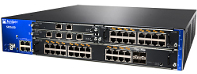
sa_4000 We recently upgraded to software release v6.2R1 which promised full support for Windows Vista 64-Bit and Juniper’s Windows Secure Application Manager (WSAM). Juniper’s Windows Secure Application Manager is essentially a mini VPN client that tunnels traffic across an SSL connection with the SA4000 appliances. It provides raw connectivity for non-HTTP based applications. While the documentation indicated that Windows Vista 64-Bit was fully supported we were unable to make it work after a few customers reported having issues. We opened a ticket with Juniper and waiting four business days before Juniper was able to confirm our findings; they too were unable to make it work. We were informed the ticket was to be escalated to design but I immediately found it odd that no one else had already reported this problem. In short Juniper informed us that Windows Vista 64-Bit is not supported and the documentation indicating it was support was “incorrect”. Needless to say I’m not very happy with Juniper as this point and it certainly seems that Juniper has some serious QA issues in their software and documentation teams.  Let’s not even talk about the 9 business day turnaround which is essentially two weeks.

I recently had a discussion with a physician, remember I work for a large healthcare provider, who had tried in vein to help himself by Googling for any hints or tips to getting WSAM working with Windows Vista 64-Bit. So here are some tips that will hopefully get picked up by Google.

  1. You must be an Administrator to install the software components
  2. You’ll need to be running Windows XP (32-Bit) Service Pack 2 or later
  3. If you have a pop-up blocker enabled make sure you exempt the Juniper URL
  4. If you have your firewall enabled make sure you unblock WSAM

I’ve also seen issues if ActiveX, JavaScript, or Cookies are disabled from within Internet Explorer. The WSAM software is a Layered Service Provider (LSP) application and as such other software, malware, spyware, etc can sometimes interfere with it’s proper operation. You can have a look here for a utility that might help to clean up any LSP issues that you might have.

The Windows Secure Application Manager can not be run from within a Windows Terminal Server or Citrix session.

Cheers!

Update: August 13, 2008
I recieved a few questions about Juniper’s Windows Secure Application Manager (WSAM) and I thought I would pass on the questions and answers.

Q. Does Juniper’s WSAM support a proxy server?
A. No Juniper’s WSAM does not support a proxy server. The client will need direct Internet access on TCP 443 (https).

Q. Where are the log files, there’s nothing in C:\Program Files\Juniper Networks\Secure Application Manager?
A. The log file is actually stored in the following location; C:\Documents and Settings\<username>\Application Data\Juniper Networks\Secure Application Manager

Update: September 18, 2008
As noted in the comments Juniper has released a customer bulletin concerning the problem. Here’s the official response I received from the Juniper TAC, I haven’t received any follow-up from the sales team which the Juniper TAC referred me to.

“KB12097 was posted to our Knowledge Base Support site and engineering has implemented a check in the WSAM installation that will display an error to the user if they are attempting to install WSAM on a 64-bit Operating System. This fix should be available in the next maintenance release of IVE OS 6.2. As for future support for WSAM on 64-bit systems, this has been revisited by PLM and it is now on our roadmap.”

Update: October 5, 2008
I’m amazed at the number of views that this post has garnered. It seems there are quite a few folks out there trying to figure out why Windows Vista 64bit won’t work with WSAM. I thought I should point out that the Juniper Network Connect client is compatible with Windows Vista 64bit (and 32bit). This may be an option for users although those users will need to speak to their System Administrators since it will require additional configuration and perhaps even licensing.

Cheers!

Go to Top