I’ve pulled more than a few hairs from my head troubleshooting stack (cascade) link issues when stacking multiple Nortel Ethernet Switch 460 or Ethernet Switch 470 switches together. I thought I would try to throw together a quick process for testing the cascade module and cable. I hope to make a follow-up post covering the Ethernet Routing Switch 5500 series at a later time.
Let me describe a typical scenario and then offer some ways of isolating the potential problem. You have a stack of four ES470s we’ll refer to as Unit 1, Unit 2, Unit 3 and Unit 4. 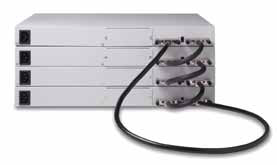 We can use the picture to the left to visualize what a stack of four Ethernet Switch 470s might look like. While all the Up/Down stack lights should be green let’s just say that Unit 3 Down and Unit 4 Up is amber.
Let me just warn you that I have yet to figure how to truly identify a bad cascade module (the module that is built into the switch) from a bad cable without using either a cascade module that is know to be good and/or cascade cable that is know to be good in a process of elimination.
How you can determine if you have a bad cascade cable or cascade module?
It’s really pretty easy although it will require you to take the switch down and use the diagnostic boot code. You’ll need to cable up to the serial interface of the switch in order to run the test. When you’re ready go ahead and cold boot the switch. When you see the following, “470-24T Diagnostics 3.6.0.7” (or something similar since you may not have a 24T but a 48T) you’ll need to interrupt the boot sequence by hitting Ctrl-C (go ahead and hit it repeatedly). You should see something similar to the following;
470-24T  Diagnostics 3.6.0.7

Testing main memory - PASSED

>> Break Recognized - Wait..

>> Break Recognized - Wait..

Press 'a'  to run Agent code
Press 'c'  to run Cascade external loopback test
Press 'd'  to Download agent code
Press 'e'  to display Errors
Press 'i'  to Initialize config/log flash
Press 'p'  to run POST tests
Press 'r'  to Receive cascade test packets
Press 's'  to Send    cascade test packets..
Once your at this point you’ll need to take a single cascade cable and loop it between the Up and Down port of the switch your working on. This will put a physical loop between the two interfaces so we can run and external loopback test across the cascade links. When you’re ready go ahead and select “c” from the diagnostics menu.
Test 501  Stack External Loopback    -        FAILED
NSX SXLB STAK: Stack Upstream Clock Failed. UCR=27 DCR=A7
In my case the Ethernet Switch 470 24 Port switch that I was using failed the loopback test. I then took a cascade cable that I knew to be working and repeated the test. It subsequently failed again which indicates to me that the cascade module is faulty. If you were to select “e” from the diagnostics menu you might seem something similar to the following;
System Resets  =       58.

Burn-In Loops  =        0.
Burn-In Errors =        0.
Auto-Burn-In   = DISABLED
Diag Baud      =     9600.

Error Log:
Bad Port Mask  = 80000000
Loop Test Error Description:
  50  501 STAK: Stack Secondary Rx (1) Timed Out
  50  501 STAK: Stack Upstream Clock Failed. Is Cascade Cable Missing?
  50  501 STAK: Stack Secondary Rx (1) Timed Out
  50  501 STAK: Stack Secondary Rx (1) Timed Out
  50  501 STAK: Force Stack RNGO Low Failed Test=0 GCReg=60
  50  501 STAK: Force Stack RNGO Low Failed Test=0 GCReg=60
  56  501 STAK: Stack Upstream Clock Failed. UCR=27 DCR=A7
  56  501 STAK: Stack Upstream Clock Failed. UCR=27 DCR=A7
  58  501 STAK: Stack Upstream Clock Failed. UCR=27 DCR=A7
One very important note! You can only stack switches that are running the same version of software (boot code and agent code). I believe the “Base” light will blink amber if you try to stack two switches together that are not running the same software.
You can also confirm a cascade/stacking issue remotely using Nortel’s Device Manager. Here’s a screenshot of two Ethernet Switch 470s stack together. You can see the yellow LEDs on Unit 1 Up and Unit 2 Down.
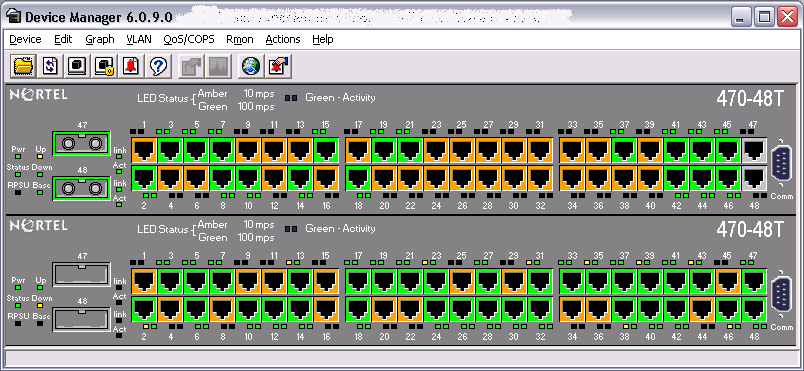
I will let you know that we’ve had our own share of cascade modules go bad over the past five years. While the cascade modules appear to be “replaceable” they really not designed to be field serviceable. If a switch fails the cascade loopback test it’s really only good for stand alone operation.
Cheers!
One other way to check the status of each stack switch is to telnet the stack IP and choose menu option Display Hardware Units. This way one is able to see what’s going on with the stack. If a cascade module is faulty, the corresponding switch won’t appear. Also check the
numbering of the units as it gives clues on which unit of the stack may be faulty or erroneous.
Normally, after building a stack I usually check for hardware problems using the Display Hardware option. If something seems to be wrong, then the procedure you referred is followed for each switch individually.
Yes, you’re right: you stack two units with different software and the amber light shows up :)
Thanks for that additional tip LGonsalves!
I have seen many occasions where only one port on the cascade module was defective. In that scenario I don’t believe the Ethernet Switch 470 menu or CLI will show you the status of the cascade interfaces. Here’s the “Display Hardware Units” menu for the same switch pictured above in Device Manager.
                         Hardware Unit Information

Unit# Switch Model     MDA Model   GBIC Port   GBIC Port   Cascade SW Version
                                                           Module
----- ---------------- ----------- ----------- ----------- ------- ----------
  1   470-48T                      (47) SX     (48) SX     400-ST1 v3.7.1.08
  2   470-48T                      (47) None   (48) None   400-ST1 v3.7.1.08
You either need to visual inspect the switch or query it using Device Manager.
Thanks for the comment!
Good point on the software being at the same rev. We always have to update the software on replacement switches received from Nortel because we run the secure runtime image.
It’s quite a pain when your rushing to replace a dead switch but it’s a show stopper if you arrive at the remote site with a switch that won’t join the stack because it’s running the wrong software version.
Thankfully Nortel has addressed this problem in the Ethernet Routing Switch 5500 series. You can stack switches with different software versions (I think you may need to be running at least software v4.2 or later) and the switches will upgrade/downgrade to the version running on the base unit.
Thanks for the comment!
hi,
i am sorry i am posting my comment here. our company has recently got 5 nortel baystack 460 switch. they were being used by other company. when i power up the switch it gives me a command prompt and i figured out through internet it is suppose to give me a menu which my switch doesnt give me.it asks me for a password. (i dont have the password) , tried to break the boot sequence and then it said nvram formatted and all but it still asks me for password for menu.i figured out through command line how to enter ip and configure. once i bring the switch on my network through command line then i tried to use the web interface. i did see the web interface but it just shows system configuration and shows “access(RW)” i think i should be able to configure my switch through web interface. any idea how can i get those configuration settings so that i can configure through web interface. i got similar 5 switches and i will have to cascade them too. any help is appreciated. thanks.
Hi Munika,
What version of software is the Ethernet Switch 460 running? If you followed the procedure outlined at http://blog.michaelfmcnamara.com/2007/11/factory-reset-nortel-ethernet-switch/ the switch shouldn’t prompt you for either a username or password (although it might if you are running software 3.7 or later). If the switch is running the SSH version of the software there won’t be any menu available just the basic CLI interface (there isn’t enough memory for both the SSH software and the menu).
The default read-write username is RW with a password of secure.
The default read-only username is RO with a password of user.
I would suggest you register for an account on the Nortel website and download the documentation for the version of software the switch is running. Depending on the version of software you should be able to configure the vast “majority” of options through the web interface although there will be some that must be configured through the CLI interface and/or Nortel’s Java Device Manager (JDM).
Good Luck!
Mike
hi,
i have a small doubt.
i have a standalone switch.for that i run loop back internal test and it was passed.
but at the same time i run loop back external test.but it failed.
what will it show about the switch.
the switch model no. is ERS 5600
appreciate your help
Hi Chandu,
You have a standalone switch and you are concerned that the external loopback test on the cascade/stacking ports is failing. You realize that you need to physically place a cascade/stacking cable between the two cascade/stacking ports on the back of the switch (aka loop).
Good Luck!
hi! need your expertise!
1) we have four 470 switches stacked. The first unit (base) hung-up. Can we replace/restart the unit without disconnecting the hosts on the remaining three switches?
2) Some of our stacks are running without “return stack cable” (cable connecting the last unit going back to the base). Does connecting a return cable needs a reboot?
Thanks!!!
Hi PJ,
If the base unit hangs up (or goes offline for whatever reason) the stack will elect a temporary base unit from the remaining switches in the stack. You can power cycle the original base unit to restore that switch (assuming it just got hung up and didn’t suffer a hardware failure) but you’ll need to power cycle all the switches in the stack to restore everything to back to the original state, again assuming you don’t have some hardware issue that caused the original problem.
With respect to your second question you can add the return cascade cable without any need for a reboot. You should need the stack UP and stack DOWN lights go green (from amber) once you connect the cable.
Good Luck!
Thanks a lot!
I have additional question. In my first problem, switch 1 (SW1) and 4 (SW4) are connected to two core switches (CS1 and CS2), for example SW1 is connected to CS1 and SW4 to CS2. Core switches are for redundancy and connected by IST. Since SW1 is defective, the stack is connected only thru SW4. Why is it that the stack IP is ok (using ping) on some PC but not on other PC (timed out)? Hint: I can ping all PC connected to it from any PC, but not the stack IP. Sorry if find you my questions not that challenging. Just a newbie to networking. =)
Thanks a lot!
Hi PJ,
Your questions are very logical and aren’t a bother at all.
You are using what is known as a Distributed MultiLink Trunk (DMLT) on your stack of 470 switches which is very wise. There are some known issues with DMLT depending on the software release you are running that you might be running into some specific bugs around DMLT. In general you see the election of a temporary base unit and all traffic should fail over to the remaining MLT link. It can sometimes take 60-90 seconds for the switch bridging table to update and connectivity to be restored.
We’ve found that using Unit 1 (Base) and Unit 2 (usually temporary base) seems to work much better than using any other units (switches) in the stack. We’re not sure if this has something to-do with the base unit function or not. You might want to try moving your second uplink to the 2nd unit (switch) in the stack and see if that performs better.
Good Luck!
I’ll try that. Thank you!
Hi PJ,
My Nortel 425-24T switch is prompting as below. Once the switch is started after pressing “a” run agent code manually. When I restart It will start properly. But during each power cycle it is prompting for “a” run agent code, “d” download agent code etc….Please help.
I have tried resetting switch & Upgrading Firmware + Diagnostic also but no result found. It is behaving on the same way.
Output during power re-cycle are as below :
Ethernet Switch 425-24 Diagnostics 3.6.0.1
Testing main memory – PASSED
Resets: 226.
Initializing Flash..
Reading MAC Address..
MAC Address: 00:1B:BA:XX:XX:XX
Initializing Switch CBs
Initializing Switch HW..
Board Revision: 0
Board Variation: 0
Manufacture Revision: 33
Manufacture Date: 05162007
Serial Number: LBNNTMJXXXXXX
MAC Address: 00:1B:BA:XX:XX:XX
GBIC Type [25]: (none)
GBIC Type [26]: (none)
Stack In Cable: (none)
Stack Out Cable: (none)
Stack Base Switch: OFF
Type: Address: Name:__________ Version:
DIAG 00000000 425 Diags 3.6.0.1
AGENT 00100000 425/325 AGENT 3.6.2.014
Test 102 ROM Config – PASSED
Test 104 FANs – PASSED
Test 207 DRAM Cached/Uncached – PASSED
Test 211 PCI Bridge Registers – PASSED
Test 221 PHYs Register – PASSED
Test 233 SOC XRAM Adr/Data Lines – PASSED
Test 241 Link Status Interrupt – PASSED
Test 242 SNMP-DMA Interrupt – PASSED
Test 251 Ports Internal Loopback – PASSED
Press ‘a’ to run Agent code
Press ‘d’ to Download Agent code
Press ‘e’ to display Errors
Press ‘i’ to Initialize config/log flash
Press ‘p’ to run POST tests..
System Resets = 226.
Burn-In Loops = 0.
Burn-In Errors = 0.
Auto-Burn-In = DISABLED
Agent Baud = 9600.
Error Log:
Bad Port Mask = 80000001_00000000
Loop Test Error Description:
127 251 SOC Port 2 Rx from 2 Bad Counter Sb=1108. Is=159.
131 251 SOC Port 2 Rx from 2 Bad Counter Sb=1108. Is=537.
179 251 SOC Port 2 Rx from 2 Bad Counter Sb=1108. Is=6.
180 251 SOC Port 2 Rx from 2 Bad Counter Sb=1108. Is=6.
181 251 SOC Port 2 Rx from 2 Bad Counter Sb=1108. Is=1104.
182 251 SOC Port 2 Rx from 2 Bad Counter Sb=1108. Is=1104.
183 251 SOC Port 2 Rx from 2 Bad Counter Sb=1108. Is=341.
183 251 SOC Port 2 Rx from 2 Bad Counter Sb=1108. Is=1104.
184 251 SOC Port 2 Rx from 2 Bad Counter Sb=1108. Is=1104.
185 251 SOC Port 2 Rx from 2 Bad Counter Sb=1108. Is=1104.
Press ‘a’ to run Agent code
Press ‘d’ to Download Agent code
Press ‘e’ to display Errors
Press ‘i’ to Initialize config/log flash
Press ‘p’ to run POST tests..
What is this error about ? and how can I resolve it.
Hi Siddharaj,
It looks like you have a hardware problem with that switch… that’s why it won’t boot normally.
You would need to replace or RMA the switch to get the problem resolved.
Sorry!
Hi Mr.Michael,
Thank you very much for fast reply and help. Now I can proceed furthure. I was depressed as call was pending since long. thanks a lot.
Sorry The question is for —–Michael McNamara—— Please help me Mr.Michael
Hi Mr. Michael
My ES 470-48t comes with this error
How can i resolve this problem ?
Thanks you very much!
470-48T Diagnostics 3.6.0.1
Testing main memory – PASSED
Resets: 205.
Initializing Flash..
Reading MAC Address..
MAC Address: 00:1A:8F:46:B9:C0
Initializing Switch CBs,…….
Initializing Switch HW..
PHY 17. Not Resetting CR=FFFF
PHY 18. Not Resetting CR=FFFF
PHY 19. Not Resetting CR=FFFF
PHY 20. Not Resetting CR=FFFF
PHY 21. Not Resetting CR=FFFF
PHY 22. Not Resetting CR=FFFF
PHY 23. Not Resetting CR=FFFF
PHY 24. Not Resetting CR=FFFF
PHY 17. Not Resetting CR=FFFF
PHY 18. Not Resetting CR=FFFF
PHY 19. Not Resetting CR=FFFF
PHY 20. Not Resetting CR=FFFF
PHY 21. Not Resetting CR=FFFF
PHY 22. Not Resetting CR=FFFF
PHY 23. Not Resetting CR=FFFF
PHY 24. Not Resetting CR=FFFF
Board Type: 2
Board Variation: 1
Board Revision: 6
Manufacture Revision: 32
Manufacture Date: 01262007
Serial Number: SACC5706V1
MAC Address: 00:1A:8F:46:B9:C0
Redundant DC: UNKNOWN
Board AC: OK
Stack Base Switch: OFF
Type: Address: Name:__________ Version:_______ InterOpVer:
DIAG-A 00000000 Diagnostics 3.6.0.1
AGENT-A 00100000 NT ES Agent 3.7.5.012 00000002
DIAG-B 00400000 BayStack Diag 3.0.0.5
AGENT-B 00500000 BayStack 3.1.2.6 00000002
Test 102 ROM Config – PASSED
Test 104 FANs – FAILED
FAN Fan Failed: FanBits=3
Test 207 NSXs Direct Registers – FAILED
NSXs DReg PHY 24. Not Resetting CR=FFFF
Test 209 NSXs Indirect Reg/Mem – FAILED
NSXs IReg/IMem PHY 24. Not Resetting CR=FFFF
Test 210 NSXs XRAM Adr/Data Lines – FAILED
NSXs XRAM A/D PHY 24. Not Resetting CR=FFFF
Test 211 PHYs Register – FAILED
PHYs Reg PHY 24. Not Resetting CR=FFFF
Test 212 NSXs Internal Loopback – FAILED
NSXs ILB PHY 24. Not Resetting CR=FFFF
Test 213 CAM Interrupt – PASSED
Test 214 SNMP Interrupt – FAILED
SNMP Int PHY 24. Not Resetting CR=FFFF
Test 215 PHYs Interrupt – FAILED
PHYs Int PHY 24. Not Resetting CR=FFFF
ROM Log Full
Press ‘a’ to run Agent code
Press ‘c’ to run Cascade external loopback test
Press ‘d’ to Download agent code
Press ‘e’ to display Errors
Press ‘i’ to Initialize config/log flash
Press ‘p’ to run POST tests
Press ‘r’ to Receive cascade test packets
Press ‘s’ to Send cascade test packets..
Looks like you have some bad hardware… I would guess the ASIC behind ports 17-24 is bad.
Good Luck.