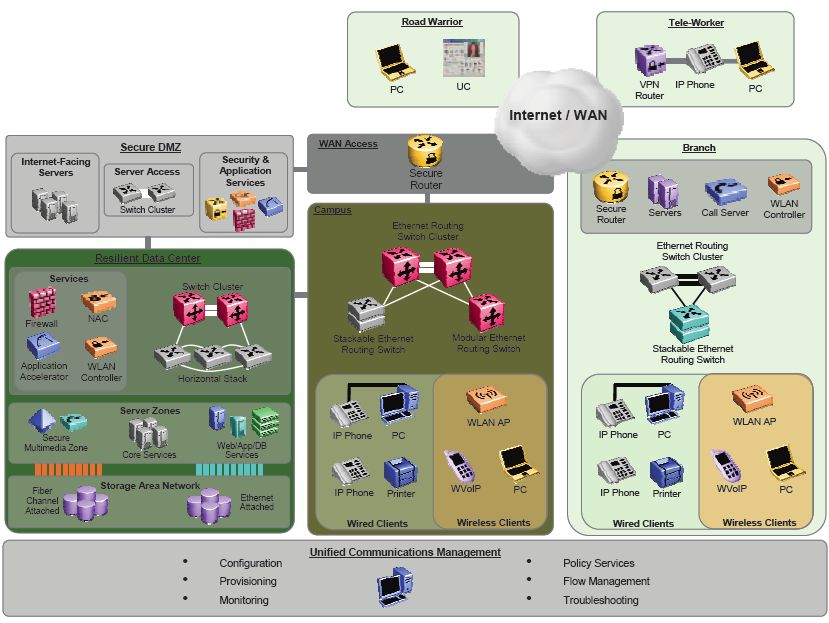
 Nortel recently released a highly technical document, Large Campus Technical Solution Guide, that should be a great benefit Nortel customers. This document covers an amazing amount of information and is a treasure trove to organizations looking for best practice approaches to managing and deploying their Nortel data equipment.
The document covers topics such as convergence between IP telephony and data networking, chassis versus stackable, Layer 2 versus Layer 3 at the edge, redundancy, high availability, clustering (IST/SMLT), two tier and three tier network designs, VLANs, Spanning Tree, Control Plane Rate Limit (cp-limit), Extended CP-Limit (ext-cp-limit), VLACP, SLPP, QoS, VRRP, RSMLT, ECMP, Multicast, EAPoL and the list goes on and on. And best of all they provide configuration examples for a large number of the scenarios which are always helpful.
A lot of the material I cover here in my blog is covered in this document. I’ll probably pull a few excerpts from this document over the next few months and make some posts out of it, expanding on some of the examples and filling in any unanswered blanks.
I’m impressed with effort that Nortel has made in trying to “get out the word”. This is really a great tool for Nortel customers! Let’s hope that Avaya will allow these folks to continue with their success.
Oh behalf of all those Nortel customers out there let me say “Thanks!”
Cheers!
Mike,
This is great information. A couple of years ago, you had answered a few questions for me regarding voice vlan setup. I appreciated the help very much. Today, this guide provided the answer for another issue I have seen with STP. If I understand correctly, STP should be disabled on both the edge uplinks to the core and the SMLT ports on the core….We just had a user plug a phone into a switchport and plug the pc port on the phone into another switchport. This (combined with STP enabled on the uplinks) resulted in STP shutting down both of the uplink ports on the core. Any comments?
Hi Chuck,
I’m happy I was able to help. I’m guessing you didn’t have STP enabled on the edge ports of the switch?
You should disable STP on your core switch ports that feed your edge closet. You should disable STP on the uplinks ports out of the edge switch. You should make sure that STP is enabled (globally) on the edge switch and then enable STP on all the edge ports (ports that connect to users an not other switches).
You should also enable faststart to avoid the STP learning delay when the port first comes active.
You can also enable BPDU guard to protect against someone accidentally cabling two closet switches together.
You might want to reference this post.
You can also stop over at the forums and post any specific question or problem you might have.
Good Luck!
michael:
what is the command syntax for BPDU guard on a 5520?
Hi Greg,
Here’s an example;
config term
interface FastEthernet 1/1-5
spanning-tree learning fast
spanning-tree bpdu-filtering enable
exit
Good Luck!
thanks!
when I type “spanning-tree ?”
bpdu-filtering is not a listed command option however the full syntax you supplied does indeed work.
What version of software are you running? I believe a “show sys-info” will tell you from the CLI interface.
You’re probably running an older version of software that doesn’t support BPDU guard. I know it’s available in 6.1 software for sure.
Cheers!
ver 5.1.1.17
The command seems to work. I have not tested it yet. Does it disable the port and if so, do I have to manually enable it?
thanks for all your help.
The default timeout is 120 seconds (12000 [1/100 seconds]) for every port. If you set the timeout to 0 you would need to manually re-enable the port.
You can see the configuration with the following command, “show spanning-tree bpdu-filtering”.
Cheers!
Hi All,
I was searching some information about troubleshooting QoS on 8600 and 8300 devices. In fact, I have one 8600 with QoS configured ad vlan level connected to an 8300 with QoS configured at port level.
On the 8600 side I have only R modules but there are no filters configured.
I would just like to have a documentaion or something describing how I can do a monitoring for the 8600-8300 connection in order to see if and how QoS is working.
Thanks.
Best regtards,
Mary
Hi Mary,
You might find it a better option to post on the forums; http://forums.networkinfrastructure.info/nortel-ethernet-switching/.
The easiest way to check would probably be with a packet trace of the traffic. You can setup a port mirror and then capture the data with WireShark or some other packet capture software and then look over the packets to make sure that they are marked, 802.1p / DiffServ, properly. You could also look at the packets at their egress points and make sure that their 802.1p or DiffServ tags were not modified from the time their ingressed the network.
Cheers!