There was a question recently on the discussion forums regarding the ability to run Spanning Tree Protocol (STP/RSTP/MSTP) over a MultiLink Trunk (MLT). You can most certainly run STP/RSTP/MSTP over a MLT interface. You can NOT run STP/RSTP/MSTP over a SMLT interface.
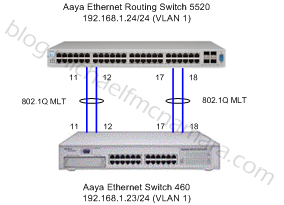 I thought I would run through a few quick commands to demonstrate how to enable Spanning Tree over an MLT interface. In the spirit of making things interesting I’ll utilize Multiple Spanning Tree Protocol (MSTP) over the default legacy Spanning Tree Protocol (STP) or the optional Rapid Spanning Tree Protocols (RSTP). I won’t try to explain Spanning Tree as there are plenty of resources available on the Internet.
For this example I have an Avaya Ethernet Routing Switch 5520 and an Avaya Ethernet Switch 460 (formerly Nortel BayStack 460). I’ll setup 2 MLT links between the two switches utilizing 4 ports in total. I’ll utilize VLANS 1, 100, 200 and Multiple Spanning Tree Instances (MSTI) 1 and 2 with CIST 0.
Ethernet Routing Switch 5520
By default only legacy STP is enabled so we need to enable MSTP and reload the switch;
config t
spanning-tree mode mst
copy config nvram
boot -y
Once the switch has restarted we can continue the configuration. Let’s make all 4 ports 802.1q tagged ports;
config t
vlan ports 11,12,17,18 tagging tagAll
Now we’ll create the MultiLink Trunk interfaces and add the port members. You might notice in the code below the command “mlt # bpdu all-ports”. By default Avaya/Nortel switches only send BPDU frames on the single port in a MLT. This is completely opposite of the behavior from Cisco and other network manufacturers so as a best practice I enable this option. If we were connecting Avaya switches and didn’t enable this feature we would need to ensure that the lowest number ifIndex on one switch connected to the lowest number ifIndex on the other switch. This is important because Nortel/Avaya switches only send BPDU frames on the lower ifIndex port in an MLT. For example if we had say ports 3 and 7 on switch A and ports 10 and 14 on switch B we would need to connect 3(A) to 10(B) and 7(A) to 14(B) to ensure that the BPDU frames would be exchanged on matching ports between the switches.
mlt 1 name "Primary Group"
mlt 1 member 11,12
mlt 1 learning enable
mlt 1 bpdu all-ports
mlt 1 enable
mlt 2 name "Secondary Group"
mlt 2 member 11,12
mlt 2 learning enable
mlt 2 bpdu all-ports
mlt 2 enable
Now we’ll create the MSTI instances 1,2 along with VLANS 100,200 respectively;
spanning-tree mstp msti 1
spanning-tree mstp msti 1 enable
spanning-tree mstp msti 2
spanning-tree mstp msti 2 enable
spanning-tree mstp region region-name acme region-version 1
spanning-tree mstp priority 8000 (this is 32768 in decimal)
spanning-tree mstp msti 1 priority 8000 (this is 32768 in decimal)
spanning-tree mstp msti 2 priority 8000 (this is 32768 in decimal)
vlan create 100 type port msti 1
vlan create 200 type port msti 2
vlan members add 100 11,12
vlan members add 200 17,18
As a best practice we’ll enable edge-port (FastStart) and BPDU filtering on the remaining ports;
inter fa 1-10,13-16,19-48
spanning-tree mstp edge-port true
spanning-tree bpdu-filtering enable
Ethernet Switch 460
By default only legacy STP is enabled so we need to enable MSTP and reload the switch;
config t
spanning-tree op-mode mstp
copy config nvram
boot -y
Once the switch has restarted we can continue the configuration. Let’s make all 4 ports 802.1q tagged ports;
config t
vlan ports 11,12,17,18 tagging tagAll
Now we’ll create the MultiLink Trunk interfaces and add the port members. Just as we did with the ERS 5520 we’ll enable “mlt # bpdu all-ports”.
mlt 1 name "Primary Trunk Group"
mlt 1 member 11,12
mlt 1 learning enable
mlt 1 bpdu all-ports
mlt 1 enable
mlt 2 name "Secondary Trunk Group"
mlt 2 member 11,12
mlt 2 learning enable
mlt 2 bpdu all-ports
mlt 2 enable
Now we’ll create the MSTI instances 1,2 along with VLANS 100,200 respectively;
spanning-tree mstp msti 1
spanning-tree mstp msti 1 enable
spanning-tree mstp msti 2
spanning-tree mstp msti 2 enable
spanning-tree mstp region region-name acme region-version 1
spanning-tree mstp priority f000 (this is 61440 in decimal)
spanning-tree mstp msti 1 priority f000 (this is 61440 in decimal)
spanning-tree mstp msti 2 priority f000 (this is 61440 in decimal)
vlan create 100 type port msti 1
vlan create 200 type port msti 2
vlan members add 100 11,12
vlan members add 200 17,18
As a best practice we’ll enable edge-port (FastStart) and BPDU filtering on the remaining ports;
inter fa 1-10,13-16,19-24
spanning-tree mstp edge-port true
spanning-tree bpdu-filtering enable
Results
Let’s have a look at some of the show commands to see how things are running;
5520-48T-PWR#show autotopology nmm-table
LSlot                                                                     RSlot
LPort IP Addr          Seg ID  MAC Addr     Chassis Type     BT LS   CS   RPort
----- --------------- -------- ------------ ---------------- -- --- ----  -----
0/ 0 192.168.1.24    0x000000 001F0ACEBC01 5520-48T-PWR     12 Yes HTBT    NA
1/11 192.168.1.23    0x00010b 000FCDF59601 460-24T-PWR      12 Yes HTBT   1/11
1/12 192.168.1.23    0x00010c 000FCDF59601 460-24T-PWR      12 Yes HTBT   1/12

460-24T-PWR#show autotopology nmm-table
LSlot                                                                     RSlot
LPort IP Addr          Seg ID  MAC Addr     Chassis Type     BT LS   CS   RPort
----- --------------- -------- ------------ ---------------- -- --- ----  -----
0/ 0 192.168.1.23    0x000000 000FCDF59601 460-24T-PWR      12 Yes HTBT    NA
1/11 192.168.1.24    0x00010b 001F0ACEBC01 5520-48T-PWR     12 Yes HTBT   1/11
1/12 192.168.1.24    0x00010c 001F0ACEBC01 5520-48T-PWR     12 Yes HTBT   1/12
We can see that the SONMP table is exchanging packets across MLT 1 (11,12). That would lead me to guess that ports 17,18 are in discarding (blocking) mode. Let’s see if that’s the case;
5520-48T-PWR#show spanning-tree mstp port role 11,12,17,18
Port     Role       State     STP Status  Oper Status
----  ----------  ----------  ----------  -----------
11    Designated  Forwarding  Enabled     Enabled
12    Designated  Forwarding  Enabled     Enabled
17    Designated  Forwarding  Enabled     Enabled
18    Designated  Forwarding  Enabled     Enabled

460-24T-PWR#show spanning-tree mstp port role 11,12,17,18
Port     Role       State     STP Status  Oper Status
----  ----------  ----------  ----------  -----------
11    Root        Forwarding  Enabled     Enabled
12    Root        Forwarding  Enabled     Enabled
17    Alternate   Discarding  Enabled     Enabled
18    Alternate   Discarding  Enabled     Enabled
From the output above we can determine that the Ethernet Routing Switch 5520 is the root bridge and that MLT 2 (17,18) is an alternate path that’s currently discarding traffic on the Ethernet Switch 460. Lets confirm who’s the root bridge;
5520-48T-PWR#show spanning-tree mstp status
Bridge Address:          00:1F:0A:CE:BC:00
Cist Root:               80:00:00:1F:0A:CE:BC:00
Cist Regional Root:      80:00:00:1F:0A:CE:BC:00
Cist Root Port:          0
Cist Root Cost:          0
Cist Regional Root Cost: 0
Cist Max Age:            20 seconds
Cist Forward Delay:      15 seconds

460-24T-PWR#show spanning-tree mstp status
Bridge Address:          00:0F:CD:F5:96:00
Cist Root:               80:00:00:1F:0A:CE:BC:00
Cist Regional Root:      80:00:00:1F:0A:CE:BC:00
Cist Root Port:          MLT 1
Cist Root Cost:          0
Cist Regional Root Cost: 100000
Cist Max Age:            20 seconds
Cist Forward Delay:      15 seconds
The root bridge is definitely the ERS 5520 as it should be since we set the bridge priority in our configuration above.
Hopefully you’ll agree that was pretty easy. You could of course set path costs/priorities so that you can administratively choose which path is the designated and alternate and for which MST instance. In a future post I will demonstrate how you can connect a Cisco Catalyst 3750-E to an Avaya switch while supporting MSTP.
Cheers!
References;
Avaya Ethernet Routing Switch RSTP/MSTP Technical Configuration Guide
wait…do you need to reboot the switch just to change the spanning-tree mode?
Yes.
Do we need to reboot ERS 8600 to change STP mode ?
Yes, more importantly you also need to potential re-write your configuration. You can’t just change the bit and reboot, the switch will complain that your configuration is invalid.
Good Luck!
Hello Michael ,
Your blog is a boon to engineer who use Avaya . I have few basic questions
– What is the difference between enabling BPDU filtering and disabling STP (learning disable ) , both can be used on edge ports of access switches right ? BPDU filtering will put the port in error disabled state when it received the BPDU but when a port is disabled of STP it will receive BPDu but that wont make any change right .
– In edge ports why should we enable learning fast , is it not enough to disable spanning tree . In short can you explain the difference between port fast , BPDU filtering and learning disable
You use Spanning Tree as a defense mechanism to keep the network running when someone accidentally or intentionally mis-cables a switch port. You can certainly disable Spanning Tree but doing so would be most unwise… eventually you’ll have an event where in your network that will bring everything crashing down around you.
Hi
I have used command
spanning-tree mstp edge-port true
on Avaya 5500 series switch
but the port still takes 15 seconds to come up?
Thanks