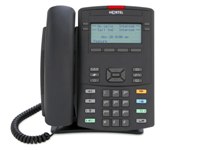
 We recently purchased two Avaya/Nortel 1220 IP phones for testing in our environment as a possible replacement to the manufacture discontinued i2002/i2004 IP phones. We’re evaluating whether we should purchase the 1120e/1140e or the 1220/1230 as our standard IP phone going forward. An obvious concern going forward is that the phone support the Session Initiation Protocol (SIP) so that it will be potentially capable of inter-operating with whatever soft switch or PBX we might have in the backend, be it the Avaya Aura or the legacy Avaya/Nortel Call Server 1000.
I should warn folks that the phone is sold with different SKUs depending if you want it running the UNIStim or SIP protocol. Upgrading the phone between the UNIStim and SIP firmwares is not supported by Avaya/Nortel. With that said I was successful in upgrading/converting a UNIStim SKU’d phone with the SIP firmware available from Avaya/Nortel’s Software Communication System (SCS). I did have some issues downgrading/converting the same set back to UNIStim, although I eventually found the workaround that was needed to trick the SIP firmware into believing I had newer firmware. I can share that with anyone that is interested or if anyone is stuck in a similar position.
The default configuration password is:
26567*738
Cheers!
Update: Monday February 22, 2010
It might be easier to remember the password as follows:
We have been using a mixture of 1120’s and 1140’s since they were released, about 1000 in total. We were informed that we were one of the first UK based companies to use them. The first version of these phones came with an advisory that the “on hook” switch would get stuck and we did see a spate of this. Having said that though our users really like them. In small meeting rooms they work very well as a conference type of device. Quality is good and numerous firmware updates have kept them current and bug free. Not tried the 1200 series yet but can vouch for the 1100 series.
Thanks for the feedback Dave.
We have a handful of 1140e IP phones and around 100 1150e (Contact Center) IP phones. They’ve worked great but were difficult to fit into previous project budgets. Hopefully the price has come down over the past few years, especially now that the 2002/2004 models have been discontinued.
I forgot to mention that the Nortel 1200 series phones were developed and manufactured in partnership with LG. With the Nortel’s acquisition by Avaya it’s also possible that they may terminate that agreement with LG. Although all we’ve heard from Avaya/Nortel is the line that “everything will stay the same..”, sooner or later it needs to change or Avaya will end up like Nortel.
Thanks for the feedback!
Hi Michael, if you could briefly mention the workaround for going between SIP and UNIStim that would be interesting- I don’t have any plans for this at the moment but I’m sure we will want to trial the SIP firmware in the future. I’m guessing this is about forcing the firmware load even though it is a ‘downgrade’?
Thanks!
Conversion process for IP Phone 1120E/1140E between SIP UNISTim is documented in the SIP Administration Guilde. It is accomplished using TFTP/HTTP servers and config files to change the firmware loads.
Hi Tony & Gord,
I had a problem downgrading the phone back to a UNIStim firmware after I had upgraded/converted the 1220 IP phone to SIP. The phone would not downgrade/convert back to the UNIStim firmware because the SIP firmware thought it was “newer” than the UNIStim firmware I had configured in the configuration files on the TFTP server. I was able to trick the SIP firmware by using a newer SIP firmware to get the phone into BOOTPC mode and then replaced the 1200.cfg configuration file so it pointed to the UNIStim firmware as opposed to the SIP firmware.
This might have been resolved with the latest SIP firmware release although I haven’t had the opportunity to test it again.
Cheers!
Using DOWNLOAD_MODE FORCED in the [FW] section of the TFTP/HTTP config file will override version checking.
We have a mixture of around 400 1220’s and 1230’s (mostly 1220’s) in our newest facilities. So far we have been very happy with them and have all but stopped buying the 1100 series.
The 1200’s are significantly cheaper than the 1100 series, but for a good reason. They only have a 2 point adjustable base (which i find to be mildly annoying), a lower res screen that is not backlit, and no bluetooth.
Still, they have their pros as well. The 1200 series is solid color molded plastic unlike the painted 1100 series (which scratches easily). You also have discrete navigation buttons (thank you!!) and with the 1230, you have ten discrete line keys as opposed to six with the 1140.
If the cons mentioned above do not matter to you, the cost difference should make your purchasing decision a no brainer.
Avaya claims in their roadmap that both the 1100 and 1200 series phones would be SIP supported. We’ll see how that plays out.
One item of note. In my own personal experience I have seen the off hook button problem with *many* of our 1100 series phones. I got so frustrated that I tore apart one of our affected sets to see exactly what was causing the problem.
It turns out that the U-shaped spring/clip that sits underneath the off hook button loses its ‘spring’ after repeated use. I compared this clip to those used in the 200x series and it ‘appears’ identical. The only conclusion I was able to reach is that material & manufacturing differences allowed an inferior part to be used in their newest handsets.
We have several thousand barney phones in use and in the eight years I’ve been working with them I’ve seen maybe ten of them fail due to an off hook button.
I have yet to see this issue in the 1200 series in a little over a year of heavy use.
We have about 5250 IP phones. A mixture of 1120, 1140, 1220, 1230, 2210, 2211, 2004P1, 2004P2, and 2050 soft clients.
– Wes
I’m pretty sure we set that option and it didn’t work either but I could be wrong.
I’ll test again since we’ve spent so much time talking about it just to set the record straight. It’s quite possible I missed that option or botched something else while we were testing the two 1220 IP phones.
Thanks!
I just recently got my hands on several 1200 sets from a customer who changed to the 1100’s for Gig and BT, and I want to convert these 1200’s to SIP firmware. Is the 1100 SIP firmware the same, or is there a different formware for the 1200’s? And if so, where can I find the firmware to convert from the UNIStim? I checked the Nortel site with no luck.
Thanks,
You’ll find the SIP software for the 1200 series under the Software Communication System.
Home > Technical Support > Voice, Multimedia & Unified Communications > Software Communication System
Good Luck!
it’s been many’a year
“You’ll find the SIP software for the 1200 series under the Software Communication System.
Home > Technical Support > Voice, Multimedia & Unified Communications > Software Communication System”
Didn’t take me far from avaya.com :(
Before I buy a lot of these used I’d prefer to lay hands on the needed firmware. Can you share a tinyurl in case your blogs also lkikes to mangle URLs?
i am useing nortel 1220 series ip phone how to sercuriy password to that phone……………..
Hi Anand,
You can use the “menupwd” option in either the DHCP string or the TFTP/HTTP provisioning files. The option can include up to 21 characters which can include numbers, the * (asterisk) and # (pound) sign.
Just be aware that this menu password is transmitted in clear text over the TFTP and/or HTTP protocols.
Good Luck!
Do you need a valid contract with Nortel (i.e. a site ID/CLLI, like they call it) to get access to SIP firmwares ? I can’t find them on support.nortel.com.
Thanks
You only need an account on the Nortel support website. If you don’t have an account just register for one and after you login you’ll find the SIP firmware under the SCS.
Hi Mike,
Would it be possible to go through the upgrade process for the 1230 phones to a sip image? Sorry i’m from an avaya definity background and i haven’t dealt with upgrading to an sip image for the 1230’s.
Hi Jase,
I don’t have the time right now to go into detail. You’ll need the SIP firmware and a TFTP server. Just configure the phone with an IP address and TFTP server and then place the files from the ZIP archive onto your TFTP server. I believe that’s all I did, there might be a .cfg file to edit that comes in the ZIP archive that tells the phone which firmware file to download, etc.
Good Luck!
Hello all
I am looking for a solution for an external optical off-hook status indication for the Nortel 1210 or 1140 phones. Has someone idea or experiences with the 3rd-party products supporting this?
Alternatively if someone can suggest the 3rd-parts SIP Nortel-compatible phonest with support for an off-hook contact, please let me know that.
Thanks a lot in advance
Saed
Hi Sead,
You’ll probably need to research Nortel/Avaya CTI interface with the PBX switch (CS1000, BCM, etc). You’ll need to make sure you purchase the appropriate CTI licenses for the specific number of handset your interested in using.
You might want to start your search at Avaya’s DevConnect website.
Good Luck!
Hi Michel,
thanks, I probably didn’t explained it properly. I am not looking for a CTI solution, I am loking for a device or solution that will work locally with the phone and through a relay contact lit a light bulb on a desktop to indicate the off-hook state.
This is tipical requirement for emergency rooms where the supervisor can immediately recognise which person is not engaged in s phone call.
There was a device from the company Algo (8001 IP Alerter) working with 2002 and 2004 phones. I need similar solution but for the 1140 phones.
Regards
Sead
I’m not aware of any such solution and hadn’t previously heard of Algo until you mentioned it here.
You will probably need to look at some type of centralized solution that might need to be tied into Nortel/Avaya’s Call Center (Symposium). I know there are both physical ticker display based solutions for software based solutions for tracking but they usually integrate directly with the CS1000 and the Call Center servers.
When you talk about emergency rooms are you talking about a Nurse Call type system? Those are generally independent of the actual voice solution. I don’t think I’ve ever heard of a requirement where the nursing supervisor needs to know if a nurse is on the phone or not. Every nurse in our emergency department utilizes a Nortel/Avaya 6140 wireless handset so they are always reachable.
Good Luck!
Hi Michael
I have tried to get the SIP firmware onto a brand new 1220 IP but not having any luck. I’m likely missing something simple!
I have setup a TFTP server with the SIP .bin file and tried loading it using DHCP and Manual, but the 1220 just keeps rebooting – with only the manual/dhcp option available. I get a momentary ping to the phone IP so I know it’s not a network issue.
Does the phone need some other software on it first perhaps? Or it is likely in my .cfg file in the tftp directory. I couldn’t find an example of one for the 1220 (only the 1230 which I copied and adjusted). Is there an example somewhere?
Thanks
Klaus
I managed to work it out! I called the .cfg file 1220.cfg it should have been “12XXBoot.cfg”. All good now.
Hi
I was wondering if any of you had run into this problem, or perhapst it is addressed in one of the other posts.
This is with any unstim device (I tried I 2004 and I1230) configured to a BCM50, the BCM50 is on a public IP address but the phone would be behind NAT, and the local IP address is in the DMZ.
the phone works great with no complains, the problem begins if you start to use SIP trunking in the mixture.
if you use the IP phone to make a call using a SIP trunk, the call would proceed but after about two minutes the IP set would start loosing connection with the BCM, interestingly the call (voice stream) would still go on but the phone will say something like “lookig for server” and restart NOW etc. eventually the phone would reboot and the voice (RTP stream) would stop.
I checked on the BCM Monitor and it looks like the RTP stream goes from the phone to the far end (service provider).
I called Nortel and opened a case, they said that “my router is changing the port” and therefor there is nothing they can do!
I’m wondering if anyone has an understanding of what ports are being used and why this would only happen if you are using a SIP trunk but not us if you are using any analog or digital trunk or if you use the phone internally.
thanks
We have received BCM 450 Avaya. with all IP phone. Unfortunately the Avaya phone when we connect to BCM 450 it is not downloading firmware and phone is not coming up. This unit is software version 6.0
Hi Dhanteja,
If the problem is similar to what Evan mentions you’re not completely stuck. The nice thing about the 1100 and 1200 series IP phones is that you can upgrade them from a standard TFTP server (you can’t do that with the 2000 series IP phones). So you could download the latest (UNIStim) firmware from Avaya support website, put it up on a TFTP server and then the IP phone will upgrade itself.
Have a look at this post; http://blog.michaelfmcnamara.com/2011/01/avaya-ip-1100-series-ip-phone-upgrade-to-sip/
It will outline how to upgrade the IP phone for SIP, but just replace the VERSION and FILENAME in the 1220.cfg file with the proper UNIStim firmware release and the IP phone will upgrade itself.
Good Luck!
I have had a similiar problem with BCM and 1200 IP phones. I was able to determine that the firmware that is in the 6.0 code of the BCM is not stable and in fact does not recognize the shipping firmwares on the 1200 series phones. My fix, my deployment environment has a CS1000 as well, and registering the phones to the CS1000 and letting them do a firmware upgrade first then allowed the phone to be recognized to the BCM. Since I had this fix, I didn’t open a case, but Avaya may be your only solution to this.
Hi Michael,
thanks for your detailed technical description of nortel products! I got a 1230 ipphone and now I am trying to switch it to SIP.
I’ve downloaded the sip firmware und set up my TFTP-Server. The way you have described the process, it all looked pretty much the way as cisco phones are beeing switched to sip. (Firmware and config-files with mac adresses on the tftp-Server). Unfortunately, as a nortel new-bee, I don’t get to that point… I have no idea, how to change the basic network parameters so the phone gets in contact with my tftp server. Is there any phone-menu (special keys?) where I can set these parameters? The phone only says: “Start DHCP…” And nothing else happens… :(
Hi Jan,
There have been quite a few posts in on this blog and some discussion threads on the forums that you should probably review.
http://forums.networkinfrastructure.info/nortel-ip-telephony/
The upgrade of the 1200 series IP phones is almost identical to the 1100 series IP phones with the exception of the firmware/software and the configuration filenames. You could review this post for how to upgrade an 1100 series IP phone.
In addition everything is documented in the SIP Software for Avaya 1200 Series IP Deskphones-Administration guide from Avaya.
Good Luck!
Thank you, Michael!
I have already read the pages you have mentioned. (esp. the post how to upgrade a 1100).
I have now tried to install the firmware for three days… :(
I’ve tried it with tftp32d, solarwinds tftp-server (witch has worked great for cisco phones) and others as DHCP-Server from Ruttkamp.
I have even set up a win 2003 test-server to provide the necessary DHCP-Options (66), but nothing has helped yet. The phone requests a DHCP address but does not accept it. It does not contact any of the tftp-Servers I have set up. There does not appear any GET command in the tftp-logs.
In some manuals, I’ve found a hint, that manual network configuration is also possible. But how? I have no menu on the phone. Is any menu unavailable, if the phone is not connected to a VOIP-Server / BCM…? (No double pressing the globe, no mute, up, down, up down…)
Is there anything I can do to configure the Network-Settings manually? Is there anything, I can try for providing the necessary options via DHCP (now with win 2003 dhcp) (I’ve tried next-server, Option 66…)
The phone does not even accept the provided IP-Adress (other phones and my notebooks accepted the DHCP-provided Ip Adresses properly).
Is my phone broken (from ebay), or is this a normal process for I have done sth. wrong?
The display says:
… Loading BootC…
12×0 IP telephone
Manual Configuration
Nortel
than
Start DHCP… and that’s it. (and sends a DHCP-Request)
Hi Jan,
If you strike the four soft keys just below the LCD display when the “Nortel” or “Avaya” logo/text comes up you’ll be prompted for the administrator password, after which you’ll be able to configure the IP phone. Pages 83-91 in the previously quoted manual cover the upgrade process. You can also get to the configuration by pressing the “Services” key twice in quick succession, not sure though if the IP phone has to be booted and running for that to work.
Please take additional questions to the discussion forums;
http://forums.networkinfrastructure.info/nortel-ip-telephony/
Good Luck!
Every time I try to convert back Sip 1230 to UNIStim I get a error 2 in system call CreateFile The system cannot find the file specified
1230.cfg File
[FW]
DOWNLOAD_MODE FORCED
VERSION 062AC8A
PROTOCOL TFTP
FILENAME 062AC8A.bin
both the cfg and bin file is in the tftp server folder ,
any suggestions
Thanks
Hi Randy,
I’m going to guess that you’re getting the “The system cannot find the file specified” from your TFTP server? That’s because once you upgrade to the SIP software the IP phone will now look for the filename 1230SIP.cfg as opposed to the 1230.cfg file that the UNIStim version looks for.
So you just need to copy/rename the file on your TFTP server.
If you have any other questions please feel free to post on the discussion forums;
http://forums.networkinfrastructure.info/nortel-ip-telephony/
Good Luck!
Hi
I have a 1120e and trying to change to sip from unitsim. I have tftp32 and set ip adresses in phone according to my network. the only i cannot save is the tftp: i can change it but I can’y get the phone to keep it. when pressing apply and reset i get the message insert calue1, 6, 7. Please help thank you
Hi Chris,
Please post your problem over on the discussion forums, your question isn’t really about converting an 1120e to SIP isn’t relavent on a post about the IP 1200 series phones.
http://forums.networkinfrastructure.info/nortel-ip-telephony/
Good Luck!
Hi there,
I have a phone with a flash config error. It’s a Nortel 2211 phone with 97.072 firmware.
Someone decided to put an admin pw on the phone so I can can’t get in and restore defaults. I have tried the usual 1234. 123456. No go.
Trying to flash the phone gives me error “Unable to Determine PT type.”
Is there a universal default password I can use to get through it?
Thanks
Hi Sharon,
Your question isn’t really on-topic but that doesn’t usually stop me from replying. If you have a configuration cradle and the Handset Administration Tool (HAT) you might be able to download the configuration, blank the password and then upload that new configuration to the handset. If you don’t have the configuration cradle then (I believe) your old option is to RMA the phone to Avaya for repair.
Good Luck!
Hi, could somebody help me!, i need to convert a unistim set to sip, please somebody help me.
Hi Alex,
Have a look at this post.
Good Luck!
Hi Michael,
Hi Michael,
My question is in regards to a power supply for a 1220 I obtained on ebay. The phone doesn’t come with an AC adapter, but I have an extra power supply left over from a Cisco IP phone, that does power up my 11xx/12xx phones.
I want to make sure that it is an acceptable power source before I use the power supply permanently.
Its a Input: 100-240V-500mA 50-60HzOutput: 48V—200 mA LPSSays it is “for use with information technology” equipment.
Does you know if this acceptable for the 11xx/12xx phones? Thank you,
be sure it’s “regulated”. look for two horizontal lines. top solid line, bottom dashed line
HI Michael
I am wondering if you have available the SIP Firmware for the nortel 1200 phones
we have 12 nortel 1210 and 5 nortel 1230 and recently we ran out of lines on our BCM 50 we are upgrading to another platform but would like to keep the phones as they are excellent phones.
I have been looking for the SIP FIRMWARE on the nortel website but i just can’t get to the menu that you described above it never appears for me so i cannot download the file. Can you please if you still have it available or have the direct link to where i can get it send it to me please.
Thanks
Hi Aaron,
You can find the firmware on the Avaya Support website;
http://support.avaya.com/css/appmanager/public/support/Downloads/P0600/SIP%204.x
Just click on Downloads (left side) and then enter “1200 Series IP Deskphones” and then select which SIP firmware you want from the dropdown box.
Good Luck!
Please help us with the current URL ;)
It only takes a little effort to find it….
support.avaya.com -> Products -> 1200 Series IP Phone
The links occasionally change not quite sure why but that’s Avaya design not mine.
http://support.avaya.com/products/P0600/1200-series-ip-deskphones/
Hello Michael
I am currently running a Hosted PBX server (Asterisk based) I have a potential customer with about 100 i1230 phones on a BCM450, the customer would like to move to our hosted solution, would it make sense to upgrade the 1230’s to SIP firmware for this reason?
(I’m a little worried because in the documentation it appears the SIP firmware is intended for the:
Avaya IP Office R8.0 (1220, 1230, 1120E, 1140E IP Deskphones only)
• Avaya CS1000 R7.0 and 7.5.
• Avaya CS2100 SE13
• Avaya Aura® Communications Manager 6.0
• Avaya Aura® Session Manager 6.0
I’m kinda looking for this to work jut like a polycom or Aastra SIP-phone etc.
please let me know thanks much.
Hi Harry,
As I’m sure you know by now Cisco SIP, and Avaya SIP and Nortel SIP and Siemens SIP are all really different standards. And don’t really interoperate well. So just because an IP phone says it’s SIP compatible doesn’t really mean much these days.
The only way you’ll know what works (or doesn’t) for sure is to test an Avaya 1230 IP phone with your Asterisk solution.
Avaya only supports utilizing their Call Server products with their IP phones, not much different from any other vendor out there. Just because the manufacturer doesn’t support it doesn’t mean it won’t work though.
Good Luck!
Thanks Michael
Can you point me to a blog post showing how to obtain or creat a 12xx.cfg config file.
Thanks.
You should be able to find a number of examples on the forums.
http://forums.networkinfrastructure.info/nortel-ip-telephony/
Good Luck!
Hi Michael,
If a 1220 phone says
License Mode: Locked
License Status: No Request
Token Type: Evaluation
Am I SOL, or because it says No Request, does this mean the phone won’t expire after a 27 days? Evaluation scares me…
So Michael,
I should be ok with the Evaluation showing, as long as the phone says “No request?”
Cheers,
Joe
Once flashed SIP can the phone be used independantly with a VoIP provider (like voip.ms)? Or does it require [proprietary, not free] management software/server?
I’m evaluating the bargain of buying a few used for home use. Are they SIP TCP capable? (anveo is the only TCP capable voip provider I’ve found)
You can connect a SIP based 1200 series IP phone to a SIP provider such as voip.ms.
There are some configurations you need to avoid utilizing features that require an advanced license.
You can read all about the issue in this thread post;
http://forums.networkinfrastructure.info/nortel-ip-telephony/disabling-features-from-extended-feature-set-on-ip-deskphone/
Good Luck!
>> As I’m sure you know by now Cisco SIP, and Avaya SIP
>> and Nortel SIP and Siemens SIP are all really different standards
Even if the device propaganda cliams “SIP 2.0”?
Is there a site with experience identifying which respective SIP firware is likely to play best to soho/enterprise sip VoIP providers? (as opposed to iax). I’ve seen mention of which cisco 79X0Z SIP firmware plays best with “broadvoice”, but no mention of other voip as one mind find atop charts at http://dslreports.com/gbu/
If I was to DIY IP PBX it would probably be PBX in a Flash on Amazon EC2. But as SIPsorcery abandoned Amazon EC2 for azure because of SIP- and ports woes I’d be leery even of that.
You can usually get SIP handsets to operate at a basic level although you can run into issues with MWI and similar but basic dial-tone is usually obtainable.
The comment comes into play when you are trying to bring up a SIP trunk between disparate equipment.
Cheers!
Hi.
I have a Nortel 1230 phone which has a SIP firmware and I’m trying to downgrade it to UNIStim and we’re having a lot of trouble. The phone has an address to a TFTP server and the TFTP server has the files 12xxBoot.cfg and 12xxSIP.cfg and the .bin we would like to load but it is not loading. How do you “force” the phone to load said .bin from the TFTP?
Hi Alain,
You should read this post for details and clues…
http://blog.michaelfmcnamara.com/2011/01/avaya-ip-1100-series-ip-phone-upgrade-to-sip/
Good Luck!
Hey Michael,
I’d just like to thank you for the heads up! We got the phone to downgrade to the UNIStim firmware successfully. Pretty much what was happening is that the phone was asking the TFTP server for a file that it didn’t have. We didn’t know that, so I ran a Wireshark on the LAN segment running the TFTP server and the phone. I saw that the phone was requesting for 1230SIP.cfg and we had 12xxSIP.cfg. I just renamed it and made the files available and BOOM! It worked.
Hi Alain,
Happy to hear you were able to figure out… the filenames have also changed a little over the years.
I believe TFTPD32 will show you the name of the file being requested. That might save you some work in the future.
Cheers!
So back to your original post: what was your decision between standadizing on either 1120/1140 or 1220/1230? I don’t see the results of your evaluation.
Thanks!
Hi Tim,
I use the 1120e for standard users and 1140e for receptionist, call coordinators, etc. We use the 1220 for our wall phones – they sit flatter/closer to the wall. The 1100 series provides 1Gbps to the desktops so that’s the primary reason to chose them over the 1200 series.
Good Luck!
Thanks for the feedback. My network guy agrees with you on the 1Gbps. Of course that makes the cost of my phones go up a nice chunk.
Have you found any cheapo third-party SIP phones you can recommend for use in places where they may tend to be abused (like college dorm rooms)?
Unfortunately, no… we still use analog sets for the patient phones (not too far from college dorms) which we can get for about $9 each.
You can try and contact the following reseller and see if he can give you a better price;
Jon Zulick
jzulick@robertscommunications.net
Roberts Communications Services, Inc.
Tel: 215-542-2240
Fax: 215-542-7151
Good Luck!
Wondering if you ever had the issue when as soon as IP 1220 SIP registration completes the PC connected to the phone losses connection.
Hey Michael,
Recently one of our clients BCM400 password has been… forgotten would be the correct word. We as a company keep all the customer’s password on record but they decided to replace and now they can’t access it. Wiping it out is not an option as we have a VERY outdated backup of it. Is there any way that the password could be retrieved physically extracting the HDD from the BCM and maybe looking somewhere?
Hi Alain,
I’m guessing there might be a way to reverse engineer the passwrd file of the Linux host system. I have no idea if it’s possible or ever been tried.
Sorry.
Hi Michael.
I have a 1210 series phones that have already worked for about 2 years. During this time, there was 8 of idle phones. All one and the same problem they are not loaded. When connected to the network it appears “updating file system wait a few minutes” Then nothing happens. In this state, the phone can be infinitely dlolgo. Anything you can do with this?
Hi Van,
I’ve never seen a handset display “updating file system”… sorry but I can’t help.
Good Luck!
Hi Michael.
It is a pity that you have not met such a problem in the phone 1210. If you’re interested I can send to your address phone 1210 with the inscription on the display “updating file system wait a few minutes”.
Hi all, I would loike ask for help. I flashed 1210 to SIP firmware and when I press preference (setup) key phone reboots. I red some thread about this problem but there was not any solution. I know officially 1210 is not supported with SIP firmware but the phone works with SIP (incoming, outgoing call) but the problem is with spontaneous reboot after I press service key. I s there any solution? Do you have experience with this? Thanks. Martin
I believe I responded to your post in the forums.
What do you have the Avaya 1210 connected to? What Call Server?
Good Luck!
AVAYA 1210 with FW SIP12x004.04.10.00 (MAC: FC-A8-41-F2-E4-45) and I connected this phone to Asterisk 1.8. The phone works well (incoming / outgoing call) but the problem is with service key and spontaneous freeze of the phone. I have to disconnect power. Thanks for help. M.
Does anyone know of any apps , tools or API which can directly fetch stats from the Avaya 1200 series phones running SIP connected to an CS2100? Trying to install some sort of monitoring at remote locations for the phones.
Thanks
There are quite a few commercial applications available to help monitor the endpoints, NetIQ comes immediately to mind.
You can retrieve the individual QoS statistics via the command line and via the CS1000.
Good Luck!