[ad name=”ad-articlebodysq”]Here’s a quick tutorial on how to configure SNMP v3 for the ERS8600,ERS1600, and ERS5500. In this day and age it is becoming more and more paramount to secure the network infrastructure and SNMP v3 is just another evolution in that process. The commands documented below are fairly straight forward and while the syntax might differ between the different switch models the basic principles are the same.
Here are the values I’m going to be using below;
SNMP v1,v2 read-only string = readme123
SNMP v1,v2 read-write string = writeme123
SNMP v3 userID = Manager (yes I use the same username as the old BayRS software)
SNMP v3 SHA authentication = winnie2009
SNMP v3 AES encryption = poobear2009
Nortel Ethernet Routing Switch 8600
One word of caution with the ERS8600; early default switch configurations included a SNMPv3 user called initial that had full read-write access to the entire switch. I’m not sure if Nortel has changed this behavior but I would strongly urge you to delete any default SNMP v3 users as well as change the default SNMP community strings.
Let’s set the SNMP community strings right away;
 ERS-8610:5# config snmp-v3 community commname first new-commname readme123
 ERS-8610:5# config snmp-v3 community commname second new-commname writeme123
Let’s load the proper AES, 3DES and DES encryption files;
 ERS-8610:5# config load-encryption-module 3DES /flash/p80c5110.img
 ERS-8610:5# config load-encryption-module AES /flash/p80c5110.aes
Let’s create a new SNMP v3 user called Manager;
config snmp-v3 usm create Manager sha auth winnie priv-prot aes priv poo
Let’s create a new SNMP v3 group called admin;
config snmp-v3 group-access create admin "" usm authPriv
Let’s give this new group access to the root MIB;
config snmp-v3 group-access view admin "" usm authPriv read root write root notify root
Let’s add the user Manager to the group admin;
config snmp-v3 group-member create Manager usm admin
Let’s clear out any previous SNMP trap hosts;
 config snmp-v3 target-addr delete TAddr1
 config snmp-v3 target-addr delete TAddr2
Let’s configure two new SNMP trap hosts. I actually have two configured on all my switches, with one being our HP OpenView Network Node Manager server (10.1.31.1) and the second being our Nortel Enterprise Network Management System server (10.1.31.2);
 config snmp-v3 target-addr create HPOpenView 10.1.31.1:162 TparamV1 taglist trapTag
 config snmp-v3 target-addr create NortelENMS 10.1.31.2:162 TparamV1 taglist trapTag
Let’s delete that default SNMP v3 user just in case it still exists;
config snmp-v3 usm delete initial
Let’s set the source IP address used to communicate with the SNMP trap hosts. I want this to be the CLIP (Circuitless IP Interface) that I use for all management purposes which in this example is 10.1.50.1. I should mention that the commands below may not appear in switch software earlier than 4.7.1 or 4.6.3.
 config sys set snmp sender-ip 10.1.31.1 10.1.50.1
 config sys set snmp sender-ip 10.1.31.2 10.1.50.1
 config sys set snmp force-trap-sender true
 config sys set snmp force-iphdr-sender true
That should be everything for the Ethernet Routing Switch 8600.
Nortel Ethernet Routing Switch 1600
I’m not going to go into the line by line detail here as I did above. You should be able to follow the explanation provided above.
 ERS-1648T:1# config load-module DES /flash/p16c2160.des

 ERS-1648T:1# config snmp-v3 community commname first new-commname readme123
 ERS-1648T:1# config snmp-v3 community commname second new-commname writeme123

 ERS-1648T:1# config snmp-v3 usm create Manager sha auth winnie2009 priv poobear2009
 ERS-1648T:1# config snmp-v3 group-access create admin "" usm authPriv
 ERS-1648T:1# config snmp-v3 group-access view admin "" usm authPriv read root write root notify root
 ERS-1648T:1# config snmp-v3 group-member create Manager usm admin
 ERS-1648T:1# config snmp-v3 target-addr create HPOpenView 10.1.31.1:162 TparamV1 taglist trapTag
 ERS-1648T:1# config snmp-v3 target-addr create NortelNMS 10.1.31.2:162 TparamV1 taglist trapTag

 ERS-1648T:1# config snmp-v3 usm delete initial
That’s the ERS1600 series switch.
Nortel Ethernet Routing Switch 4500, 5500, 5600 Series
We need to create a new view so we’ll use the name snmpView;
5520-48T-PWR(config)# snmp-server view snmpView +1.3
If you have the secure image loaded then you have access to SHA authentication, DES, 3DES and AES encryption.
5520-48T-PWR(config)# snmp-server user Manager sha winnie2009 aes poobear2009 read-view snmpView write-view snmpView notify-view snmpView
If you receive an error using the command above (see below) you may not have the secure software image loaded on the switch. If you want to use SHA authentication, DES, 3DES or AES encryption you’ll need to load the secure image. Example SW:v6.1.0.006 will only allow you to use the md5 authentication with no encryption while SW:v6.1.0.007 will allow both MD5 and SHA authentication along with DES, 3DES or AES encryption.
 5520-48T-PWR(config)#snmp-server user Manager sha winnie2009 aes poobear2009 read-view snmpView write-view snmpView notify-view snmpView
snmp-server user Manager sha winnie2009 aes poobear2009 read-view snmpView writ
                         ^
% Invalid input detected at '^' marker.
You can use the following command to just use MD5 authentication with no encyrption;
5520-48T-PWR(config)#snmp-server user Manager md5 winnie2009 read-view snmpView write-view snmpView notify-view snmpView
Java Device Manager
With all that done you can now use Nortel’s Java Device Manager to manage the switch using SNMP v3.
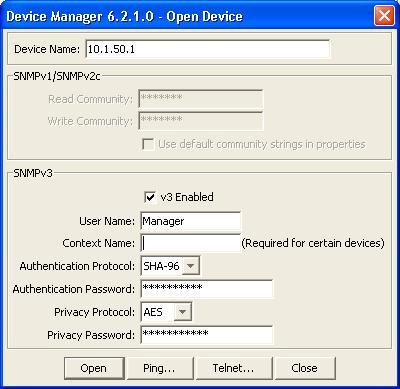
In the example to the left I’m going to connect to the ERS8600 switch at the management IP address of 10.1.50.1.
We are going to use the SNMP v3 user of Manager which we configured above.
We will also use the Authentication Protocol of SHA-96 using the Authentication Password of winnie2009 which we configured above.
We will use the Privacy Protocol of AES which we configured above along with the Privacy Password of poobear2009.
Cheers
[ad name=”ad-articlefooter”]
Once folks have SNMP v3 set up, they may want to consider disabling access to SNMP v1/v2c by issuing the following commands:
TEST_ERS4500(config)#no snmp-server community rw
TEST_ERS4500(config)#no snmp-server community ro
I checked and these work on ES 470 and ERS 4500/5500 switches, along with the ERS 8600 switch
Hi Tom,
That’s a great idea… I would just warn folks to be careful in the event that they are still relying on SNMP v1/v2 and don’t realize it. It could be that HP Open View or maybe MRTG are performing SNMP v1/v2 polls. You could also write an access policy to restrict which IP addresses can perform SNMP polling.
Thanks for the comment!
Michael,
Could you please tell me how do I go about changing current snmpv1 or V2 comm string?
Many thanks
Jaffar
Hi Jaffar,
What switch are you inquiring about? The commands for the ERS 8600 are above;
ERS-8610:5# config snmp-v3 community commname first new-commname readme123
ERS-8610:5# config snmp-v3 community commname second new-commname writeme123
Those commands will set the SNMP read and write community strings for the switch. You can poll the switch using SNMPv1 or SNMPv2c.
Good Luck!
Hi Michael,
apologies for late reply , Working for Passport 8006
Thanks
Hi Michael,
I’ve been playing around with these commands on my 5520 running 6.1.0.007, and have found that I get an error while entering the passphrases inline in the command.
The solution is simply to leave out the passphrases, and the system will prompt you for the sha and aes passphrases.
i.e.: run the following command:
snmp-server user Manager sha aes read-view snmpView write-view snmpView notify-view snmpView
and the system will then prompt for the correct passphrases.
Thanks a million for the very usefull site!
Liam.
I am trying to reset my nortel 8006 switch snmp password. Please help me
Hi ramesh,
The answer to your question is only three comments up above in the thread.
http://blog.michaelfmcnamara.com/2009/10/how-to-configure-snmp-v3-on-nortel-ethernet-routing-switches/#comment-1683
Good Luck!
Thank You!!!!!!!!!!!!!!!!!!!!!!
You’re welcome Tim.
Just for future reference your email address is not publicly visible nor do I sell or provide that information to anyone.
Cheers!
Hey, i have a problem about the SNMP Access to my Passport 8606. If i enable the access-policy, i only have access via telnet, ssh …. but not with snmp V1. In the access-police i can only configure snmp-v3. I´m using Software 4.1.8.2.
Hi Thomas,
You should enable snmp-v3, it will provide you all SNMP access to the switch assuming you’ve configured SNMP correctly.
Good Luck!
Dear Michael,
I enabled Snmp -V3 as shown above. But when I try to access them through JDM, I get an error “the packet cannot be decrypted.”
PLease advice..
Thank you,
ahmed
Hi Ahmed,
Can you post the relevant sections of your configuration?
Cheers!
my switch is ers 8300
Dear Michael,
Thanks for your reply.
Below are the relevent sections:
#
# SNMP V3 GROUP MEMBERSHIP CONFIGURATION
#
snmp-v3 group-member create Manager usm admin
#
# SNMP V3 GROUP ACCESS CONFIGURATION
#
snmp-v3 group-access create “admin” “” usm authPriv
snmp-v3 group-access view “admin” “” usm authPriv read “root” write “root” notif
y “root”
#
# SNMP V3 MIB VIEW CONFIGURATION
#
snmp-v3 mib-view create root 1.3 type include
#
# SNMP V3 NOTIFY CONFIGURATION
#
#
# SNMP V3 TARGET ADDRESS CONFIGURATION
#
snmp-v3 target-addr create “HPopenview” 10.0.23.31:162 “TparamV1” tdomain i
pv4_tdomain timeout 1500 retry 3 taglist trapTag mms 484
snmp-v3 target-addr create “Testpc” 172.16.0.222:162 “TparamV1” tdomain ipv4_
tdomain timeout 1500 retry 3 taglist trapTag mms 484
#
# SNMP V3 TARGET PARAMS CONFIGURATION
#
#
# SNMP V3 NOTIFY FILTER CONFIGURATION
#
snmp-v3 ntfy-filter delete profile1 99.3.6.1.6.3.1.1.4.1
#
# SNMP V3 NOTIFY FILTER PROFILE CONFIGURATION
#
#
# SNMPLOG CONFIGURATION
#
snmp snmplog enable true
snmp snmplog maxfilesize 256
#
I have the same problem !
With the JDM Error:
usmStatsDecryptionErrors: The packet can’t be decrypted
Hi Swin,
You most likely have a configuration error. You should review your configuration.
Good Luck!
When trying to access switch through SNMP, the CPU utilisation is going high to 100%.. :(
Please suggest why it is happening??
Hi Siddharth,
What are you doing via SNMP when the CPU utilization goes to 100%? If you are walking a large MIB then the reaction is expected since you are heavily polling the switch. If I walk the RFC 1493 Bridge MIB I’ll spike my CPUs as well. That’s because I have some 6000 devices in my FDB/MAC tables so that’s a lot of information for the CPU to gather.
Unless you are having performance issues it’s probably safe to ignore.
Cheers!
Hi Micheal,
I need to update my Nortel 4550T-PWR switches with the new snmp v3 read-only and read-write passwords. Also i need to enable md5 Authentication and AES encryption on it. Currently it is running snmpv2c. How can i do that.
Hi Vijay,
You simply follow the instructions I’ve laid out in the past above for the ERS 4500 series switches.
Good Luck!
Hi Michael,
Thanks for your great blog. It has been very helpful since I started working with Avaya devices.
I just have a question about setting the source of the SNMP traps. Does it work only with the CLIP? I have tried using the following commands to send the traps to our syslog server (SNMP trap receiver as well) from one of the routed VLAN interfaces but it did not work.
config sys set snmp sender-ip
config sys set snmp force-trap-sender true
config sys set snmp force-iphdr-sender true
On the syslog server, I am filtering the traps based on the 8600 source IP I configured above. However, the traps were not emailed to me by the syslog server. I then ran some packet captures and discovered the source IP was not altered. The traps were sent from the 8600 outgoing interface instead (as shown in the routing table).
I then tried using the CLIP as the source IP and it all worked fine.
Do you know if this feature is limited to the CLIP only?
Thanks,
Hi Adel,
Thanks for the kind words. I believe it does need to be a CLIP interface.
Cheers!
Thanks Michael. You’re absolutely right.
I found it documented in the 8600’s SNMP guide from Avaya (Page 22)
http://www.google.ca/url?sa=t&rct=j&q=%22circuitless%22%20%228600%22%20%22trap-sender%22%20site%3Aavaya.com&source=web&cd=1&ved=0CCEQFjAA&url=http%3A%2F%2Fsupport.avaya.com%2Fcss%2FP8%2Fdocuments%2F100123752&ei=n5hrT_n5OeeQiQK0woHCBQ&usg=AFQjCNGQ1x44lcqpJZBgU7BashxeRZ8Kow
I am able to open my 5520 SNMPv3 configured switch with JDM but ESM will discover it, show it by IP Address(when ESM is configured for sysName), but will not open it….
Any ideas?
Thanks,
Bill
Hi Bill,
I don’t believe Enterprise Switch Manager (ESM – which has been retired) supports SNMPv3. I’m guessing you have this problem on all your switches?
What version of software on the ERS 5520? What version of ESM? What version of JDM?
Good Luck!
I figured out how to configure it.
Edit/Communities/Password
Insert
IP address ( with the default 0.0.0.0 being v1/2c) I have to add each switch individually until they are all done. Then I can convert 0.0.0.0 to v3.
User Name
Auth Protocol = SHA
Priv Protocol = DES ( to conform the my free version of “The Dude”)
Passwords.
These reflect the configuration of the switch.
You will see an orange lock, on the device, in ESM.
Thanks for sharing the solution Bill.
Forgot your questions.
Ver 6.1.5 on the 5520.
6.3.0 on ESM
6.2.1.2 on DM
I have an 8610 that I have successfully configured snmp v3 on. I am demoing an snmp management platform that polls v1 or v2c only. This platform cannot discover the 8610 using the communities I have configured. No response received from device…..
Is there anything I need to do to turn back on v2c?
Communities are there:
show snmp-v3 community
================================================================================
Community Table
================================================================================
Index Name Security Name Context Name Transport Tag
——————————————————————————–
first ******** readView
second ******** writeView
2 out of 2 Total entries displayed
——————————————————————————–
Hi Bill,
Do you have any access policies configured?
Cheers!
I do, they are allowing snmpv3.
This is very frustrating. I had v3 configured and working. I am demo’ing an NMS from Path Solutions and they use v2c. The communities were already configured. I’ve deleted them added new ones, created new groups….SNMP speak is Chinese to me….lol
I have started a discussion on the Network Infrastructure forum….no luck getting this to work yet…crazy. http://forums.networkinfrastructure.info/nortel-ethernet-switching/snmpv2c-from-snmpv3-on-an-8610/
Thanks
Well you’re not talking about SNMPv3 you’re talking about SNMPv2/SNMPv1 correct? I believe you need to allow SNMPv2/SNMPv1.
Perhaps you could show us your access policy?
You might want to refer to this blog post.
Good Luck!
Yes. I had v3 working….. my management network is 10.10.1.0/24.
Thanks.
Id: 1
Name: default
PolicyEnable: false
Mode: allow
Service: ftp|http|tftp|telnet|ssh|snmpv3
Precedence: 128
NetAddrType: any
NetAddr: N/A
NetMask: N/A
TrustedHostAddr: N/A
TrustedHostUserName: none
AccessLevel: readOnly
AccessStrict: false
Usage: 1
Id: 2
Name: secure
PolicyEnable: true
Mode: allow
Service: ftp|http|tftp|telnet|rlogin|ssh|snmpv3
Precedence: 10
NetAddrType: ipv4
NetAddr: 0.0.0.0
NetMask: 0.0.0.0
TrustedHostAddr: 0.0.0.0
TrustedHostUserName: secure
AccessLevel: readWriteAll
AccessStrict: false
Usage: 1459
Id: 10
Name: policy10
PolicyEnable: true
Mode: allow
Service: ftp|http|tftp|telnet|ssh|snmpv3
Precedence: 10
NetAddrType: ipv4
NetAddr: 10.10.1.0
NetMask: 255.255.255.0
TrustedHostAddr: 0.0.0.0
TrustedHostUserName: none
AccessLevel: readWriteAll
AccessStrict: false
Usage: 27016
mch8610a:5#
I am using 8300 series core switch and avaya switches. I am getting the topology of Network in OCM which is the Local area. how can i get the remote topology? can you please write the SNMP commands for this requirement.
I have more than 4 sites and i need to view all the devices Switches and WLCs.. please help me
Dear Michael,
I wan to my Nortel Switch ERS-8610 (5.1.3.1) send syslog traps to one of my server IP 10.67.X.X.
I followed your tips but fails to configure and getting below message
GDPREBS3-COR-4A:5/config/sys/set# snmp sender-ip 10.67.80.70
Not enough required parameters entered
set snmp trap sender Ip
Required parameters:
= ip address {a.b.c.d}
= ip address {a.b.c.d}
Command syntax:
sender-ip
please advice