I thought I would take a few minutes and outline a few quick LACP configuration examples using Nortel Ethernet Switch 470s, Ethernet Routing Switch 5520s and Ethernet Routing Switch 8600s. Nortel’s LACP implementation conforms to the IEEE 802.3ad standard and is known to inter-operate with the vast majority of major vendors, Cisco, HP, Juniper, Blade Technologies, Brocade, etc.
After writing this article for the past 90 minutes I decided to break it into multiple parts for multiple reasons, firstly because it’s getting long and secondly I don’t want to skimp on the content and want to get it right.
Example 1 – Ethernet Routing Switch 8600 to Ethernet Switch 470 using LACP trunk
In this example we’ll build an LACP trunk between a Nortel Ethernet Routing Switch 8600 and a Nortel Ethernet Switch 470. As we all know a picture is worth a thousand words so let’s start with a simple basic diagram of our two switches;
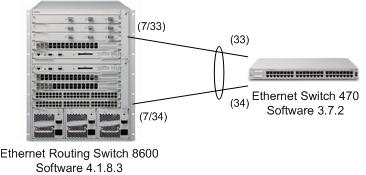
We’ll start with the Ethernet Routing Switch 8600 and I’ll walk you through the commands.
In our first step we’ll create the MultiLink Trunk (MLT) table entry which is required for the ERS 8600, it’s not required for the the majority of Nortel’s other switches. We’ll be using LACP key 33, I chose 33 for no real specific reason. The value is important though because it also needs to be unique (not already used) and needs to be used later in the configuration. This value will identify the ports in the switch that should participate in the trunk configuration. You can have multiple LACP LAGs each with their own key, sometimes referred to as the admin key.
config mlt 13 create
config mlt 13 name "LACP-LAG"
config mlt 13 lacp key 33
config mlt 13 lacp enable
The next step is to configure the actual ports that will make up the trunk. In my example I’m using ports 7/33 and 7/34, again for no specific reason. I’ll enable tagging if for no other reason than to preserve any 802.1q headers such as the Priority Code Point (PCP) which is just the 802.1p bits. I’ll also add the ports to VLAN 99 which we’ll bridge between the two switches;
config ethernet 7/33-7/34 perform-tagging enable
config vlan 1 ports remove 7/33-7/34
config vlan 99 port add 7/33-7/34
With the basic port configuration complete we now need to turn our attention to the LACP specific parameters. We need to use the same key we used to create the MLT above.
config ethernet 7/33-7/34 lacp key 33
config ethernet 7/33-7/34 lacp timeout short
config ethernet 7/33-7/34 lacp aggregation true
config ethernet 7/33-7/34 lacp enable
Let’s not forget to enable LACP globally;
config lacp enable
That’s it.
Hopefully you’ll agree that it isn’t too hard. Now let’s focus on the configuration steps for the Ethernet Switch 470. First we’ll enable tagging on the ports we’re going to use on the Ethernet Switch 470;
vlan ports 33,34 tagging tagAll
Let’s add VLAN 99 to the ports, I’ve already created the VLAN ahead of time.
vlan members add 99 33,34
Now we just need to configure the LACP parameters for each port and then enable LACP.
interface fastEthernet 33-34
lacp key 13
lacp mode active
lacp timeout-time short
lacp aggregation enable
exit
That’s it.
Let’s just make sure that everything is working properly on both the 8600 and the 470 switches.
ERS-8610:6# show mlt info
================================================================================
Mlt Info
================================================================================
PORT    SVLAN  MLT   MLT        PORT         VLAN
MLTID IFINDEX NAME      TYPE    TYPE  ADMIN CURRENT    MEMBERS      IDS
--------------------------------------------------------------------------------
13  6156  LACP-LAG     trunk   normal norm   norm     7/33-7/34         99

MULTICAST             DESIGNATED   LACP      LACP
MLTID IFINDEX  DISTRIBUTION  NT-STG  PORTS        ADMIN     OPER
--------------------------------------------------------------------------------
13     6156     disable      disable  7/33       enable      up
ERS-8610:6# show mlt lacp info
================================================================================
LACP Aggregator Information
================================================================================
MAC               COLLECTOR     AGGR    PORT
MLTID IFINDEX       ADDR              MAXDELAY     ORINDI   MEMBERS
--------------------------------------------------------------------------------
13    6156       00:0f:cd:f1:e1:30    32768        aggr    7/33-7/34

--------------------------------------------------------------------------------
OPER        MIN        OPERLAST
MLTID IFINDEX     STATE       LINK       CHANGE
--------------------------------------------------------------------------------
13    6156        up          1          6 day(s), 09:54:53

--------------------------------------------------------------------------------
ACTOR      ACTOR          ACTOR      ACTOR
MLTID IFINDEX    SYSPRIO     SYSID         ADMINKEY   OPERKEY
--------------------------------------------------------------------------------
13    6156       32768   00:0f:cd:f1:e0:00    33      33

--------------------------------------------------------------------------------
PARTNER      PARTNER        PARTNER
MLTID IFINDEX    SYSPRIO      SYSID          OPERKEY
--------------------------------------------------------------------------------
13    6156       32768   00:16:60:80:07:c0    8205
And now on the 470 switch;
ES-470#show mlt
Trunk Name                 Members             Bpdu   Mode   Status
----- -------------------- ------------------- ------ ------ --------
1     Trunk #1             NONE                All    basic  Disabled
2     Trunk #2             NONE                All    basic  Disabled
3     Trunk #3             NONE                All    basic  Disabled
4     Trunk #4             NONE                All    basic  Disabled
5     Trunk #5             NONE                All    basic  Disabled
6     Trunk #6             33-34               Single DynLag Enabled
ES-470#show lacp port 33,34
Admin Oper         Trunk Partner
Port Priority Lacp    A/I Timeout Key   Key   AggrId Id    Port    Status
---- -------- ------- --- ------- ----- ----- ------ ----- ------- ------
33   32768    Active  A   Short   13    8205  8193   6     480     Active
34   32768    Active  A   Short   13    8205  8193   6     481     Active
I think that’s enough for now… there’s a simple LACP configuration between two switches. Please know that you cannot add/remove VLANs from LACP LAG configurations dynamically on Nortel switches. You must disable the LACP configuration and then change the port configuration. So there’s a great benefit to use Nortel’s proprietary MultiLink Trunk (MLT) where possible. Please also note that you don’t need to enable VLACP since LACP already performs the same functionality provided by VLACP.
Please feel free to post specific questions in the discussion forums;
http://forums.networkinfrastructure.info/nortel-ethernet-switching/
Cheers!
Nice tut.
Why did you use LACP instead of just SMLT’s?
Hi Bill,
Great question…
I still personally use Nortel’s proprietary MLT/SMLT/SLT between Nortel switches. The purpose of the article was to provide examples of how to configure LACP (802.3ad) on Nortel switches in the event that you need to connect to a non-Nortel switch via 802.3ad LACP. In the examples I just used two Nortel switches so I could cover both the Passport series (Ethernet Routing Switch 8600) and the BayStack series (Ethernet Switch 460, 470, Ethernet Routing Switch 5500, 5600 series) but they could have easily been a Cisco 3750 or a HP GbE2c or a Cisco 3120. I hope to provide additional examples covering a few of the different switches I just mentioned. Hopefully that answers your question.
Thanks for the comment!
Your website is fantastic… I don’t get here often enough, but when I do there’s always something of use on it for me. I hope you continue to post information and content as Nortel makes its transition.
Hi Tim,
Thanks for taking the time to stop by… I’m happy to hear you’ve found the site useful.
I certainly hope to provide continuing coverage of Nortel/Avaya products and solutions but I’ll also start covering Cisco as I start working with the Nexus product line.
Cheers!
Hi,
I have a query regarding LACP. Suppose we want our configuration to be dynamic and we take out the active port abruptly then what all actions will be taken and how the other link will come to know about the topology change.
Regards
Rajesh
Hi Rajesh,
All links that participate in a LAG (Link Aggregation Group) run the LACP protocol. Depending on how one of the links fails both switches will eventually discover the issue and move all traffic to the remaining working link(s).
Here’s a great write-up regarding LAG and LACP;
http://www.ieee802.org/3/ad/public/mar99/seaman_1_0399.pdf
Good Luck!
Hi Michael!
I’m still use Nortel’s proprietary MLT/SMLT/SLT too. And it’s working fine on the Nortel’s switches.
But now i want to connect Cisco 2960 (and 3550) and Passport8600. And i trap one thing: on the Passport Switch i can add the VLAN`s on ports (which are joined by LAG) ONLY BEFORE joining ports!
How I can add the additional VLANs for the working LAG – ports on the Passport 8600 (with sw.3.7.17)?
Thanks Michael
Hi Michel,
I have a question regarding troubleshooting LACP in Nortel 8600 relese 5.1.2.0
in the logs I found this Msg
LACP INFO Aggregation Link State Change Trap (mltId=8, trapEvent=3)
In the “trapevent” field Do you know what the integer number represents?
I tried to google and searching through Nortel documents with no success
Thanks in Advance
AZ
Thanks for the comment AZ.
It probably correlates with the state of the LACP group… up… down… etc… you’d probably need to test to verify the options.
Good Luck!
Hi Michael, thanks for the guide
I have used this guide to create 4 LACP trunks on a Nortel 5520 stack, but although I have used the same commands for all four trunks, two of the trunks have configured correctly (show lacp port command as above shows all fields filled in) however on two others the show lacp port command shows the AggrId 0, and Trunk ID and Partner Port are blank. The switches are remote so I haven’t actually tried if they’re working, but could you please let me know if this corect?
Hi Michael, thanx for your guide , it was really helpfull.
one more thing i would like to ask you is , if i want to connect CSB4624 CPCI diversified technology MPIO switch through LACP , will this configuration work for that also.
Hi Sayantani,
As long as the device in question (CSB4624) supports LACP then it should work fine.
Cheers!
Hi Michael
i have done the config in 8600 as u have mentioned above . but whenever am connecting with CSB4624 , the vlans and ports are getting removed from LAG and LACP status is also showing down in 8600 . but with other nortel 5520 it is working fine . what might be the reason for this.
Hi Sayantani,
Have you configured/enabled LACP on the CSB4624? You need to configure/enable LACP on both devices before it will start working.
Good Luck!
Hi Michael,
I need to configure the same topology but instead of the BS470 i have a CISCO 3750X…
My question is : the configuration ERS8610 is it remains the same?
What advice would you give to the configuration of CISCO?
Thanks
Cyril
Hi Cyril,
You should find the commands you need on the Cisco 3750 from this post;
http://blog.michaelfmcnamara.com/2011/01/802-1q-vlan-tagging-on-a-cisco-catalyst-3750-e/
Cheers!
Hi Michael,
I have a scenario whereby native MLT (stack 4548GT’s) and a pair of 5650TD’s in an IST/SMLT but they are connected via L2 extensions at a distance of 20 miles each (diverse).
The data communication works well until we emulate certain failures. VLACP is required to logically bring down an interface if its reciprocating partner fails (or anything in between). So if an issue occurs whereby the link lights are still OK – VLACP should bring down the interface. It does, but it appears to NOT bring down the interface correctly whereby a re-hash of existing communications are pushed to the other MLT member doesn’t occur. Thereby the opposite site still tries to send data down that line and obviously fails. If you disconnect the port at the peer end as well and the link light drops then the port correctly identifies the port change and redirects existing data down other MLT members.
My question is – do you know of any way to prove that VLACP isn’t correctly bringing down the port whereby existing data streams are migrated to other remaining MLT members. VLACP status clearly shows the operating status down at the peer end if physically disconnected at the local end but I don’t believe that recognition of the link failure via VLACP is operating correctly.
Hi Paul,
This question is probably better suited for the discussion forums but since you posted here I’ll do my best to provide a worthy reply.
What software versions are you running on the ERS 4548s and on the ERS 5650s?
VLACP is essentially a heartbeat protocol, if the far side doesn’t see the heartbeat is marks the interface as unavailable (the port still stays up). There have been more than a few issues with VLACP so the software release you are running is going to play a big part in this problem.
What are your timers are you using on the VLACP configurations? Long timers, short timers, 30 seconds, 500ms, retries?
How would I go about simulating a failure? What’s providing your L2 extensions? Just unplug the fiber (WAN) link to that piece of equipment, you should still have link to your switch port because the “MUX” is still running but it’s essentially had a fiber break (you unplugged it).
Good Luck!
Hi Michael,
I thought I would update you with the issues I had experienced….
Firstly the issue with VLACP not disabling the ports correctly wasn’t the problem per-se. It was a bug with SMLT. Even though there was only 1 port used from each 5650TD for the connection to a stack of 4548GT’s ( we preconfigured spare ports in the SMLT for diagnostic purposes) the status did not drop from splitMLT to normalMLT so even though the port was ‘down’ the 5650TD IST member was still trying to use it! Do remember that it intermittently failed – it wasn’t a complete failure so many times it would work OK.
The fix was to reconfigured the SMLT for an SLT and all works perfectly now! We have been told to wait for 6.2.5 release but we have no release notes to confirm/deny until the code is available.
The second issue we had was a Linux server employing a SMLT as it does use four 1 gigabit Ethernet ports suffering data loss. The service was transferring a considerable amount of data which highlighted this condition. We initially thought it was an IST issue, or due to edge stacks losing connectivity to the VMware ESX hosts. We even tried to change the configuration to use local MLT’s on each core switch and migrating to LACP instead – all with varying degrees of failure. It turns out that a unique ‘feature’ of the 56XX series that although is performs well, it also allows data loss. Loss of packet streams under backup conditions, loss of LACPDU’s etc.
The fix was to provide the following statement and a reboot…..
“qos agent buffer lossless”
The default employed “qos agent queue-set 2” already – so this didn’t need to be set!
Now we get perfect data transfers and no errors!
Please use the following URL which explains these settings in an iSCSI environment
http://downloads.avaya.com/css/P8/documents/100123892
Many thanks PAH
Thanks for the feedback Paul.
I’m curious to better understand the scenario… did you have other QoS tagged traffic in the network that was preempting the Linux server traffic?
The only time I’ve seen this scenario is when the TX or RX devices can’t keep up with each other and expect the network to buffer the overflow.
Cheers!
Hi Michael,
I have a question, can you help me please, the question is how i can do lacp for two port on different slots of a nortel 5530-24tfd switch,
Thanx,
Michael, do you have any thoughts on the following?
We are to connect a nortel 5500 stack to 2 core nexus 7000’s. I am thinking of using an mlt with lacp that will be split between 2 nexus’ using a vpc.
The idea is that the vpc on the nexus side will handle the logic.
Our H3C’s to the nexus’ use a single bridge aggregation group split between the 2 nexus core switches with a single vpc handling the logic and is working well.
Hi Michael,
Do you know if there is any logic to what MLT-id the LACP configuration takes? I have done this on a 5530 and it looks like it uses the last MLT-id (32). In your example it looks like it is using the last one too (MLT-id 6).
I did try configuring a MLT on MLT-id 32 and then a different LACP LAG and it used MLT-id 31.
I am wondering if this can be configured, so that you can choose what MLT-id the LACP aggregation configuration will take.
Thoughts? Ideas?
Stefan
@exactnetworks
Hi Stefan,
On the stackable Avaya switches the LACP LAGs will start at the last available MLT, usually MLT ID 32 and work back towards 1.
The first LACP LAG you create will utilize MLT ID 32 (assuming that you haven’t already utilized that MLT), if so it will use the next available MLT ID wording toward 1.
Cheers!
Thanks Michael,
This makes sense – It is automatic and cannot be configured.
I am just working on some SRX/5530 LACP configurations and this has helped.
Thanks again,
Stefan
@exactnetworks
Hi Michael,
I’m trying to build a LACP trunk between a 8600 and a linux machine. On the linux machine I’m running this configuration:
auto bond0
iface bond0 inet static
address 172.31.3.176
gateway 172.31.3.254
netmask 255.255.255.0
dns-nameservers 192.168.69.2
bond-slaves eth0 eth1
bond-primary eth0
bond-mode 4
bond-miimon 100
bond-lacp_rate 1
on the passport I tried to create a trunk ( with JDM ) with the two ports where the linux machine is connected, but I see no LACP related options to configure. If I remove the trunk and go to each of the two individual ports and enable LACP it also doesnt work.
Can this trunk be created using JDM or I will need to go to CLI?
thanks!
Pedro
You can use either JDM/EDM or the CLI interface to configuration an LACP trunk.
Good Luck!
Hi Michael, thank god for your website, there doesn’t seem to be that much info on the web about Nortel kit. I was trying to follow your steps to configure mlt with lacp on a ers5698tfd I managed to configure the mlt OK but I could seem to configure lacp as well. I’m guessing the CLI on the ers8600 is slightly different. any help would be great.
Hi Michael, are the steps the same to configure mlt with lacp on a ERS 5698?
They are identical to the steps outlined above for the Ethernet Switch 470.
Good Luck!
Thanks Michael, I have now successfully configured LACP on my ERS 5698, is it as easy to completely remove any LACP config from those configured ports
Hi Andyj,
Sure, just remove the LACP key and your done.
Cheers!
Good day Michael
Looking forward to your tutorials, hoping that you will post more especially in Avaya networks, I’m still getting confused with the command line of Avaya compare to a Cisco device.
Cheers
Thanks
You’ll get the hang of it eventually… Avaya, Aruba, Brocade, Cisco, Juniper, etc.. are pretty much all the same just different syntax and ways to approach the same problem.
Good Luck!
hello michael,
I would like to connect 5650TD and ers 8600 with smlt .
Is the same as 5520 ?
thanks,
Hi Philippe,
It should work, you might need a few tweaks.
Good Luck!
Hi Michael,
Your posts are very helpfull. I having problems configurig a etherchanel between a Cisco Nexus Switch and a 8310 Nortel. I follow this guiance but i coulnt bring on the LACP. The Cisco switch says that it is not receiving any LACP PDUs. I enable lacp at the interface label on Nortel 8310 but not globally.
This is the Nortel config and show command
!Configure LACP
!
config ethernet 1/11 perform-tagging enable
config ethernet 1/11 lacp key 11
config ethernet 1/11 lacp aggregation tru
config ethernet 1/11 lacp enable
!
!Create vlan
!
config vlan 1032 create byport 1
config vlan 1032 ports add 1/11 member portmember
!
!Configure mlt group
!
config mlt 3 create
config mlt 3 lacp key 11
config mlt 3 lacp enable
!
8310:5#sh mlt info 3
================================================================================
Mlt Info
================================================================================
MLT PORT MLT MLT PORT DESIGNATED LACP LACP VLAN
ID IFINDEX NAME TYPE ADMIN CURRENT MEMBERS NT-STG PORT ADMIN OPER IDS
——————————————————————————–
3 6146 MLT-3 access norm norm disable null enable down
8310:5# config ethernet 1/11 lacp info
Sub-Context: clear config monitor show test trace
Current Context:
port : 1/11
aggr-wait-time : 2000
aggregation : true
lacp : enabled
fast-periodic-time : 1000
key : 11 (default: 1098)
mode : active
partner-key : 0
partner-port : 0
partner-port-priority : 0
partner-state : 0x0
partner-system-id : 00:00:00:00:00:00
partner-system-priority : 0
port-priority : 32768
slow-periodic-time : 30000
system-priority : 32768
timeout : long
timeout-scale : 3
Have you tried changing the LACP timers from slow to fast?
Hi Michael,
I see that i can change the timers values, but i did not find how to change timers form slow to fast as you mention. Any help is welcome.
Also this is the info from the Cisco, it says that it is sending PDUs but not receiving:
sh lacp interface eth 1/1
Interface Ethernet1/1 is suspended
Channel group is 98 port channel is Po98
PDUs sent: 2305
PDUs rcvd: 0
Markers sent: 0
Markers rcvd: 0
Marker response sent: 0
Marker response rcvd: 0
Unknown packets rcvd: 0
Illegal packets rcvd: 0
Lag Id: [ [(0, 0-0-0-0-0-0, 0, 0, 0), (0, 0-0-0-0-0-0, 0, 0, 0)] ]
Operational as aggregated link since Wed Dec 31 20:00:00 1969
Local Port: Eth1/1 MAC Address= 0-a2-ee-ac-86-19
System Identifier=0x8000, Port Identifier=0x8000,0x101
Operational key=32866
LACP_Activity=passive
LACP_Timeout=Long Timeout (30s)
Synchronization=NOT_IN_SYNC
Collecting=false
Distributing=false
Partner information refresh timeout=Long Timeout (90s)
Actor Admin State=68
Actor Oper State=68
Neighbor: 0x0
MAC Address= 0-0-0-0-0-0
System Identifier=0x0, Port Identifier=0x0,0x0
Operational key=0
LACP_Activity=unknown
LACP_Timeout=Long Timeout (30s)
Synchronization=NOT_IN_SYNC
Collecting=false
Distributing=false
Partner Admin State=0
Partner Oper State=0
Aggregate or Individual(True=1)= 2
I tried changing the lacp timeout from long to short at the port level, also changing the lacp mode from active to passive on both sides doing active-passive combination but nothing happend. It seems like the Nortel 8310 is not sending any lacp PDU.
You might try getting LACP to work with another Avaya (formerly Nortel) switch… not even sure that the 8300 supports LACP.