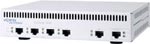
 In this post I’ll provide an example of how to configure a Nortel VPN Router. We’ll configure the remote office VPN router for a tunnel with 3DES/SHA1 encryption and DH2 using pre-shared keys, routing all traffic to the main office across the tunnel (no split tunneling). You should start by connecting up to the local console port on the VPN router (the diskless 1100,1050,1010 require a special RJ45 -> DB9 console cable). Log into the VPN router with the default username of “admin” and the default password of “setup” and reset it to factory defaults. You’ll find the option under “R” for “Reset System to Factory Defaults”.
Welcome to the Contivity Secure IP Services Gateway
Copyright (c) 1999-2004 Nortel Networks, Inc.

Version:                 V05_00.136
Creation date:           Aug 20 2004, 15:50:15

Date:                    07/23/1980
Unit Serial Number:      11221

Please enter the administrator's user name: admin

Please enter the administrator's password:

Main Menu:  System is currently in NORMAL mode.
1) Interfaces
2) Administrator
3) Default Private Route Menu
4) Default Public Route Menu
5) Create A User Control Tunnel(IPsec) Profile
6) Restricted Management Mode       FALSE
7) Allow HTTP Management            TRUE
8) Firewall Options
9) Shutdown
B) System Boot Options
P) Configure Serial Port
C) Controlled Crash
L) Command Line Interface
R) Reset System to Factory Defaults
E) Exit, Save and Invoke Changes

Please select a menu choice (1 - 9,B,P,C,L,R,E):
The first step will be to configure the IP addressing for the private LAN and public WAN interfaces. Using the serial console select “L) Command Line Interface” from the menu options.
CES>
Upon entering the CLI environment the prompt will be changed to “CES>”. You must now enter privileged mode using the “enable” command entering the default admin password of “setup”.
CES>enable
Password: *********
Let’s take care of the easy stuff first. I’m currently working in the Eastern time zone;
CES#clock timezone est
CES#clock set 15:22:30 12 JANUARY 2005
You can discern from the syntax above that #clock set <hh:mm:ss> <day> <month> <year>
Now you must enter configuration mode using the commands listed below. We’ll reset the admin password before anything else.
CES#configure terminal
Enter configuration commands, one per line.  End with Ctrl/z.
CES(config)#
CES(config)#adminname admin password <standard password>
We’ll configure the private LAN IP Address. In the example below I’m using 10.2.203.1 as the LAN address of the branch office VPN router.
CES(config)#interface FastEthernet 0/1
CES(config-if)#ip address 10.2.203.1 255.255.255.0
CES(config-if)#exit
Next we’ll configure the MANAGEMENT IP Address. The LAN address and management IP address must be on the same subnet.
CES(config)#ip address 10.2.203.10
Management address set to 10.2.203.10 successfully !
Next, make sure Mgt addr and private LAN addr are on same subnet
CES(config)#
You should use the IP addressing that’s been assigned to the equipment your configuring in place of the IP addressing used above. Next we’ll assign the public WAN IP Address provided by the Internet Service Provider (ISP) which in this case happens to be Verizon DSL;
CES(config)#interface FastEthernet 1/1
CES(config-if)#ip address 70.256.1.10 255.255.255.0
%Warning: The IP address type is changed from DHCP dynamic to static
CES(config-if)#exit
CES(config)#ip default-network 70.256.1.1 public
CES(config)#ip name-server 151.197.0.38 151.197.0.39 199.45.32.43
NOTE: FastEthernet 0/1 is the PRIVATE LAN while FastEthernet 1/1 is the PUBLIC WAN
Let’s disable those services we won’t be using and enable those we will be using;
CES(config)#no tunnel protocol pptp public
CES(config)#no tunnel protocol pptp private
CES(config)#no tunnel protocol l2tp public
CES(config)#no tunnel protocol l2tp private
CES(config)#ipsec encryption 3des-sha1
CES(config)#ipsec encryption aes256-sha1
CES(config)#no ipsec encryption aes128-sha1
CES(config)#no ipsec encryption des40-md5
CES(config)#no ipsec encryption des40-sha1
CES(config)#no ipsec encryption des56-md5
CES(config)#no ipsec encryption des56-sha1
CES(config)#no ipsec encryption hmac-md5
CES(config)#no ipsec encryption hmac-sha1
Let’s configure the “Base” default Branch Office Group with the standard settings.
CES(config)#bo-group ipsec /Base
CES(config-bo_group/ipsec)#encryption 3des-sha1
CES(config-bo_group/ipsec)#encryption ike 3des-group2
CES(config-bo_group/ipsec)#antireplay enable
CES(config-bo_group/ipsec)#no compress
CES(config-bo_group/ipsec)#initial-contact enable
CES(config-bo_group/ipsec)#exit
Let’s add a designator for the local network (to be used later – replace with your IP network)
CES(config)#network add LocalNetwork ip 10.2.203.0 mask 255.255.255.0
Let’s add a sub group for our IPsec tunnel configuration;
CES(config)#bo-group add /Base/AcmeHealth
CES(config)#bo-conn add Acme-1 /Base/AcmeHealth
CES(config)#bo-conn Acme-1 /Base/AcmeHealth
CES(config/bo_conn)#conn-type peer2peer
CES(config/bo_conn)#local-endpoint 70.256.1.10
CES(config/bo_conn)#remote-endpoint 192.1.1.124
CES(config/bo_conn)#tunnel-type ipsec
CES(config/bo_conn)#ipsec authentication text-pre-shared-key password987
CES(config/bo_conn)#routing type static
CES(config/bo_conn)#state enable
CES(config/bo_conn)#routing static
CES(config/bo_conn/routing_static)#local-network LocalNetwork
CES(config/bo_conn/routing_static)#remote-network 0.0.0.0 mask 0.0.0.0 state enable cost 1
CES(config/bo_conn/routing_static)#exit
Let’s setup the DHCP relay agent forwarding our DHCP/BOOTP requests to 10.2.16.40;
CES(config)#no service dhcp enable
CES(config)#ip default-network 70.20.130.1 public
CES(config)#ip dhcp-relay 10.2.203.1
CES(config)#ip dhcp-relay 10.2.203.1 enable
CES(config)#ip helper-address 10.2.203.1 server 1 10.2.16.40
CES(config)#ip forward-protocol dhcp-relay
Since we’re routing everything over the IPSec tunnel (the remote-network was 0.0.0.0 with a mask of 0.0.0.0) we need to change the default route preference.
CES(config)#ip default-route-preference private private
That’s the short approach to using the CLI interface to configure the Nortel VPN Router. There is a somewhat old and slow web interface that you can also use to configure the VPN router. You only need to point a web browser to the mangement IP address.
Cheers!
Update: Wednesday December 10, 2008
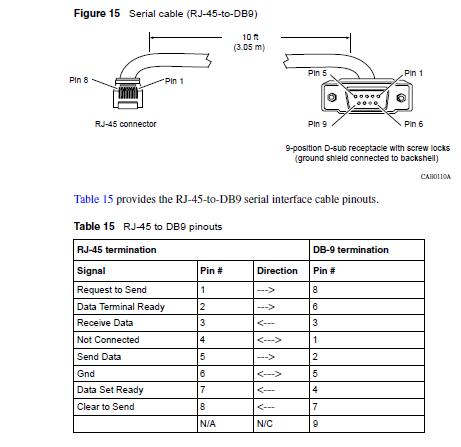
Here’s the pinout for the special RJ45 to DB9 serial cable used to access the diskless VPN routers;
Cheers!
Wonder what is the official position about the site owner about using the forum for sharing Nortel Software.
Hi!
Alexey write me duzers(at)rambler.ru
Hi,
I managed to configure the SSL part of the router so HTTPS works, but I can’t get SSH working no matter what I try.
valentin@valentin-laptop:~$ ssh -v admin@192.168.21.2
OpenSSH_5.1p1 Debian-5ubuntu1, OpenSSL 0.9.8g 19 Oct 2007
debug1: Reading configuration data /etc/ssh/ssh_config
debug1: Applying options for *
debug1: Connecting to 192.168.21.2 [192.168.21.2] port 22.
debug1: connect to address 192.168.21.2 port 22: Connection refused
ssh: connect to host 192.168.21.2 port 22: Connection refused
SSH is opened for both private and public. Any advice is welcomed.
Thanks.
Hi Valentin,
Have you enabled the SSH server? Within the web GUI under Servers -> SSH, select “SSH Service Enabled”.
You also need to have SSH enabled on the specific interface under Services -> Available.
Good Luck!
Hi Michael McNamara!
It’s not a “hacking”.
If you open the case of Contivity you can unplug CF and make it image useing cardreader and any kind of unix system (dd).
Thanks for answer. I try to find another way of reanimation this damn router. Or Duzerz will help me. I wrote the letter to him.
Hi Alexey,
Using the term “hacking” I meant the process of actually opening up the router and messing around with the file system, etc. It wasn’t meant in a derogatory way… I have “hacked” away at a Symbol WS5000 Wireless LAN switch that also uses a CF (Compact Flash) card as an IDE device.
Thanks for the comment!
Hi Alexey!
Have you any CF image from 1xxx device? I have problems with CF on my Contivity 1100.
Hi Michael,
I have enabled the SSH server and permitted it on both the public and private interfaces. It refuses SSH connections on both interfaces. Is there anything else i can try?
Thanks,
Valentin
Hmm… you’re using the correct IP address? You should be trying to connect to the management IP interface, not the routing IP interface. It would be the same IP address that you use to establish an HTTPS/SSL session to the web GUI.
I will assume that you are using the correct IP address. Are you using the default “deny all” filter on the public and private interfaces or are you running a custom filter? Are you running the firewall on either interface? Assuming that you’ve rebooted the router and it’s not a code issue I would guess that something is blocking traffic to tcp/22. Try using the default “deny all” filters on the private interface and/or the “allow all” filter on the private interface.
I tried this last night on a VPN 1700 with V07_05.400 software and it just worked on the first shot.
Cheers!
Michael,
I am using the correct IP address, the same one that is used for HTTP management. Both interfaces are using a “permit all” filter. The firewall is enabled for the public interface, with rules doing port mapping and port forwarding. I have rebooted the router several times, but I haven’t tried upgrading the software version (1750 V07_05.300 build date Sep 10 2007, 10:31:42).
Thanks,
Valentin
Hi Michael,
I have managed to get SSH working on the 1750, but I have a couple of 1010’s that don’t have SSH in the Servers menu. Is there anything I can do about it?
Thanks,
Valentin
Hi Valentin,
If it’s not in the menus it might not be available in the specific version of software you have installed on the router. I have a 1010 here that is running V07_05.400 (128-bit) and it has the SSH server option available as a means of managing the VPN router.
Sorry I can’t be of more help!
BTW, is there any reason why a 1750 wouldn’t accept more than one simultaneous PPTP sessions?
Hi Valentin,
I believe it’s a configurable option with respect to the number of concurrent logins a user can have. Check under Profiles -> Group -> “Your Group” -> Connectivity -> Number of Logins. I’m not sure if it applies with an enduser/branch using PPTP but it definitely applies for IPSec endusers using the Nortel VPN client.
Cheers!
Hi Michael,
I had 50 logins configured with 2 or 3 simultaneous PPTP clients not being able to connect. The parent group had 5 logins and I changed that to 50 aswell, but it didn’t have any effect. Any other idea that I can try out?
Thanks,
Valentin
Hi Micheal,
Iam facing a strange issue with Nortel VPN router 1100,Observed from LAN 0 interface statistics, IP Local system filter drops are increasing frequently
not sure why it is increasing,Can you please help me out,Please find the below details.
IP Packet Drops
IP Routing Filter Drops 0
IP Local System Filter Drops 14738
IP Local Interface Filter Drops 78
IP PAT Drops 0
IP Header Error Drops 0
IP QoS Random Drops 0
IP QoS Forced Drops 0
IP Zero Source Address Drops 99
IP Source Address Equals Destination Address Drops 0
IP Bad Packet Length Drops 0
IP Bad Header Length Drops 0
IP Bad Checksum Drops 0
IP Packet Too Short Drops 0
IP Bad Options Drops 0
IP No Buffer To Fragment Drops 0
IP Cannot Fragment Drops 12
IP Cannot Forward Drops 0
IP No Protocol Drops 0
IP No Route Drops 104
IP Bad Version Drops 0
IP 802.1Q Untagged Drops 0
IP 802.1Q Tagged Drops 0
TOTAL 15031
Thanks & Regards,
Akram
I seem to have missed quite a few posts here, my apologies Mohammad.
Those stats are probably indicators of your interface filters dropping packets. Is this the public or private interface? If things are working fine you can probably ignore the statistic. If this is your public interface and you have the default “deny_all” filter applied to the interface you’re going to see a lot of dropped packets from all the script kiddies, virii, trojans, worms, port scanners, etc.
If this is your private interface you could be dropping packets internally. Again you should look at the interface level and see what filter you have defined.
Cheers!
That was very good write up…thumbs up! I have encountered an issue with a pair of Nortel 1010’s. The VPN switches are connected through 2 DSL lines, both DSL lines have a static IP address. The branch-to-branch tunnel is running properly, but when I connect to one of the 1010’s through the Contivity client, I am not able to ping anything at the remote end and vice versa. The end goal of this branch-to-branch tunnel is to pass a video stream; an encoder at one end, and a decoder at the other. These devices must be on the same subnet (ie, 192.168.1.x) in order to “see” each other and pair up, and they use port #5510.
Any tips/ideas on this? Thanks!
Hi JC,
I’ve started a few forums to help users post their own questions and issues;
http://forums.networkinfrastructure.info/nortel-vpn-routers/
In the meantime I’m somewhat confused when you talk about using the Contivity client. I’m assuming that you mean the Nortel VPN Client, the full IPSec VPN client that gets installed onto a Windows desktop. However, you also talk about two Nortel 1010 VPN Routers and building a point to point tunnel over two DSL lines. In any case your last statement, “devices must be on the same subnet” is probably going to be the most problematic. Your going to need to build a tunnel (IPSec, L2TP, etc) and then bridge across that tunnel as opposed to route across the tunnel.
Off the top of my head I’m not sure the 1010 VPN router can bridge across a tunnel connection.
Try to start a thread in the forums and I’ll try to research the topic for you.
Good Luck!
Hi Mike,
I have a contivity 1010 at the main office and now I can connect with a vpn connection, the problem that I have is , when I connected from my home I can not navigate for internet.
Any idea?
Thanks
Yuri
Hi Yuri,
This behavior depends on the configuration of your main office Nortel 1010 VPN (Contivity) router. The Nortel VPN (IPSec) Client will assign you an internal IP address when you connect to the main office. Is that IP address able to access the Internet from your office location? By default all traffic will be routed across the IPSec tunnel back to your Nortel 1010 VPN router and placed onto your internal network.
Example; after making a VPN client connection I open a web browser and try to load http://www.google.com, the traffic will leave my desktop, travel over the IPSec tunnel to the Nortel 1010 VPN router, after it’s routed out the internal interface it will then try to reach the remote network through your coporate firewall or whatever appliance you have in your environment.
If you only want traffic for your internal network to route across the IPSec tunnel you need to look into setting up Split-Tunneling within the Nortel 1010. That configuration would then route traffic for your internal network, say 10.10.0.0/16, across the IPSec tunnel while routing all remaining traffic out your regular LAN connection and ultimately to the Internet.
I’ve started a few forums to help users post their own questions and issues;
http://forums.networkinfrastructure.info/nortel-vpn-routers/
If you make a post over there I’ll try to provide you some command line examples of how to set it up.
Good Luck!
Michael (or anyone who may help),
I have the following problem:
While configuring a VPN Router 1750:
CES#show version
Software Version: V07_05.300
MAC Address: 00-1C-EB-XX-XX-XX
BIOS Version: PO11
I configured 2 subinterfaces, on a vlan tagged environment:
CES#show interface Fastethernet 0/1
FastEthernet Interface 0/1 Configuration
Filter : permit all
IP Address : 10.156.248.10
Mac pause : Disabled
MTU : 1500
Public/Private : Private
Status : Enabled
802.1Q : Enabled
802.1Q Interface VLAN ID: 2
FastEthernet Interface 0/1 Configuration
Description : Telephony VLAN
Filter : permit all
IP Address : 172.16.200.1
Status : Enabled
Subinterface : 2
802.1Q Interface VLAN ID: 4
FastEthernet Interface 0/1 Configuration
Description : WIFI Lan
Filter : permit all
IP Address : 192.168.100.1
Status : Enabled
Subinterface : 1
802.1Q Interface VLAN ID: 3
The NVR1750 succesfully provides internet access to any of the vlans configured, which have they proper DHCP Server per vlan configured.
Now, i just found out, the NVR1750 is fwd packages between vlans, and i can’t stop that. I disabled pretty much any routing protocol, but Natting (since traffic needs to go out to the internet). I pretty much ran out of ideas, here. I need to stop inter-vlan traffic somehow. I got the following entries in the routing table:
CES#show ip route
Protocol IP Address Mask Cost Next Hop Interface
————————————————————————
STATIC 0.0.0.0 255.255.255.255 [10] xxx.xxx.xxx.185 xxx.xxx.xxx.187
DIRECT_N 10.156.248.0 255.255.255.0 [0] 10.156.248.10 10.156.248.10
DIRECT_H 10.156.248.10 255.255.255.255 [0] 127.0.0.1 127.0.0.1
MGMT 10.156.248.51 255.255.255.255 [0] 127.0.0.1 127.0.0.1
DIRECT_N 172.16.0.0 255.255.0.0 [0] 172.16.200.1 172.16.200.1
DIRECT_H 172.16.200.1 255.255.255.255 [0] 127.0.0.1 127.0.0.1
DIRECT_N xxx.xxx.xxx.184 255.255.255.248 [0] xxx.xxx.xxx.187 xxx.xxx.xxx.187
DIRECT_H xxx.xxx.xxx.187 255.255.255.255 [0] 127.0.0.1 127.0.0.1
DIRECT_N 192.168.100.0 255.255.255.0 [0] 192.168.100.1 192.168.100.1
DIRECT_H 192.168.100.1 255.255.255.255 [0] 127.0.0.1 127.0.0.1
As you see, i have some DIRECT_N(etwork) and DIRECT_H(ost) entries that i can’t get rid of it.
Anyone has an idea of how to solve this?
Thanks!
Dan.-
Hi Dan,
I would guess (without trying it myself) that you’ll need to create some filter rules to prevent communication between the two interfaces. If you think about it the VPN router is acting just like a typical router, you need to create some filters to drop packets to the other networks.
If you have trouble just let me know and I can try to write a few in the testlab.
Cheers!
Michael,
I guess help will be very welcome.
I’m trying to set the interface filter, but the vpn router is acting very strange (either that, or i dont understand mucho about how this filters works).
I have 2 sub-interfaces:
Int: 10.156.251.0/24
SubInt1: 192.168.100.0/24
Subint2: 172.16.200.0/16
I placed a filter restriction on the main interface to block icmp traffic going to the ip 192.168.100.50/32, and all the icmp trafic, from the 10.156.251.0 network (going anywhere, even the internet) was blocked. Same results when i set the filter either incoming or outgoing. Am I assuming the use of the interface filters wrong??
Hi Dan,
It’s been a few years since I’ve had to play with the configuration of those VPN routers… I’m guessing that an interface filter is the right approach. Just as a side note I believe the IP masks in the interface filter are inverse masks similar to Cisco ACL masks. You may also need to build an allow all rule at the bottom of the filter rules.
We use a lot of different filters on the actual VPN tunnel connections but we’ve never really had a need to use them on the interface level.
I can’t make any promises but I’ll see what I can dig up in testing.
Cheers!
Thanks for the tips about the CISCO – ACL Style.
I’ll try again based on this info. I didn’t see any example of this nor in the pdfs about filtering and/or in a vpn router book released in 2004.
Dan.-
Man, right on the money! Wonder why nortel adopted that cisco-minded-acl-way for the filters.
Anyways, I’m happilly setting my inter-subinterface filters now :)
I owe you a steak :)
I’m happy I was able to help…
We accidentally stumbled over that a few years ago when we were writing filters for some of our VPN tunnels that connect to third party networks.
Cheers!
I just found this on the running config:
ip default-network 190.94.81.185 public 10 enable
! !!! RIP is currently disabled
! !!! In order to properly provision
! !!! RIP it will be temporarily enabled
! !!! When RIP provisioning is complete
! !!! RIP will be set back to disabled
router rip
timers basic 30
network 10.156.251.10 255.255.255.0
network 172.16.200.1 255.255.0.0
network 192.168.100.1 255.255.255.0
exit
Basically, the router is enabling RIP routing on its own!
Any ideas how finally kill that for good?
Thanks
Dan.-
Sorry I missed your post Dan.
On the Nortel VPN Routers RIP is enabled by default. I believe your configuration above indicates that it is disabled because there’s no “rip enable” command present. You can check in the GUI and you can check using a packet sniffer to see if the VPN router is putting out any RIP packets.
Good Luck!
Hi Michael,
Can you please advise how I can make a Nortel VPN Router 1750 push a route to its PPTP clients, other than the default route?
I want it to push 192.168.0.0/16 but I am unable to find such a setting in the GUI.
Thanks,
Valentin
Hi Valentin,
I’ve never used PPTP clients so I can’t really answer you definitively. With PPTP it might be a function of the client, I’m not exactly sure having only read about it and never actually set one up.
I would probably advise you to use IPSec clients if at all possible, much easier and much more secure and PPTP clients have some known weaknesses.
Sorry I can’t be of more help!
Hi, Michael! Why are DHCP requests forwarded to 10.2.16.40 in your config? This ip address is missing here http://blog.michaelfmcnamara.com/2008/02/vpn-router-branch-office/. What additional commands need to be done to make 10.2.16.40 accept DHCP requests? Will it work if all IP addresses are assigned manually and no DHCP service enabled?
Hi George,
I think you’ve just stumbled over a bug in WordPress for me… I’ll need to dig a little deeper on why your comment made today (9/6/09) appears before my last comment (8/20/09).
Anyways let me answer your question. You can ignore the article that you referenced in your comment, it’s an older version of this artcile that I never cleaned up – but I will do so right after this response. I use a central IP Management plaform (Alcatel-Lucent VitalQIP) that integrates IP management with DHCP and DNS. I want all my branch office equipment to either have their static IP addresses registered in my central solution or I want them to get DHCP/BOOTP addresses from a few different centralized DHCP servers that then feed back into my IP management solution.
To answer your question, that’s all you need assuming that your DHCP server is properly setup and ready to go.
You can certainly statically assign the IP addressing, there’s nothing stopping you from doing it like that. In my environment that would be a management nightmare as devices usually move regularly which would require a technician/field engineer to visit the location to reconfigure the statically assigned devices.
Hopefully that answers your question! If not please head over to the forums and post any follow-ups there!
http://forums.networkinfrastructure.info/nortel-vpn-routers/
Cheers!
Thanks, good luck!
Hi,
The company I work for uses Nortel Contivity’s for third party VPN’s.
We regularly have requests to build a third party filter and often it is very time consuming.
I have the commands used via the CLI which helps to cut down on time, but what I’m really after is some sort of perl script, excel macro or alike that can be used to generate the config.
Ideally something where I enter server name (or IP), protocol required and then hey presto!
Have you seen a scripts that could do this?
Thanks.
James.
Hi James,
I would agree that the filters within the Nortel VPN Router (Contivity) can be very painful. I don’t personally have any scripts but we do have a few well developed filter sets which are well documented and then use those to provision additional filters. We also have a set of “standard” filters that we apply to almost all of our environments. Just remember that the IP mask is an inverse mask similar to Cisco when you are defining IP ranges/addresses.
Cheers!
Michael,
Running a Nortel 1010 @ main office & BSR222 at my BOs – 222s connect to the 1010. Tunnels are up and running, everything is solid – EXCEPT I can’t pass traffic between remote subnets – branch office to branch office.
I have turned on items under System->Forwarding on the 1010.
Any ideas on where else to look?
Thanks.
Hi Opsimex,
Why not post your question over on the forums?
http://forums.networkinfrastructure.info/nortel-vpn-routers/
I would start with some simple pings and traceroutes. Is the routing in place? Is there anything of interest in the logs?
Good Luck!
Nah, it’s all going into the bit bucket as far as I can tell. I’ll try that forum.
Thanks!
any one help me in ADVANCED ROUTING KEY/STATUS for contivity 1700 running in version V05_00.136
Hello Michael, ive accidentaly set the remote management console on a bsr 222, but didnt set a rule on the firewall to allow the access:(
I figure I may be able to do this via the coms port, but just wanted your advice before I do it. Ive configured a few routers via comms, but would the menu system be similar to above and could I alter them back to lan access.
I only ask as the site is quite a distance from my home, hence trying to allow the wan access in the first place.
Hope you can help
Hi Roudy,
You can certainly configure the BSR222 via the serial console port. The menu will look a little different than you might be accustom to but it is usable.
Here’s a phrase from the configuration manual;
“The embedded web configurator is an all platform, web based utility that you can use to easily manage and configure the Business Secure Router. Most functions of the Business Secure Router are also software configurable via the SMT (System Management Terminal) interface. The SMT is a menu driven interface that you can access from a terminal emulator through the console port or over a Telnet connection.”
You can also read more about the BSR222 on my blog.
Good Luck!
After spending hours searching the internet for a solution and even quickly going through the manual you linked to I was unable to find what i wanted.
However I spotted your website by chance and saw all of the kind help you gave others, so i thought I would give it a shot and post here.
you came back to me extremely fast and with exactly the info I needed. went to site, the interface was far easier then i expected, and now i can access from home.
All is sorted now, and I owe a great deal of thanks to you, mega cheers to you.
big cheers, and thank you for being so helpful.
I’m happy I was able to help roudy!
Cheers!
Mike,
HELP!!!
I am trying to port forward RDP on port 7779 with a bsr222 to a PC addressed 192.168.1.73 within my vpn scope.
the router is vpned into another bsr222 at a location 8 miles away.
I attempt to remote desktop by using external ip colon port#
this worked previously on my Fios router, but I cannot get it to work on the bsr222 router.
I setup as sua/nat within the router
port range start= 7779 end= 7779 server= 192.168.1.73
what am i missing?
Hi Richard,
I can’t say that I’ve ever tried to setup a ‘port forward’ configuration with the BSR222.
In any case did you make the necessary firewall changes to allow your the traffic in from the WAN to the LAN? Sorry I can’t offer more help.
Good Luck!
Mike, the firewall was off and continues to be off.
Michael,
Is it possible to tell whether a software load is 56bit or 128 bit and if so which file indicates this….
Also !!! if I load a 56bit version onto a 1050 designed to be a 128bit box apart from the obvious will there be any problems?
Thanks again
Hello sir
I am a communications engineer, I have a problem with the device
(vpn nortel 1100), the problem is after the push the button (pinhole) marked REC on the back panel and plugged in via consol cable entry through the
Hyper terminal I can not enter the password
I know the username is admin and password is setup
Please help me I’m in trouble and wants to help But all this can not log in
Regards
I have to replace peer IP on VPN Router CES1600D
through GUI . what other entries need to replaced apart from peer ip. Head office has PIX for IPSec VPN
can you provide vpn configuration document for Nortel router CES1600D.
Hi Devendra,
Assuming that the NVR (formerly Contivity Extranet Switch) has a default route to the Internet that includes the main office peer IP all you should need to-do is to change the remote IP address under the branch tunnel connection profile (Profiles -> Branch Office -> Group -> Connection).
Good Luck!
I need to know how to do a backup with the contivity 1010 via GUI. It is inherited and I am not familiar. Also, is there an admin guide I can find anywhere?
Hi Luger,
You can find the manuals on the Avaya support website which is here – http://support.avaya.com/css/Products/P0815/Installation,%20Migrations,%20Upgrades%20&%20Configurations
Within the Avaya VPN Router management GUI you should find Backup (or Auto Backup) under the Admin tab. From this point you can configure a FTP server to backup the entire system to although the FTP destination needs to be on the LAN side of the VPN router.
Good Luck!
Michael,
I have a 1010 operating here with a block of 8 public IP’s, used for different purposes, mainly through NAT. I now had to an additional block of 8 IPs, naturally in a complete different range. These are not recognized by my current config; I assume I have to add them to the 1010s configuration but I have now idea how. Any help would be appreciated!
Thanks
Hi Gerd,
You need to modify the FW/NAT table to utilize the new IP addresses. You’ll need to launch a Java based utility from the Contivity management interface.
Good Luck!
Hi Michael
I am trying to make a VPN between 2 Nortel contivity equipments, in my side the equipment is 1010 and it is connected to a DSL service through PPPoE.
I am getting the static public IP address direct to the device, the ISP device is working as a bridge.
in the other side they have a PUBLIC IP to make the connection and have other offices connected
We are setting up the VPN as initiator-responder with 3DES 1024 bits group 2 IPSEC, Preshared Key and No NAT.
unfortunately i have not been able to establish the connection I am receiving always the error:
FAILED LOGIN ATTEMPT
IPSEC 192.x.x.x. has no active sessions
IPSEC 192.x.x.x. has no active accounts
DELETING ISAKMP SA with 192.x.x.x.
any advise of what is wrong?
thanks in advance.
Juan
Hi Juan,
I would check and re-check your configuration. If you are using aggressive mode what are you using to authenticate the connection? Are you sure you have the same Initiator ID on both VPN routers? Have you enabled the Branch Profile on both VPN routers? (I believe it defaults to disabled). Are you sure you are using the same pre-shared key on both VPN routers?
Good Luck!
Any one having a newer version of the software for conectivity 1010. My version is V04_80.124 ?
Or where i can download it.
rune AT goegsig dot dk
Hi Rune,
You’ll need a support contract from Avaya to upgrade the NVR 1010. I also believe they have been discontinued so I’m not sure Avaya would even sell you a support contract. Your best bet would be to contact your Avaya sales engineer.
Good Luck!
Hi Michael,
I have an issue with a nortel contivity 1100. For some strange reason ( which I can’t explain) I am unable to get into, I’ve tried all the passwords and even reset it which it says is booting from the recovery image but still unable to get into it. any ideas?
I have a 1010 setup as a BO that I also need to operate as a DHCP server. I have the connection up and DHCP is handing out IP addresses, but I get no DNS resolution to MO. Outbound routing is set to Private Private, I have tried adding option 6 to the DHCP server pointing to DNS servers in the MO, but that didn’t work (they don’t even list when you look at a computer that picked up it settings from DHCP). Any help is greatly appreciated.
Thanks,
Ray
Never mind, forgot that the options are available in both the defined pool and the main DHCP server config. All fixed.
This is the most helpful page I have found anywhere for setting up nortel VPN tunnels. I have one question. Is it possible to change route preferences (AD in cisco terminology). I’ve got 2 tunnels…one with RIP routing and one with static routing. RIP tunnel is the primary and the static is the backup but since its static it is taking priority. I’ve working on this off and on for over a month and any help would be greatly appreciated.
Thanks!!
Hi David,
You should be able to make the static route more costly…. so your RIP route will be preferred and then in it’s absence the static route will take over.
When you define the remote IP network in the branch office profile just set the COST to a value higher than your RIP route/tunnel.
Cheers!
Anthony,
Here are the password recovery procedures.
Unplug the router for 30 seconds, and then restart it. Push in the button labeled “REC” located on the back panel of the router within the pinhole.
Open your internet browser and access the router’s user interface. Type “192.168.1.1” into the address bar.
Click the “Restore original factory settings” button, then click on the “Restore” button. Once the process is complete, you will receive a message stating “Successful Factory Restore.”
Restart the router again. The factory settings will have been restored to the router. The user ID will now be “admin” and the password will be set to “setup.”
David
Even setting the cost to the max value of 200 on the static still does not force it to take preferance. Here are 2 sh ip routes. There first is with the static tunnel disabled and the second is with it enabled. Once I enable it it replaces the RIP default route and brings the first tunnel down. Any more suggestions I could try?
Thanks so much!
Hi David,
Sorry for the late response… what’s the route for the tunnel you are working with?
It’s not a default route is it? 0.0.0.0?
Cheers!
HI MICHAEL,
I need two “Advanced routing licenses” for Nortel 1750, please helpme leting me know what part number it is, and who could be able to provide it.
Now, if some one from the forum is able to provide these, please letme know to tbravot AT yahoo.com
Regards
Editor: updated to remove the email address and save the SPAM.
Hi Thomas,
Unfortunately I believe that hardware has already been EoL by Avaya.
http://support.avaya.com/css/P8/documents/100120822
Sorry.
Hi Mike, i have kind of a weird thing going on with my contivity 600, i thought you would be the man to ask. I can log in with my VPN client from my home PC and connect to my VPN with no problem. The thing is that once i log in to my VPN network (122.225.x.x), i am unable to ping anything outside of the 122.225.x.x network range UNLESS i ping the gateway of the router (122.225.x.254). Then everytime after i do that, i can ping everything within my 122.x.x.x network. Any thoughts? Thank you sir!!
Hi Mike,
That’s an interesting problem and I have some additional questions. Unfortunately it’s a little off topic for this post and since there are 50+ people subscribed to this thread I want to keep the discussion on-topic. If you post your question/problem on the discussion forums I’ll be sure to reply as will a few others probably.
Cheers!