[ad name=”ad-articlebodysq”]Update: July 30, 2009
I’ve added a command to disable the User Interface Button (UI Button) “no ui-button enable”.
Update: February 7, 2009
It was time to update this article with some additional information and settings that I’m now using in all my switch deployments. The big change is the updated ADAC MAC address table. Please also note the VLACP time-out scale change and I’ve updated the year field for the Daylight Saving Time change.
Update: August 13, 2008
This was one of the first articles I wrote back in October 2007 and it is by far the most popular article out of all 110 articles that I currently have published. With that said I decided to come back and spruce up this post with some additional “tweaks” that I’ve added over the past 10 months. I’m also going to attack a link to a text file so folks can just download the file of commands, tweak the specific individual settings such as IP address and VLAN information, and then cut and paste into the CLI interface of the Nortel Ethernet Routing Switch 5520. It will hopefully save folks from having to cut and paste each section.
Note: just a quick warning about cutting and pasting into the CLI interface, I’ve often found that the buffer will overflow if I try to paste an entire configuration at once. I usually need to break it into at least two or three sections and cut and paste those section one at a time.
In this post I’ll try to outline how you can configure the Nortel Ethernet Routing Switch 5520 in a VoIP environment using Nortel i2002/i2004 Internet Telephones (this procedure will also work the same with the i2007/1120E/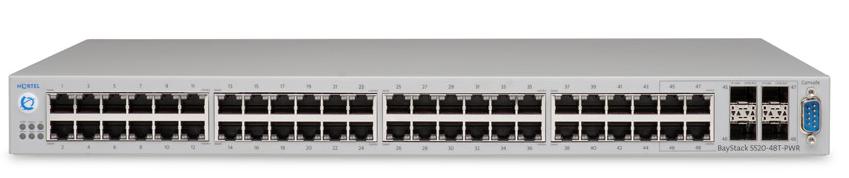 1140E phones).
You’ll obviously need a ERS 5520 switch and you’ll need SW 5.0.6.22 or later and FW 5.0.0.3 or later (there are known issues with earlier software versions that create inconsistent results using LLDP with the i2002/i2004 phones). I would strongly advise that you start with a default configuration. From the CLI issue the following commands to reset the switch to factory defaults;
5520-48T-PWR> enable
5520-48T-PWR# boot default
The switch should reboot with a default configuration. Let’s proceed with the configuration;
5520-48T-PWR> enable
5520-48T-PWR# configure terminal
Let’s set the local read-only and read-write passwords;
5520-48T-PWR (config)#cli password read-only readpass
5520-48T-PWR (config)#cli password read-write writepass
5520-48T-PWR (config)#cli password serial local
5520-48T-PWR (config)#cli password telnet local
Let’s disable the user interface button (UI button);
5520-48T-PWR (config)# no ui-button enable
Enable AUTOPVID;
5520-48T-PWR (config)# vlan configcontrol autopvid
We’ll be up linking this switch using a MultiLink trunk on ports 47 and 48 so we’ll enable tagging on the fiber uplinks;
5520-48T-PWR (config)# vlan ports 47,48 tagging enable
Let’s create the data VLAN (VID 100) and management VLAN (VID 200) on the switch;
5520-48T-PWR (config)# vlan members remove 1 ALL
5520-48T-PWR (config)# vlan create 200 name "10-1-200-0/24" type port
5520-48T-PWR (config)# vlan members add 200 47,48
5520-48T-PWR (config)# vlan create 100 name "10-1-100-0/24" type port
5520-48T-PWR (config)# vlan members add 100 1-48
5520-48T-PWR (config)# vlan port 1-46 pvid 100
5520-48T-PWR (config)# vlan port 47,48 pvid 200
Let’s make VLAN 200 the management VLAN and assign the IP address;
5520-48T-PWR (config)# vlan mgmt 200
5520-48T-PWR (config)# ip address switch 10.1.200.10 netmask 255.255.255.0 default-gateway 10.1.200.1
Let’s setup Simple Network Management Protocol (SNMP);
5520-48T-PWR (config)# snmp-server authentication-trap disable
5520-48T-PWR (config)# snmp-server community  ro
5520-48T-PWR (config)# snmp-server community  rw
5520-48T-PWR (config)# snmp-server host
Let’s configure the logging so it will overwrite the oldest events;
5520-48T-PWR (config)# logging volatile overwrite
5520-48T-PWR (config)# logging enable
Let’s setup Simple Network Time Protocol (SNTP);
5520-48T-PWR (config)# sntp server primary address
5520-48T-PWR (config)# sntp server secondary address
5520-48T-PWR (config)# sntp enable
Depending on the version of switch software your running you may be able to configure Daylight Saving Time;
5520-48T-PWR (config)#clock time-zone EST -5
5520-48T-PWR (config)#clock summer-time EDT date 9 Mar 2009 2:00 2 Nov 2009 2:00 +60
Let’s setup the MultiLink trunk that will connect the switch back to the backbone;
5520-48T-PWR (config)# mlt 1 disable
5520-48T-PWR (config)# mlt 1 name "MLT-8600"
5520-48T-PWR (config)# mlt 1 learning disable
5520-48T-PWR (config)# mlt 1 member 47,48
5520-48T-PWR (config)# mlt 1 enable
Let’s setup ADAC (Automatic Detection and Automatic Configuration) for our i2002/i2004 phones. We’ll using VLAN 50 as our voice VLAN and we’ll use port 48 as our uplink (the switch will add 47 automatically because of the MLT configuration). There is a new command to clear the ADAC MAC address table that may be missing from earlier versions, “no adac mac-range-table”. I’ve also updated the list of entries that I use.
5520-48T-PWR (config)# adac voice-vlan 50
5520-48T-PWR (config)# adac op-mode tagged-frames
5520-48T-PWR (config)# adac uplink-port 48
5520-48T-PWR (config)# no adac mac-range-table
5520-48T-PWR (config)# adac mac-range-table low-end 00:0a:e4:75:00:00 high-end 00:0a:e4:75:ff:ff
5520-48T-PWR (config)# adac mac-range-table low-end 00:13:65:00:00:00 high-end 00:13:65:ff:ff:ff
5520-48T-PWR (config)# adac mac-range-table low-end 00:14:c2:00:00:00 high-end 00:14:c2:ff:ff:ff
5520-48T-PWR (config)# adac mac-range-table low-end 00:16:ca:00:00:00 high-end 00:16:ca:ff:ff:ff
5520-48T-PWR (config)# adac mac-range-table low-end 00:17:65:00:00:00 high-end 00:17:65:ff:ff:ff
5520-48T-PWR (config)# adac mac-range-table low-end 00:18:b0:00:00:00 high-end 00:18:b0:ff:ff:ff
5520-48T-PWR (config)# adac mac-range-table low-end 00:19:69:00:00:00 high-end 00:19:69:ff:ff:ff
5520-48T-PWR (config)# adac mac-range-table low-end 00:19:e1:00:00:00 high-end 00:19:e1:ff:ff:ff
5520-48T-PWR (config)# adac mac-range-table low-end 00:1b:ba:00:00:00 high-end 00:1b:ba:ff:ff:ff
5520-48T-PWR (config)# adac mac-range-table low-end 00:1e:ca:00:00:00 high-end 00:1e:ca:ff:ff:ff
5520-48T-PWR (config)# adac mac-range-table low-end 00:22:67:00:00:00 high-end 00:22:67:ff:ff:ff
5520-48T-PWR (config)# adac enable
We need to strip the 802.1q tag from any packets in the PVID VLAN from going to the phone. In this design we’re expecting to connect IP phones to ports 1 – 46.
5520-48T-PWR (config)# vlan port 1-46 tagging untagpvidOnly
Let’s configure LLDP for the ports we expect to connect IP phones (1 – 46);
5520-48T-PWR (config)# interface fastEthernet 1-46
5520-48T-PWR (config-if)# vlan ports 1-46 filter-unregistered-frames disable
5520-48T-PWR (config-if)# lldp tx-tlv port-desc sys-cap sys-desc sys-name
5520-48T-PWR (config-if)# lldp status txAndRx config-notification
5520-48T-PWR (config-if)# lldp tx-tlv med extendedPSE med-capabilities network-policy
5520-48T-PWR (config-if)# poe poe-priority high
5520-48T-PWR (config-if)# spanning-tree learning fast
5520-48T-PWR (config-if)# adac enable
5520-48T-PWR (config-if)# exit
The option in RED above was added after an issue was discovered when trying to upgrade the firmware on the IP phones. The filter-unregistered-frames is enabled by default and should be disabled to avoid and issues with upgrading the firmware on the IP phones. We are attempting to investigate further with Nortel and our voice vendor Shared Technologies.
Let’s disable the two remaining ports that share the GBIC interfaces incase we need those in the future;
5520-48T-PWR (config)# interface fastEthernet 45-46
5520-48T-PWR (config-if)# shutdown
5520-48T-PWR (config-if)# exit
Let’s setup a QoS interface group to trust all traffic that will ingress on the fiber uplinks. By default the ERS 5520 switch will strip all QoS tags on all ports. Thankfully ADAC will take care of the QoS settings for all VoIP traffic.
5520-48T-PWR (config)# qos if-group name allUpLinks class trusted
5520-48T-PWR (config)# interface fastEthernet 47,48
5520-48T-PWR (config)# qos if-assign port 47,48 name allUpLinks
5520-48T-PWR (config)# exit
Let’s set the SNMP information;
5520-48T-PWR (config)# snmp-server name "sw-icr1-1east.sub.domain.org"
5520-48T-PWR (config)# snmp-server location "Acme Internet Phone Company (ICR1)"
5520-48T-PWR (config)# snmp-server contact "Network Infrastructure Team"
Let’s enable rate limiting for all broadcast and multicast traffic to 10% of the link;
5520-48T-PWR (config)# interface fastEthernet ALL
5520-48T-PWR (config-if)# rate-limit both 5
5520-48T-PWR (config-if)# exit
Let’s setup VLACP (Virtual Link Aggregation Protocol) on the uplinks to the core;
5520-48T-PWR (config)# interface fastEthernet 47,48
5520-48T-PWR (config-if)# vlacp port 47,48 timeout short
5520-48T-PWR (config-if)# vlacp port 47,48 timeout-scale 5
5520-48T-PWR (config-if)# vlacp port 47,48 enable
5520-48T-PWR (config-if)# exit
5520-48T-PWR (config)# vlacp enable
That’s it your done! Well hopefully your done.
In my next post I’ll tell you what DHCP options you’ll need to configure on your DHCP server in order for the phones to boot properly and connect to the Nortel Call Server.
Cheers!
Hi Micheal,
Its really grt to read your blog.
I wish if you can give lil time to answer my query.
We have 3 tier network, 2*ERS8600 as Core,2* ERS8300 as Distribution Switch and 4500 as Access.
The query is related to making my network loopfree, where as we have STP (BPDU gaurd) on access ports, SLPP on SMLT ports and rate-limiting on uplinks.
Now, bcoz STP is not there on MLT so root bride election process is within access stack, can u pls explain the root bridge election and designated root bridge election process in a stack ??
Also can we have feature like spanning tree loopguard feature or Spanning tree root guard feature ?
Thx for information.
hi,
i am strugling to prevent the network from Guest-DHCP by qos. i am using ers 4550t switch. the qos config is:
! *** QOS ***
!
qos agent reset-default
! *** Interface Apps ***
interface FastEthernet ALL
exit
qos if-group name “User_Ports” class unrestricted
qos if-assign port 1-48 name User_Ports
interface FastEthernet ALL
qos if-shaper port 1-48 name “2Meg_Shaper” shape-rate 2000 max-burst-rate 4000
max-burst-duration 262
exit
qos ip-element 1 protocol 17 dst-port-min 68 dst-port-max 68
qos ip-element 2 protocol 17 dst-port-min 67 dst-port-max 67
qos ip-element 3 src-ip 10.2.12.0/24 dst-ip 10.2.12.1/32
qos ip-element 4 dst-ip 255.255.255.255/32
qos ip-element 5 src-ip 10.2.12.0/24 dst-ip 10.2.12.0/24
qos classifier 1 set-id 1 name clfrComp1 element-type ip element-id 1
qos classifier 2 set-id 2 name clfrComp2 element-type ip element-id 2
qos classifier 3 set-id 3 name clfrComp3 element-type ip element-id 3
qos classifier 4 set-id 4 name clfrComp4 element-type ip element-id 4
qos classifier 5 set-id 5 name clfrComp5 element-type ip element-id 5
qos agent nvram-delay 10
qos policy 2 name “Drop-Broadcast” if-group “User_Ports” clfr-type classifier c
lfr-id 4 in-profile-action 1 precedence 2
qos policy 3 name “Drop-Inter-Sub” if-group “User_Ports” clfr-type classifier c
lfr-id 5 in-profile-action 1 precedence 3
qos policy 4 name “Drop-DHCP_Rep” if-group “User_Ports” clfr-type classifier cl
fr-id 1 in-profile-action 1 precedence 4
qos policy 5 name “Allow_GWi” if-group “User_Ports” clfr-type classifier clfr-id
3 in-profile-action 2 precedence 5
qos policy 6 name “Allow_DHCP_Req” if-group “User_Ports” clfr-type classifier c
lfr-id 2 in-profile-action 2 precedence 6
but i am still getting dhcp brodcast from guest-routers. it give me a big headache to me. if i nee anyhing change in above config ….pls guide me.
thanking u…
udayakumar.
Hola Michael, soy de chile necesito saber como configurar paso a paso QoS en equipamiento ERS 5520 , soy nuevo en estos equipos, necesito configurar QoS para un servicio de Telefonia IP , tienes algun manual de configuracion por web o cli que puedas facilitarme, lo necesito con Urgencia.
Saludos.
Hi Michael,
I really need your help.
I am newbie on Nortel Switch.
I need to show to my customer that my application has been running on my own network environment.
The application cannot working on my customer network (Cisco). I have request to open some ports to be opened on their network. Until now my application cannot running on their environment. I am sure, they miss something (may be not all port I need have been opened.
I just want to show to my customer, that my application can running on my nortel switch.
I have try to use my nortel switch (all port openes/default), and my application running well.
Can you help to show me how to configure my nortel switch, with implementing (like access list): default : closed all port, except some ports needed by application.
The port need to be opened:
PORT TYPE PROTOCOL DESCRIPTION
1719 Static UDP Gatekeeper RAS
1720 Static TCP Q.931 (Call Setup)
1024-65535 Dynamic TCP H.245(Call Parameters)
1024-65535 Dynamic UDP (RTP) Video Data Streams
1024-6553 Dynamic UDP (RTP) Audio Data Streams
1024-65535 Dynamic UDP (RTCP) Control Information
Thank you for your valuable help.
Many thanks and regards,
Ahmad
Hi Ahmad,
While I’m happy to help I’m not going to do the work for you… I would suggest you read up on the documentation. You might find that a firewall or edge router might be a better place to filter traffic than say an edge switch.
Good Luck!
Hi Michael,
I have not found it in a release note yet, but in one of the latest software updates (at least v6.3.1.039) there is finaly a Summertime RECURRING configuration option, YAY! :)
It goes a little something like this (for European DST):
5520-48T-PWR (config)# clock summer-time recurring last Sunday March 02:00 last Sunday October 03:00 60Hi Ralf,
I believe the feature you are referring to is available as of 6.2.x software.
You can see I’m using it in my configuration example of the Ethernet Routing Switch 4800 Series;
http://blog.michaelfmcnamara.com/2013/02/avaya-ethernet-routing-switch-4800-series-configuration-template/2/
Thanks for the comment!
Hello,
I use these commands as you suggest :
5520-48T-PWR (config)# interface fastEthernet ALL
5520-48T-PWR (config-if)# rate-limit both 10
but when I go to rate limiting configuration in the menu, Some ports are still having more than 10 % values in the Last 5 minutes, Last Hour and Last 24 hours columns. Is it neccessary to power off the switch to take effect ? Are the SFP ports rate-limit set by this command or is there another one ?
Regards,
Hi Smelfra,
There’s no need to reboot the switch, and the command is the same for all ports. I’m guessing you are referring to the output of the ‘show rate-limit’ command?
The output is an average value computed over time so if you just made the change you’ll need to wait for the statistics to catch up with your change. The important piece is just making sure that the limit change is in effect, you can see in the output above that I have rate-limiting enabled for ports 1-3 but disabled for ports 4 and 5.
Good Luck!
Thanks for the reply. However, If you look at the statistics below, I have some ports with values above the 10 % rate-limit.
SWITCH#show rate-limit port 1/15-20
Unit/Port Packet Type Limit Last 5 Minutes Last Hour Last 24 Hours
——— ———– ————- ————– ——— ————-
1/15 Both 10% 2.9% 0.3% 5.2%
1/16 Both 10% 0.6% 0.5% 0.6%
1/17 Both 10% 5.5% 0.5% 1.2%
1/18 Both 10% 50.0% 49.3% 49.8%
1/19 Both 10% 18.5% 1.9% 1.2%
1/20 Both 10% 100.0% 99.5% 97.6%
Regards,
And are your inDicards incrementing on those ports?
Sorry, but I don’t know what InDicards means, could you explain ?
Regards,
ifInDiscards – The number of inbound packets which were chosen to be discarded even though no errors had been detected to prevent their being deliverable to a higher-layer protocol. One possible reason for discarding such a packet could be to free up buffer space.
Although now that I’ve cut-n-pasted that definition above I don’t believe the ASIC reports dropped broadcast or multicast frames to the software, so the ifInDiscards will likely not reflect any dropped broadcast or multicast packets due to rate-limiting.
The feature is implemented in hardware in order to keep any broadcast/multicast from flooding the switch.
Good Luck!
Hi Michael,
I am using your ADAC configuration with Aastra IP Phones. ADAC appears to be working but I am getting a Phone DHCP address from my data VLAN DHCP Scope not the Voice VLAN DHCP Scope. Any help would be appreciated?
Thanks, Bill
5520-VoIP-Test(config)#show adac
ADAC Global Configuration
—————————————
ADAC Admin State: Enabled
ADAC Oper State: Enabled
Operating Mode: Tagged Frames
Voice-VLAN ID: 112
Call Server Port: None
Uplink Port: 1,48
5520-VoIP-Test(config)#show adac interface 5
Auto Oper Auto
Port Type Detection State Configuration T-F PVID T-F Tagging
—- —- ——— ——– ————- ——— —————
5 T Enabled Enabled Applied No Change Untag PVID Only
5520-VoIP-Test(config)#
Hi Bill,
I believe I answered this question already? On the forums perhaps?
Astra supports ADAC/LLDP-MED for voice VLAN assignment?
It’s up to the IP phone to understand the LLDP-MED packets and utilize the correct voice VLAN for the voice traffic.
Good Luck!
Hi Michael,
Large files transferred by FTP via ERS 3524GT were failed. Two ERS 3524GT have this issue.
I have checked the show port-statistics, one of 4 links of MLT has high Dropped On No Resources
ERS 3524GT-02
MLT(port 21-24)
port 23 Dropped On No Resources 64390
ERS 3524GT-03
MLT(port 21-24)
port 24 Dropped On No Resources 341301
I think this issue is due to buffer (buffer is full)
I tried to change the buffer setting, but there are no such option on this device.
Could you please suggest any other alternative to overcome from this issue?
What’s the topology of the network? Is everything running at 1Gbps? I’ve only seen this problem when you have a 1Gbps device that is trying to send data to a 100Mbps server, or when you have a 100Mbps IP phone in the middle of the TCP data stream.
Good Luck!
Thanks Michael…
Will check the speed on both sides, switch port and server.
Hi Michael,
I know this is an old thread, but it’s a frequent result on Google. I have two questions about rate-limit .
1. Is there a rule-of-thumb conversion between the “percent” value you give (10%) for the 5520 and a “packets per second” value that my 3524GT switch uses? Percent makes more sense to me, but firmware 5.3.2 for the 3524 says the value is PPS, not percent.
2. If the rate-limiting kicks in, do the discarded packets show up in the port statistics anywhere?
Thanks, your site has saved my bacon many times over the past 4 years, even when it’s older posts like this.
It is an old thread but it’s usually one of the top 10 URLs in terms of traffic to this blog.
Yes, the % was in relationship to the port speed, so 10% of a 10Mbps port would be 1Mbps of traffic, 10% of a 1000Mbps port was 100Mbps, etc. The rate limiting was done in the Broadcom ASIC and that’s how the chipset worked.
In later ASICs the chipset worked on PPS, which as you point out is not so clear a value to us everyday humans. I’ll refer to this post I made the forums sometime ago;
https://forums.networkinfrastructure.info/nortel-ethernet-switching/broadcast-and-multicast-rate-limit-values-best-practice/
I would suggest you start at 2500 PPS and see what you get, I’ve gone as high as 5000 PPS in the past. The issue is specific to each network depending on how much broadcast noise there is on the network. We don’t want to ‘break’ the network by dropping these needed broadcasts but we want to prevent a flood of broadcasts from overloading the network so some trial and error is required.
In the past there was no feedback into the UI since the rate-limiting was being implemented into the Broadcom ASIC. That might have changed in the past few years but not to my knowledge.
Cheers!
Thanks Michael, I appreciate the help with this, and the background info on what’s what.
hi Michael,
hoping you’ll have a suggestion here. performed a firmware/software upgrade on 2 standalone 5520’s .
messed up the first one that i did (second was done perfectly!)- got interrupted and also think i did the v6 diag and restarted before the v6 software was in. it now boots up with all 48 speed LED’s steady on (+ UI white, pwr green, all others off). I assume i’ve either corrupted the firmware or loaded incompatible firmware/software and effectively bricked the first unit.
the network not working (getting no link on any ports), no response using hyperterminal on the console port, no diff between power reset or UI switch reset (holding for 8 sec does reboot it which gives me some hope)
any idea if these switches have a recovery mode that i can trigger in order to get in and download the firmware & software? havent been able to find anything in the manuals or online (and the led set up also not described there)
any pointers will be greatly appreciated!
thanks,
Stu
Hi Stu,
I’ve never run into that problem myself… have you tried to interrupt the boot cycle with a break or cntrl-c during the initial boot up? That would be our only option and if that doesn’t work you probably need to scrap the switch.
Good Luck!
I have this switch second hand and want to upgrade the firmware but can’t get it from an official website. Do you know of any mirrors who host it.
Hi Michael, very informative blog. I’ve just acquired one of these switches off eBay and am using it in a home lab. I mainly use Cisco stuff but thought it would be good to expand my knowledge to other brands. One question I have is what are the commands to view and manipulate the files in flash? Cisco uses the dir command set but I cannot find an equivalent on my 5520-48T-PWR. I have access to the latest diag and images and want to make sure I will be using the correct one to do an upgrade.
One file I have is named 5xxx_60006_diags.bin and the other is 55x0_60006_diags.bin. I’m not too sure which is the correct one for this switch.
Cheers,
Matt
Hi Matt,
Extreme/Avaya/Nortel doesn’t expose the filesystem to the users in this product so you can’t just manipulate the files. You should review the release notes before you try an upgrade. Depending on what code you are currently running you might need to upgrade to an interim release first.
If you are just looking for a simple Ethernet switch, I would leave it on the code it’s running.
If you are looking to play around, well then enjoy!
Cheers!
Hi Can 5520 only have one RW user?
Yes
So thought you could help me out… I’ve got 3 x 5520s stacked and SFP ports 1/48,2/48 configured as MLT, years back when I configured trunks the second port didn’t show OperStatus: down and they were both linked up. I’ve configured them and not sure why 2/48 shows OperStatus: down and in the UI it shows orange not green. On the physical SFP port 2/48 shows one solid green light. Stack is connected back to a 5530 SFP ports. Traffic is traversing fine I’m just use to previously seeing both ports with UP status.
All three running version: FW:6.0.0.21 SW:v6.3.6.017
Thank you for any insight!