technology, networking and IP telephony
Posts tagged VOIP
SIP Software Release 3.0 for IP Deskphones
Aug 16th
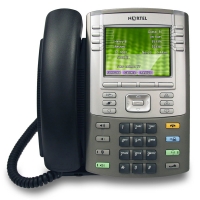
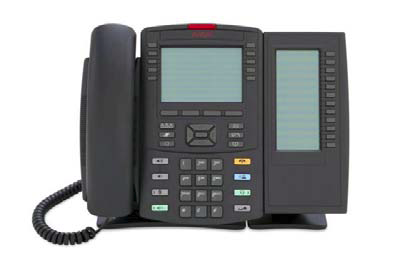
Avaya has released SIP software release 3.0 for their 1120E and 1140E IP deskphones. (There was no mention of the 1110E, 1150E, 1165E or 1200 series IP phones in any of the accompanying material).
Several enhancements have been included in SIP Release 3.0 for the 1100 series phones including User Interface and Preferences enhancements, Multi-user Login, Emergency Services support, USB device support, Wide-band Codec, Provisioning and Licensing.
The SIP software Release 3.0 for IP Deskphones also continues to improve the overall quality of the IP Deskphone software through the delivery of ongoing resolution of CRs. Numerous quality improvements have been delivered and 9 customer cases have been closed in SIP 3.0.
I’ve only performed very limited SIP testing with the 1120E, 1140E, and 1220 IP phones in non-production environments. I did notice a few feature called “Multi-user Login” which allows a SIP IP phone to connect to multiple SIP servers at the same time. Here’s the blurb from Avaya on the feature (it’s a direct quote from the release notes);
Multi-user Login
The Multiuser feature in SIP Release 3.0 allows multiple SIP user accounts to be in use on the IP Deskphone at the same time. Multiple users, each with their own account, can share a single IP Deskphone allowing each user to receive calls without logging off other users. One user can have multiple user accounts (for example, a work account and a personal account) active at the same time on the same IP Deskphone. You can register each account to a different server, and for each account, the IP Deskphone exposes the functionality available to that account. One account is considered a primary account and is used by default for most IP Deskphone operations. Each account is associated to a line key; the primary account is always on the bottom right line key of the IP Deskphone (this is the first key, Key 01), and an arbitrary key (including a key on an Expansion Module) can be selected for additional accounts.
The following operations are supported:
- Start dialing
- Place a call using the corresponding user account
- Answer an incoming call targeted to that account
- Initiate a call without pressing a line key (for example, by dialing digits at the idle screen and lifting the handset) uses the primary account.
A running IP Deskphone is associated to a single profile that represents one configuration of the IP Deskphone with all relevant persistent data such as preferences and call logs. A different profile is associated to each account used as a primary account. The IP Deskphone can store up to five different profiles; the IP Deskphone takes data from the profile associated to the current primary account. A number of configurations are independent of profiles and tied directly to an account making them available to that account regardless of the primary account you use (for example, voice mail ID).
The IP Deskphone receives and answers calls targeted at any of the registered accounts; the incoming call screen indicates who the call is for. You can place an outgoing call using any of the accounts; the account that you use is displayed on the dialing screen. When a call is active, information from both local and remote parties appear on the screen.
Regardless of which account receives the call, incoming call logs, outgoing call logs, and instant messages appear in a single list. The IP Deskphone indicates the local user in the detailed view of the entry.
Some features are only available to the primary account, such as instant messaging, retrieving parked calls by token, and establishing ad-hoc conference calls.
Please refer to the product bulletin and the release notes for all the details.
Cheers!
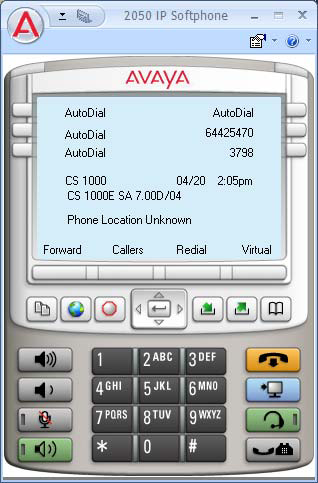
Avaya IP Softphone 2050 Release 4.0
May 24th
![]()
Avaya has released the IP Softphone 2050 Release 4.0 (Build 008) for the Microsoft Windows PC.
The following enhancements are now available;
- Support for BCM 50, 450
- Rebranding
- Node-Locked Licensing
- Secure Signaling using DTLS
- Secure Call Recording
- Incoming Call Pop-up Enhancements
The following issues have been resolved;
- (091210-67218/091216-70624) 2050 is not marking QoS values in packets (see Technical Advisory Section)
- (091030-43866) IP Call Recording stops working after retrieve call from Hold
- (091203-63291) Unable to configure annotation feature keys in Expansion Module.
- (091008-30561) i2050.exe process does not release GDI Objects
- (100224-05132) 2050 IP Softphone on CICM: Delay when hanging up from a call
- (100310-13208) Configuration tool does not support customized skins
- (100312-14320) Configuration tool errors when applying Node/TN info. The configuration tool will now allow empty values for any parameter in the config.ini file and will not overwrite the registry entry if it is blank. This allows customers to upgrade to new configuration settings without changing selected values such as the Node/TN information that may already be set in the registry.
- (100405-25547) Inconsistent behavior of IP 2050 Settings for first launch if ConfigurationTool
- (090812-96650) GN Netcom 8110 USB adaptor does not work on the docking station
Nortel IP Softphone 2050 Release 3.4
Nov 1st
Nortel has released the IP Softphone 2050 Release 3.4 (Build 3.4.003) for Windows PC.
The following enhancements are available;
- Support for Microsoft Windows 7
- Log file improvements
The following issues have been resolved;
- (090304-89596) IP Softphone 2050 freezes when calls are answered on Nortel USB Headset
- (081009-83319) IP Softphone 2050/3.3 One-way speech path
- (090903-09977) IP Softphone 2050 getting double DTMF tones on CS2100
- (090317-99855) New Call Voice Notification fails to say the CLID properly
- (090526-47034) Translation error in GUI – correct word “Release” in French, German and Spanish
- (090515-40414) Agent voice is recorded on IPCR after Mute key is activated
- (090510-36664) IP Softphone 2050 Logs have no limit in size
There were some qualifications that should be mentioned. The release notes specifically indicate that 64-bit versions of Windows XP, Windows Vista and Windows 7 are not supported although it doesn’t mention that they don’t work. The release notes also make mention that while the IP Softphone 2050 may run in VDI (Virtual Desktop Interface) from both VM Ware and Citrix Xen Desktop, neither are supported. I couldn’t imaging the potential issues of running a softphone in a VDI configuration but I guess someone has been toying with the idea.
We have about ten Contact Center users utilizing the IP Softphone 2050 v3.x with Contact Center 6 on a Nortel Succession 1000 4.5 Call Server. These users work out of their home and are connected across a Juniper SSL VPN SA4000 appliance utilizing Juniper’s Network Connect client software. We provide them an HP NC6900 laptop with all the software and they connect to their home network and Internet broadband. It’s been very successful so long as the Internet broadband connection remains stable.
You can find the complete release notes here and here.
Cheers!
Voice Pulse – IP Phone Service
Sep 12th
With AT&T CallVantage soon to be canceled I had to go searching for an alternate solution for my home phone service. I contemplated going with Verizon’s Triple Play since I already have Verizon FiOS Internet and Verizon FiOS TV but in the end I decided to go with Voice Pulse.
I ordered the service online and it took about a 11 days for the Linksys PAP2 to arrive. I had to call four days after I placed the order to find out the status since there was no email message informing me that the equipment was back ordered).
The installation of the Linksys PAP2 was quite easy. I just connected it to the Verizon Actiontec router and plugged the RJ11 jack into my phone. Within seconds I had dial tone from the Linksys PAP2. I didn’t need to make any changes to the Verizon Actiontec router although it might be necessary later to apply some QoS settings.
It took 7 days to port my original AT&T CallVantage phone number to Voice Pulse. Prior to porting my phone number I just setup CallVantage to forward all calls to the temporary number assigned by Voice Pulse.
There are an amazing number of call routing and call filtering features including telemarketer block which promises to block automated and computerized dialing services used by a vast number of telemarketing companies.
So far the service has been great and very reliable. And would you know that I actually received a phone call from Voice Pulse confirming the port of my home phone number. And I even spoke to an actual human being that I could clearly understand. Did I mention that they called me?
If you have reliable Internet broadband and your looking for a good Internet phone provider you won’t go wrong with Voice Pulse. Voice Pulse will also provide you with SIP trunks for your Asterisk deployment.
Cheers!

RECENT COMMENTS