This week I took on the task of upgrading a pair of Nortel Ethernet Routing Switch 8600s from 4.1.8.0 to 5.1.1.1 software. I used the opportunity to ‘test’ out the upgrade process and procedure for a much larger site that I will be upgrading next week.
The site that I upgraded has two ERS 8600 switches (dual 8692SF w/Mezz) running 15 VLANs, OSPF, VRRP, IST/SMLT, 15 edge ERS 5520 switches, 150 IP phones, 300 personal computers, printers, etc. It’s a fairly small site but it’s all IP telephony with a CS1000B.
The site that I will be upgrading next week has two ERS 8600 switches (dual 8692SF w/Mezz) running 80 VLANs, OSPF, VRRP, BGP, PIM-SM, IST/SMLT, 36 edge switches/stacks, 50 IP phones, 4000+ personal computers, printers, etc. This site is a much larger site with running a lot more VLANs along with BGP and PIM-SM.
With all the issues I’ve run into these past 12 months regarding the ERS 8600 switch I must admit that I was pleasantly surprised. Nothing blew up, nothing broke (knock on wood), and everything just seemed to work – there’s a surprise. I thought I would share the steps I took and the process I used. I will readily admit that I don’t have any RS blades in my environment so customers with RS blades might want to think twice before upgrading to 5.1.1.1 software (this is based on my discussions with other Nortel customers and their experience with 5.1.1.1 and RS blades).
I’ll also need to follow-up late next week and let everyone know how the larger upgrade went.
How did I do it?
Well I did it remotely but with access to the serial ports of all four CPUs (8692SFw/Mezz). I had to make a few configuration changes before I performed the upgrade, these are outlined in the release notes but I’ll touch on them here.
– Enable System Monitor (JDM, Edit Chassis -> System Flags and then look under “System Monitoring”)
– Reconfigure the SNMPv3 trap hosts with a retry value of 0 (read the release notes!)
I also took the opportunity to enable Jumbo Frame support with the ERS 8600 switch because that configuration change requires a reboot to take effect. (config sys set mtu 9600)
With those configuration changes saved I set out to copy the software up to the primary CPUs and then across to the standby CPUs. I took the extra precaution of copying all the software and configuration files from the FLASH to the PCMCIA card just in case something came up that I need them there.
I started the process by upgrading the standby CPU (8692SFw/Mezz) on B switch first. From the primary CPU on the B switch I issued the following commands;
config bootconfig choice primary image-file /flash/p80a5111.img
config bootconfig choice secondary image-file /flash/p80a4180.img
save bootconfig
save config
With the configuration files changed and saved I connected to the standby CPU (peer telnet) and issued the command to upgrade the boot software on the standby CPU;
boot /flash/p80b5111.img
I watched the console as the CPU restarted and upgraded the boot flash;
################ 8K CPU BOOT FLASH Update ################

File obj-boot/p80b5111-mpc740.romH found in loaded image
File size: 786624 bytes
Number of flash sectors to be programmed: 7

WARNING: You are about to re-program your Boot Monitor FLASH
image.  Do NOT turn off power or press reset
until this procedure is completed.  Otherwise
the card may be permanently damaged!!!

Press <Return> to stop monitor upgrade....

Erased 7 sectors of bootflash
Programmed BOOTFLASH Image
Verifying new BOOTFLASH Image
786624 matches, 0 mismatches

Updating Fileheader
Erased 1 sectors of bootflash
Fileheader update complete
Verifying new Fileheader
512 matches, 0 mismatches

Update complete!

Press return to reboot
The CPU then started to load the 5.1.1.1 software for the first time;
Copyright (c) 2009 Nortel, Inc.
CPU Slot 5:    PPC 745 Map B
Version:       5.1.1.1
Creation Time: Sep 30 2009, 15:13:36
Hardware Time: DEC 11 2009, 02:16:31 UTC
Memory Size:   0x10000000
Start Type:    cold
SMART MODULAR TECH SMART 221 CF

The /pcmcia device mounted successfully, but it appears
to have been formatted with pre-Release5.1 file system code.
Nortel recommends backing up the files from /pcmcia, and
executing dos-format /pcmcia to bring the file system on the
/pcmcia device to the latest ERS8600 baseline.
open_file:can't open "/pcmcia/pcmboot.cfg" 0x380003
S_dosFsLib_FILE_NOT_FOUND

/flash/  - Volume is OK

The /flash device mounted successfully, but it appears
to have been formatted with pre-Release5.1 file system code.
Nortel recommends backing up the files from /flash, and
executing dos-format /flash to bring the file system on the
/flash device to the latest ERS8600 baseline.

Loaded boot configuration from file /flash/boot.cfg
Attaching network interface lo0... done.

Press <Return> to stop auto-boot...

Loading /flash/p80a5111.img ... 12606133 to 43734492 (43734492)
Starting at 0x1000000...

SMART MODULAR TECH SMART 221 CF

Booting PMC280 Mezz HW. Please wait.....
The BootCode address is 0xe000100 3303
.
Mezz taking over console and modem.....
Mezz CPU Booted successfully

Initializing backplane net with anchor at 0x4100... done.
Backplane anchor at 0x4100... ..
Mounting /flash: .done.
License File <license.dat> does not exist
License File <license.dat> does not exist
License File <license.dat> does not exist
CPU6 [12/10/09 21:18:23] SW INFO Trial Period will expire in 60 days

Ethernet Routing Switch 8600  System Software Release 5.1.1.1
Copyright (c) 1996-2009 Nortel, Inc.

File does not exist
Critical Log file created

CPU6 [12/10/09 21:12:11] SW INFO System boot
CPU6 [12/10/09 21:12:11] SW INFO ERS System Software Release 5.1.1.1
CPU6 [12/10/09 21:12:11] SW INFO Waiting for cpu in slot 5 ... 2 seconds
CPU6 [12/10/09 21:12:13] SW INFO CPU card entering warm-standby mode...
CPU6 [12/10/09 21:12:16] SW INFO Loading configuration from /flash/config.cfg

**************************************************
* Copyright (c) 2009 Nortel, Inc.                *
* All Rights Reserved                            *
* Ethernet Routing Switch 8010                   *
* Software Release 5.1.1.1                       *
**************************************************
With that the standby CPU was upgraded to 5.1.1.1 software and I was set to upgrade the primary CPU which would cause the switch to fail over to the standby CPU. When I issued the boot /flash/p80b5111.img command on the primary CPU the standby CPU (slot 5) became the master and I observed the following on the console;
CPU5 [12/10/09 21:20:23] HW INFO Stand-by CPU in slot # 5 becoming master...
CPU5 [12/10/09 21:20:28] MPLS INFO All MPLS components are up and active
CPU5 [12/10/09 21:20:28] HW INFO Card inserted: Slot=5 Type=8692SF
CPU5 [12/10/09 21:20:29] HW INFO Card inserted: Slot=6 Type=8692SF
CPU5 [12/10/09 21:20:29] SW INFO R-Module inserted: Slot=1 Type=8630GBR, waiting to bootup...
CPU5 [12/10/09 21:20:29] SW INFO R-Module inserted: Slot=2 Type=8648GTR, waiting to bootup...
CPU5 [12/10/09 21:20:29] SW INFO R-Module inserted: Slot=3 Type=8683XLR, waiting to bootup...
CPU5 [12/10/09 21:20:29] HW INFO Initializing 8692SF in slot #5 ...
CPU5 [12/10/09 21:20:31] HW INFO Initializing 8692SF in slot #6 ...
CPU5 [12/10/09 21:20:37] SW INFO Slot  1: Loading /flash/p80j5111.dld
CPU5 [12/10/09 21:20:37] SW INFO Slot  2: Loading /flash/p80j5111.dld
CPU5 [12/10/09 21:20:49] SW INFO Slot  3: Loading /flash/p80j5111.dld
CPU5 [12/10/09 21:21:16] SW INFO Slot  1: 8630GBR Initializing.  Do not remove board.
CPU5 [12/10/09 21:21:16] SW INFO Slot  2: 8648GTR Initializing.  Do not remove board.
CPU5 [12/10/09 21:21:21] SW INFO Slot  1: 8630GBR Initialization completed.
CPU5 [12/10/09 21:21:21] SW INFO Slot  2: 8648GTR Initialization completed.
CPU5 [12/10/09 21:21:22] SW INFO Slot  1: Restart new image version 5.1.1.1
CPU5 [12/10/09 21:21:22] SW INFO Slot  2: Restart new image version 5.1.1.1
CPU5 [12/10/09 21:21:30] SW INFO Slot  3: 8683XLR Initializing.  Do not remove board.
CPU5 [12/10/09 21:21:31] SW INFO Slot  1: Loading /flash/p80j5111.dld
CPU5 [12/10/09 21:21:31] SW INFO Slot  2: Loading /flash/p80j5111.dld
CPU5 [12/10/09 21:21:36] SW INFO Slot  3: 8683XLR Initialization completed.
CPU5 [12/10/09 21:21:36] SW INFO Slot  3: Restart new image version 5.1.1.1
CPU5 [12/10/09 21:21:45] SW INFO Slot  3: Loading /flash/p80j5111.dld
CPU5 [12/10/09 21:21:49] SW INFO slot 2 found NP heartbeat - R-Module is online
CPU5 [12/10/09 21:21:51] SW INFO slot 1 found NP heartbeat - R-Module is online
CPU5 [12/10/09 21:22:12] SW INFO slot 3 found NP heartbeat - R-Module is online
CPU5 [12/10/09 21:22:12] HW INFO Initializing 8630GBR in slot #1 ...

SNMP-v3 VACM configuration is currently using default parameters.
These parameters should be changed for maximum security.

SNMP-v3 Having more than one entry in Group-access table for the same group-name with different security levels can cause a security hole

WARNING: THE ALLOWED LOG FILE SIZE HAS EXCEEDED CONFIGURATION LIMITS.
THE FILE SIZE IS CURRENTLY 1071131 BYTES!!!!
CPU5 [12/10/09 21:22:12] HW INFO Initializing 8648GTR in slot #2 ...

**************************************************
* Copyright (c) 2009 Nortel, Inc.                *
* All Rights Reserved                            *
* Ethernet Routing Switch 8010                   *
* Software Release 5.1.1.1                       *
**************************************************

Login:

CPU5 [12/10/09 21:22:13] HW INFO Initializing 8683XLR in slot #3 ...
CPU5 [12/10/09 21:22:14] SW INFO Loading configuration from /flash/config.cfg
CPU5 [12/10/09 21:22:15] SW INFO NTP Enabled
CPU5 [12/10/09 21:22:15] SW INFO The system is ready
CPU5 [12/10/09 21:22:15] SNMP INFO Booted with PRIMARY boot image source - /flash/p80a5111.img
CPU5 [12/10/09 21:22:17] SW INFO All the configured hosts not reachable

CPU5 [12/10/09 21:22:17] SW INFO A new log file = /pcmcia/ccf00005.001 is created

CPU5 [12/10/09 21:22:17] SW INFO PCMCIA card detected in Master CPU "sw-8600-ccr-a.site1.acme.org" slot 5, Chassis S/N SSPN6C0ANC
CPU5 [12/10/09 21:22:17] SNMP INFO Chassis with Power Supply redundancy
CPU5 [12/10/09 21:22:17] SNMP INFO Fan Up(FanId=1, OperStatus=2)
CPU5 [12/10/09 21:22:17] IP INFO the VRF OSPF Md5 key file 1 does not exist
CPU5 [12/10/09 21:22:17] SNMP INFO Fan Up(FanId=2, OperStatus=2)

CPU5 [12/10/09 21:23:03] SNMP INFO CPU switch over, stand-by CPU becoming master
CPU5 [12/10/09 21:23:03] SNMP INFO Sending Warm-Start Trap
CPU5 [12/10/09 21:23:03] SNMP INFO CPU switch over, stand-by CPU in slot # 5 became master
CPU5 [12/10/09 21:23:35] SNMP INFO Communication established with backup CPU
I will comment that for the time that the standby CPU was running 5.1.1.1 software and the primary CPU was still running 4.1.8.0 software the console became very sluggish and unresponsive. The CPU utilization also surged to 97%. I suspect the CPUs didn’t like trying to communicate with each other being so far apart on software releases.
I didn’t need to-do anything special while upgrading the switches to have the other switch in the cluster maintain the network. The IST link was re-established between upgrading the switches when B was running 5.1.1.1 and A was still running 4.1.8.0. I just repeated the steps above for the A switch and everything worked just fine.
I did go backup and clean up the log files, you might have noticed the warning in there about the log file being full. I didn’t reformat the /flash or /pcmcia filesystems because I wanted to the option to downgrade if necessary. I can reformat those filesystems at a later point in time if the software proves stable and reliable.
I’m impressed with 5.1.1.1 so far, let’s see how it stands the test of time.
Cheers!
Update: Thursday December 17, 2009
I completed the 5.1.1.1 upgrade of the larger site I refered to above on Wednesday morning and I’m happy to report that everything is working well. I did get an initial scare when one of the core ERS 8600 switches (running 4.1.6.3) went belly up just before I started the upgrade. I had just completed re-configuring the VRRP interfaces on both ERS 8600 switches so the VRRP IDs would be unique. While the switch was still forwarding Layer 2 traffic it stopped processing all Layer 3 traffic, wouldn’t respond to ICMP ping and the IST went down.
The upgrade itself took more than it usually does especially with the SuperMezz cards installed. Although once the switch came up everything was working fine, OSPF, BGP,FDB, ARP, IST, SMLT, PIM-SM, etc.
I’m very hopeful that 5.1.1.1 will provide some much needed stability to the ERS 8600 switch!
Cheers!
Hello Michael,
thanks for the lot of informations about Nortel Passports. I think the best community site for Nortel Equipment. Great work.
Regarding to this post we’re running currently 5 passports with 5.1.1.1 and plan to update 48 passports from 4.1.6.3 to 5.1.1.1 in the next 4 weeks.
Can you give me more information about software 5.1.1.1 and RS blades. In the next months we are planning to use the 8612XLRS blades.
Many thanks in advance for your help
Michael
Hi Michael,
Thanks for the kind words… I’m happy that you find the information useful.
I can’t offer a lot other than to say that some Nortel customers that I’ve spoken with have had a lot of issues with 5.1.1.1 when run on switches with RS blades. Those customers have been very happy running 5.0.5 software and plan to adopt 5.0.5 going forward.
With that said I’ve learned that Nortel plans to release 5.1.1.2 (or 5.1.2) in the very near future that will address a few of the remaining issues identified in the 5.1.1.x software stream.
I would advise you to proceed with caution if you choose to run 5.1.1.1 software on any switch with RS blades. I fully expect Nortel to fix any issues, unfortunately I believe they are still trying to get their hands around the issue.
I’ve loaded 5.1.1.1 on two sets of ERS8600 clusters to date and have been very pleased with the outcome. I’m only using 8648GTR, 8683XLR and 8639GBR blades on these switches – no RS blades. I’m now counting the days hoping that the stability issues have been addressed.
Cheers!
Great article!
I wonder how easy it would be to perform this in a HA environment.
Hi svl0r,
Why don’t you write it up and I’ll post it as a guest post?
Cheers!
I lived this on the lastest weekend, we upgrade 2 8600 (8692SF no MEzz) With lot of VLans, VRRP, and MLT. We opened a case on Nortel. and they find a loop because the client had a NIC Team. The architecture in 5.x is so different than 4.1.5.4 (my client had this), because this we need create a MLT on the NIC Team and this help de % of CPU, other thing we have to able system flags and system monitor – Enable System Monitor (JDM, Edit Chassis -> System Flags and then look under “System Monitoring”) – now the CPu is running near of 10%.
I hope had help
I performed the second upgrade to 5.1.1.1 and all it well. I’ve updated the post with some additional details but I’m hopeful that 5.1.1.1 might be a solid/stable release.
Cheers!
For BGP or PIM don’t you need an advanced licene on 5.x.y (advanced in the sense that offers more than the basic one, not that the license is named advanced)?
Hi Alberto,
Nortel has changed the licensed ‘features’ slightly since they originally announced the basic, advanced and premium licenses for the Ethernet Routing Switch 8600. You can read my post titled ERS 8600 Advanced License – Grandfather Chassis where you can see the graphic I copied straight from Nortel.
Nortel has since released the following graphic;
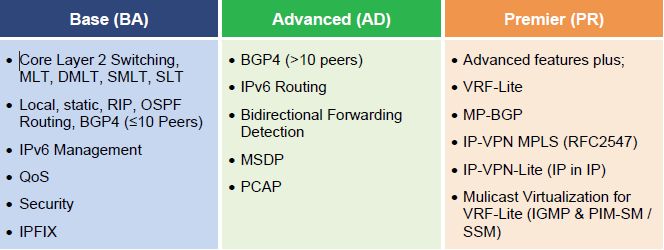
You can find additional licensing information in the Nortel Converged Data Networks Licensing Guide.
Cheers!
Hi Michael,
I know about the new license model and I took advantage of the grandfather program. I just saw in the boot log that your system didn’t find any powerfull license and I was a little biut scared. But everything seems fine.
Ciao ciao
Hi Michael,
We recently upgraded our two IST connected passports to 5.1.1.1, but it might not be a result of the upgrade, but I am finding the arp tables in are not same if I compare the boxes, and that some IPs are not available from some subnets, but available from others. I presume that depends on which 8600 they are routing via. Any ideas, we didn’t have this issue prior to the upgrade, and would like to take it out of the equation.
Any help would be appreciated.
Thanks
Hi Ryan,
They might not match 100% based up which switch is routing for all the different devices and VLANs. I have a site where switch A has an ARP table with 2899 entries and switch B has an ARP table with 2379 entries. The MAC/FDB table should be much closer though. In that same site switch A has a FDB table with 3749 entries while switch B has a FDB table with 3760 entries.
Unless you’re having issues you can safely ignore the differences.
Cheers!
Hi Michael,
Thanks for the feedback.
Unfortunately, we are experiencing issues, as some ips (172.16.x.x) are not reachable from other subnets, while other ips in the same 172.16.0.0 range are reachable. I have one specific IP, which is present one arp table of one 8600, while not present in the arp table of the other. While IPs physically connected to the same switch as the IP in question are reachable.
A bit confusing to say the least. Any ideas would be appreciated. I did have one suggestion about changing the FDB aging from 300 seconds to 21601. But not certain about that.
Regards
Ryan
You’ll be the very first person I’ve heard of running 5.1.1.1 software that has reported such a problem. The issue you are reporting was very prevalent starting with 4.1.6.3 and wasn’t resolved until 4.1.8.3 was released.
Are you using VRRP or RSMLT?
I’m assuming that you have IP interfaces from each switch in each VLAN and you have OSPF enable (passive mode) for every interface?
Increasing the FDB aging timer is a good general idea, if nothing else it will keep the switch from expiring the ARP entry every 300 seconds which only creates a lot of broadcast traffic as the switches ARP for every IP address after they all expire.
I would also suggest we move this discussion to the forums where multiple folks can offer help and suggestions.
Good Luck!
Thanks Michael, I will do so.
BTW we are using VRRP.
Regards
Ryan
Hi Micheal,
I have recently upgraded a non-production mixed module (pre-E, E and RS) populated 8600 chassis from v4.1.0.0 to v5.1.1.1as my 8648GTRS modules were not being recognised. All have now come online apart from a pre-E module which I’ll look into further. I’m curious about the repeated message below from the output of your upgrade. I am seeing the same message displayed in my output. Does this mean only the base license (BA) features will be available after the trial period (60 days) expires?
License File does not exist
License File does not exist
License File does not exist
CPU6 [12/10/09 21:18:23] SW INFO Trial Period will expire in 60 days
Hi Milko,
Yes you are correct… only the base license will be available past the 60 day trial license. You need to purchase an Advanced or Premium License if you want/need those features.
There was a ‘grandfather’ program where all ERS 8600 switches purchased before a certain date could get an Advanced License for no additional cost from Nortel. You can read more about that in this blog post.
Cheers!
Pre-E won’t work with 5.
I believe they will work (I have them in a chassis with 5.1.2 software), but they are unsupported. In soft ware release 7.0 they won’t initialize at all since the code has been removed from the software in that release.
Cheers!
Michael,
according to Avaya pre-E won’t work with 5 and E modules won’t work with 7. At a practical level I believe you that pre-E work with 5: I have no experience; I replaced them before going to 5 just to be on the safe side. Milko says that the modules are not comming up in his setup, so I was just suggesting not to invest to much time in a configuration that may be -in some way- unsupported.
Ciao
Alberto
I’ve been told the same news from our support vendors that pre-E modules are not supported with v5.x code even though I had an 8608GT module come online in the same chassis as the 8648TX module which didn’t come online. Something to do with the GT module having a back module version of BFM8 which are supported in E revision, compared to BFM6 for the TX module. I won’t bother with the pre-E modules and will get them replaced. Thanks for the feedback guys.
Hi Michael, Thanks a lot for all the information over Nortel only when question right now tomorrow night i am going to upgrade the 6 ERS 8600 from 4.1.6.3 to 5.1.2.0 i have all the steps with me but i am confused either i have to pull out all cards and should i do this upgrade one by one what is your suggestion
Regards
Asad Mukhtar
Hi Michael
Thanks to you for providing such a useful information regarding Nortel, i have my question tomorrow night i have one activity in which i am going to upgrade 6 ERS fro 4.1.6.3 to 5.1.2.0 and i have all the steps with me but only one thing i want to ask should i pull out the R modules out before upgrade or should they stay there in chassis ?
Regards
Asad Mukhtar
You can physically leave all the cards in the chassis. There may be a need to power cycle the chassis if you run into problems. Good Luck.