Nortel has released the IP Softphone 2050 Release 3.4 (Build 3.4.003) for Windows PC.
The following enhancements are available;
- Support for Microsoft Windows 7
- Log file improvements
The following issues have been resolved;
- (090304-89596) IP Softphone 2050 freezes when calls are answered on Nortel USB Headset
- (081009-83319) IP Softphone 2050/3.3 One-way speech path
- (090903-09977) IP Softphone 2050 getting double DTMF tones on CS2100
- (090317-99855) New Call Voice Notification fails to say the CLID properly
- (090526-47034) Translation error in GUI – correct word “Release” in French, German and Spanish
- (090515-40414) Agent voice is recorded on IPCR after Mute key is activated
- (090510-36664) IP Softphone 2050 Logs have no limit in size
There were some qualifications that should be mentioned. The release notes specifically indicate that 64-bit versions of Windows XP, Windows Vista and Windows 7 are not supported although it doesn’t mention that they don’t work. The release notes also make mention that while the IP Softphone 2050 may run in VDI (Virtual Desktop Interface) from both VM Ware and Citrix Xen Desktop, neither are supported. I couldn’t imaging the potential issues of running a softphone in a VDI configuration but I guess someone has been toying with the idea.
We have about ten Contact Center users utilizing the IP Softphone 2050 v3.x with Contact Center 6 on a Nortel Succession 1000 4.5 Call Server. These users work out of their home and are connected across a Juniper SSL VPN SA4000 appliance utilizing Juniper’s Network Connect client software. We provide them an HP NC6900 laptop with all the software and they connect to their home network and Internet broadband. It’s been very successful so long as the Internet broadband connection remains stable.
You can find the complete release notes here and here.
Cheers!
Michael,
Do you use any bluetooth devices with your IP Softphone 2050, if so any recomendations, hints and tips?
Thx
Wesley
Hi Wesley,
I don’t use a bluetooth headset on the 2050 but I believe bluetooth headsets are supported on the v3.x version of the 2050. The other part of the equation is going to be the laptop that you’re using.
I have a Plantronics Voyager 510 headset that I could probably try if you are curious.
Cheers!
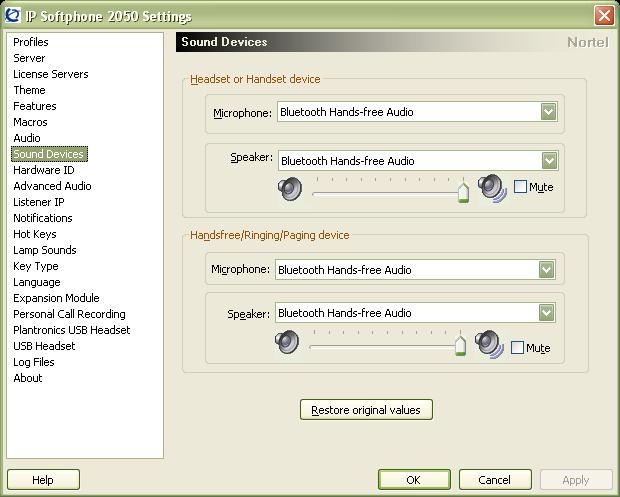
I performed a quick test tonight… pairing a Plantronics Voyager 510 Bluetooth headset with a HP Compaq 6910p laptop running Windows XP Service Pack 3 with Nortel IP Softphone 2050 v3.04.0003. I had no problem using the bluetooth headset. I wasn’t able to use the headset button to answer calls or go off-hook but the audio was very clear.
Here’s a quick screenshot of the audio configuration within the 2050 softphone;
Good Luck!
Hi Michael,
Great and many thanks for tips!!
I haven’t bought any Bluetooth devices yet, but will get one in the near future and see what it will do for me.
Cheers!
Hi Michael,
I’ve been using the Softphone over the VPN and a few times I’ve noticed strange sytuation. While being in call the other person would tell me that my voice is cut and they could not hear me and I could experience the same issue form my side as well. Then it would come back again and everything would be fine. It’ll be happening more then once while being connected. At one point I’ve completely lost connection with CS1000 and it recovered itself in a few seconds again.
Have you experience any of these symptoms with softphone?
Cheers
Wesley
Hi Wesley,
In my experience unless the softphone goes completely belly up, it’s the Internet broadband connection or VPN/SSL solution that’s usually at fault.
With that said there could have been an issue with the VGMC (Voice Gateway Media Card) that was serving up the RTP stream to your softphone at the time of the problem. The logs on the Signaling Server and VGMC cards should reveal any issues.
The new release of the 2050 softphone maintains a log of events which you should be able to find here (Windows XP);
C:\Documents and Settings\UserName\Application Data\Nortel\IP Softphone 2050\Logs
Good Luck!
When connected to the network the IP Softphone 2050 works great, but when taking it home it logs out after about 7 minutes. I am using Cisco VPN 5.0 to connect remotely to the network.
Any suggestion of why it would be logging me out?
Hi Kolby,
You might want to post your question in the discussion forums.
I’m going to guess that your VPN tunnel might be disconnecting. If you start a constant ping to the Call Server does the the ping timeout at any time? Do you have any issues with the 2050 when you are running a constant ping?
It all depends on how you’ve configured your VPN infrastructure. Some will disconnect the tunnel after a certain amount of idle time. Different routers/switches/firewalls define which traffic will reset the idle timer differently. Sometimes only Tx traffic will reset the idle timer, sometimes both Tx and Rx traffic will reset the idle timer.
Good Luck!
Hi Mickael,
Thx a lot for this article !
I’ve got a question (I’m french and I have to apologize for my poor english !)
In my enterprise, we recently deployed a IP softphones 2050 solution and everything is working well :
In their home, the users connect to a Juniper VPN, and they launch the IP softphone 2050 (3.03.10 version) and everything’s ok (incoming and outgoing calls).
Unfortunately we have discovered that a IP softphone can’t call another IP Softphone if both are using the same internet connection :
the line is busy, like if the other sofphone was calling someone.
The problem doesn’t occur if both softphones are using our LAN, or if the users are not using the same internet connection (and public IP)
So we think that the problem is coming from our CISCO firewall which is maybe blocking the call because the incoming and outgoing IP are the same.
Have you any idea of the reason of this problem ?
Do you know the port used by the softphone ?
We checked the firewall rules and everything looks ok
Thx again for your help !
Cheers
Hi Raph,
I’ll try to answer your question but let me implore you to visit the discussion forums. I’m generally the only person that trolls the comments on my blog so I’m going to be the only person that responds to you. On the discussion forums there are multiple folks that are interested in the conversation and will generally respond in the discussion giving you a lot more help.
Is the Juniper VPN appliance in-line with your Cisco firewall? Does the Juniper VPN traffic physically traverse your Cisco firewall or does the Juniper VPN appliance have a public and private interface?
Unless you are restricting the traffic that users can pass on the Juniper VPN tunnel I don’t believe the firewall will have anything to-do with it. And from my understanding if you are running the Juniper VPN – Network Connect client in SSL mode you should be able to to establish multiple VPN connections from behind a single IP address. Each VPN connection should get it’s own private/internal IP address, correct?
The IP 2050 Softphone will open quite a few ports, I would suggest you remove any firewall rules (or run them wide open while you test).
I can test this out myself tomorrow but I would suspect that this should work fine, it may be an issue with how you have your network architected and where you have your firewall and VPN appliances.
Cheers!
Hi there, I urgently need documentation for creating & administring extentions on a Nortel BCM400 system.
Hi Zirk,
You’re kidding right? I’m not sure what your question has to-do with the IP 2050 Softphone? Have you tried look at Nortel’s website?
http://support.nortel.com/go/main.jsp?cscat=DOCUMENTATION&poid=17141
Cheers!
Thanks for your answer!
The Juniper VPN traffic physically traverse our Cisco firewall.
But like you said, we have to try after removing firewall rules, so I’m doing a test plateform.
I’ll let you know the final results of my investigations on the forum ;)
Hi, I have just started using the IP 2050 release 3.4. and wondered if you could recommend a cheap bluetooth headset to use with it? We have been told that the Jabra M5390 works but this is quite expensive. Ideally we would like to answer calls from the headset as well without having to click on the laptop.
Thanks in advance.
Nigel
Hello Michael
This blog is very good, wanted to know how I can put a picture on my softphone 2050 if you can.
Nina jhony
Hi Nina,
You would probably need to investigate changing the “skin” of the 2050. A skin is a set of templates and graphic images that can be substituted in place of the original graphics.
Good Luck!
NEED hello brother how to configure the steps I am a beginner in this thanks
I wouldn’t really know myself… you could try search Avaya’s support website;
http://www.google.com/search?q=site%3Asupport.avaya.com+2050+skin&ie=utf-8&oe=utf-8&aq=t
Sorry I can’t help!
michael I have understood that My phone Nokia E 73 cell model or another, can be configured like a softphone wireless phone, as I set it up Thank God
Michael
been testing enabling bluetooth hands-free audio, if softphone in 2050 but not enabled SigmaTel Audio only shows me I would appreciate any information on how to enable
All, I saw the earlier reference to the Jabra M5390 Bluetooth headset being identified as compatible with the i2050 softphone. Has anyone been able to confirm this? We’re trying to find a Bluetooth adapter which could be paired to a Oticon Streamer 1.4 for the purpose of streaming telephone audio to hearing aids. Thanks in advance for any insight!
Hi Tom,
You’d probably need to test this yourself to be 100% sure. Here’s the language in the older Avaya/Nortel manuals;
USB/Wireless Headset support: offers the ability for users to “untether” their desktops, expanding their mobility with standard Bluetooth headset profiles (Bluetooth Power Class 2) support within the client.
The following Plantronics headset models are supported:
— Plantronics Audio 910 Bluetooth Headset
— Plantronics Voyager 510 Bluetooth Headset
— Plantronics CS55-USB Digital Wireless Headset
— Plantronics CS60-USB Digital Wireless Headset (EMEA DECT version)
In the later documentation Avaya has backed off from “supporting” any Bluetooth headsets.
Good Luck!
Hello Michael,
Thanks much for this ! We reviewed the Voyager 510 and it seemed to be compatible with both softphone and streamer but the base was discontinued in 2009 and seems to be ‘out of stock’ everywhere…