I hope the majority of folks out there can agree with me when I say that Nortel’s Java Device Manager was a large step up from Nortel’s Site Manager application. While I personally do the majority of my work in the CLI interface, Device Manager is a very useful tool to have around.
I really like the fact that you can launch either a telnet or SSH session straight from Device Manager. Over the years I’ve found PuTTY to be the best terminal application so I configured Device Manager to call PuTTY for telnet and SSH connections.
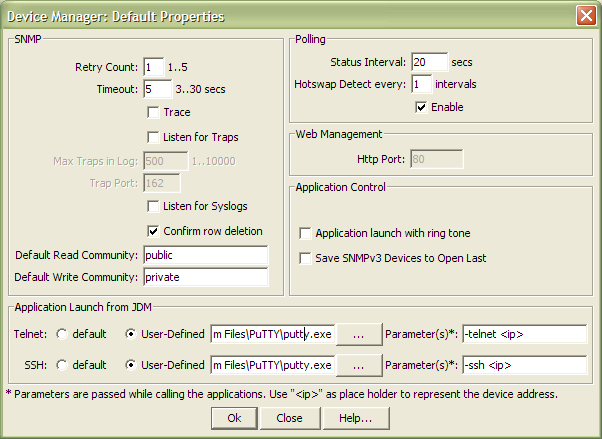
After opening Device Manager select Device -> Properties -> Current. Select “User-Defined” for both Telnet and SSH and then place “C:\Program Files\PuTTY\putty.exe” (or wherever you have PuTTY installed) into option box and then use “-telnet <ip>” for telnet sessions and “-ssh <ip>” for SSH sessions (see figure above).
Another problem you can sometimes run into with Device Manager is the relative easy with which you can mistakenly delete a row (interface, VLAN, ACL, etc). Thankfully there is an option within JDM that you can enable called “Confirm row deletion” (see figure above).
Cheers!
Yes, DM is much better than Site Mangler or Site Crasher ever was. :)
Site Crasher, like Internet Destroyer uh? :-)
The confirm row deletion was something I never new of.. nice info.
Q.
v3.2 SSH Secure Shell is still freely available on various FTP sites—mostly universities I believe. Its another very good alternative to the built-in JDM defaults. Of course we don’t use telnet anymore though, do we? :)
FYI, though: JDM will probably not get much, if any future development. I believe v6.0 of ERS 5xxx software is sporting a new web-interface and I think the 4500 code is supposed to quickly follow (if it hasn’t already). The ‘new’ Nortel probably can’t afford the resources that JDM support demands.
Does anyone use Enterprise Switch Manager (ESM)?
I find it’s very useful in mapping out the network and launching JDM quickly. It helps when you have those 2am on-call pages. It’s also very useful for backing up configurations and upgrading code.
Hi Mike,
I just have a personal preference for PuTTY, but as you pointed out there are a number of different solutions available.
You are correct in your comments about Device Manager. I understand from Nortel that there will be a new type of “Element Manager” that will run directly from the switch. I understand it will be introduced with Nortel’s new VSP 9000 switch sometime in January 2010.
Cheers!
Hi Gabe,
I use Enterprise Switch Manager from time to time. We have a standard DNS (FQDN) naming convention for our switches that makes it pretty easy to just open Device Manager and type in the FQDN of the switch you wish to manage. I’ve also written a lot of Perl scripts to that retrieve and correlate a lot of the information provided by ESM. This was of course before ESM was available or could perform that function.
I believe Enterprise Switch Manager v6.3.0 was just released on March 23, 2009. The release notes indicated support for SMLT/SLT environments and integration with CLI*Manager.
Thanks for the comment!
Does Device Manager (JDE) interface the OPtera Metro 3500?
If you select Help -> About from Device Manager it should tell you the different switches and software releases that it supports.
I have v6.1.6.1 installed on a Windows XP desktop and while it mentions the Optera 1200/1400/1450 and 8000 it makes no mention of the 3500.
Good Luck!
Check out the CLI Manager in ESM 6.3. Scripts work great for 100’s of switch changes in just minutes.
Anyone know how to launch JDM from another application. I can launch it but how do I pass a IP(device to open) and the community strings to JDM.
I would like to use JDM with a basic monitoring app.
Hi Peter,
If you have the switch already in your previously opened list of switches you can just append the switch name on the end of the JDM call. Here are all the parameters as of release 6.2.0.
<host> -out -trace {sd} -rd <cmty> -wr <cmty> -trapPort <num> -trapLog <boolean> -sysLog <boolean> -socket <num> -proxy <file> -cacheServer <host>
You should find a .bat file in C:\Program Files\Nortel\JDM which you can adopt to help you test. I marked up the .bat file like so;
Good Luck!
Also I just found that you can change all the passwords of all the switches at one time on my entire network with the Security Manager in ESM.
Start the Enterprise Switch Manager Software
Click on Tools
Click on Security Manager
In Security Manager
Double Click on SSH
Click on the “+”
Enter a Group Name
Click button for the Ethernet Switch, Ethernet Routing Switches
Click All
Click OK
Enter the SNMPv3 information
Click on Apply Changes
Click on the Change Passwords Tab
Enter the RWA User – This should be RW (uppercase)
Enter the current password
Enter the New RW Password
Enter the New RO Password
Note: The RW password for a switch and for a stack should be the same, and the RO password for the switch and the stack should be the same.
Click Change Password.
Click OK
Click Yes
Be Patient!! This will take about a half hour for 500 switches.
Look at the log file –
You should see the following
****************************************************************************************************
2009/01/28-18:35:10 : User : lab
Connecting 192.168.10.105 …
192.168.10.105: login successful.
192.168.10.105: change cli password successful.
Connecting 192.168.10.112 …
192.168.10.112: login successful.
192.168.10.112: change cli password successful.
****************************************************************************************************
Etc….
Now test your passwords
Done!
I found today that if you edit the JDM.BAT file to have a %1 at the end of the command line in the batch file, you can just call JDM.BAT followed by the Ip or hostname .
—
echo Launching Java Device Manager …
SET JDM_HOME=C:\Program Files\Nortel\JDM
SET javaCmd=%JDM_HOME%\jre\bin\java
“%javaCmd%” -Xmx256m -DEMPATH=”%JDM_HOME%” -jar “%JDM_HOME%jdm.jar” %1
@echo on
—
You can place jdm.bat anywhere in your path, or call it explicitly from an external application.
Personally, I use PRTG from http://www.paessler.com to measure my network devices, and JDM to manage them.
Thanks for sharing your finding Zolteg!
I am working over a nortel network , I want to change JDM default password for secuirity purpose?How to change JDM default password?
Hi Dinesh,
If you are referring to changing the read and write community strings you’ll need to make that configuration change on the switch itself. The configuration is different depending on the switch model. What switch are you working with?
Cheers!
Hi,
I am working with a nortel passport 8600 & 4550T Switch.Please help the configuration command .
I will warn you to be careful you don’t lock yourself out.
Here are the commands to reset your read/write community strings for the ERS8600 to “lock” and “open”. The default SNMP strings are public (first) and private (second) you can reconfigure those with the following two commands;
ERS-8610:5# config snmp-v3 community commname first new-commname open
ERS-8610:5# config snmp-v3 community commname second new-commname lock
The commands from the ERS4500 are slightly different but here are those commands;
5520-48T-PWR (config)# snmp-server community open ro
5520-48T-PWR (config)# snmp-server community lock rw
Good Luck!
Could you please let me know How do I view current community string via CLI or Device manager for passport 8600
5520
425
479
Thanks
Hi Jaff,
As mentioned by Testing you can’t view the SNMP strings in the later versions of software. If you have a really old version of software the SNMP strings might be visible in the configuration.
Good Luck!
To keep the passwords and community strings a secret Nortel dose not allow this information to be displayed. The community strings were replaced with “******” when the military made this a security requirement for securing its network equipment.
Thanks for the comment!
Hello,
How do you export/import your device list with changed snmp communities so that you can quickly move it to another computer?
It takes a long time to repopulate the opened last list.
c:Documents and Settingsusernamejdm
has two files, but replacing them does not work.
Hello!
These topics are best discussed on the forums, http://forums.networkinfrastructure.info/ but I’ll help answer them here as well.
The configuration for Nortel’s Java Device Manager is stored in XML files which are located in the user’s $HOME directory under a hidden folder called ‘jdm’.
Windows XP; C:\Documents and Settings\Michael\jdm
Windows Vista; C:\Users\Michael\jdm
You’ll be looking for two files; dm.xml and dm_devices.xml.
You can find additional information in this post.
Good Luck!
Does anyone know how to launch Java Device Manager from the command line passing it snmpv3 login details for Auth & Priv?
Hi Mick,
I’ve never done it myself… so I can’t say.
Good Luck!
for the record if you are using SNMPv2 you can use these switches
-out -trace -rd -wr -trapPort -trapLog -sysLog -socket -proxy -cacheServer
Hello to all
I use ESM 6.3.0 and i want have a estadistics of the cpu consuption.
With JDM i can viewing CpuUtil(%) a graphic from performnace in real time but only with window de 3 min and 20 seg.
Somebody knows how can capture data of the window JDM,”Graph Chasis System, CpuUtil”? For playback on a graphic historic the performance of the CPU.
Hi db_nortel,
You can use SNMP to poll the switch and create your own graphs.
.iso.org.dod.internet.private.enterprises.rapidCity.rcMgmt.rcSystem.rcSysCpuUtil.0
.1.3.6.1.4.1.2272.1.1.20.0
Good Luck!
Hi,
i am a beginner at this, any ideas how i can authenticate the JDM session…? trying to use Active Directory Username and password….
Thanks
Hi Thallium,
The answer is going to depend on a number of variables include what model of switch and what software release. The last time I looked authenticating SNMPv3 sessions via RADIUS/TACACS+ was not yet supported on the Ethernet Routing Switch 8600, 5000,4500,2500.
I’m not sure but I would be surprised if this is not supported in software release 7.0 for the ERS 8600.
I would suggest you have a look at the document below. It may be slightly dated but it should provide you enough information to get you started.
2008_03_26_Authentication_Authorization_and_Accounting_for_ERS_and_ES_TCG_NN48500558.pdf
Good Luck!
Hi Michael,
Thank you for the response actually i am using the ERS 8600 but not with the 7.0 software release. i will browse through some documentation but at first i had a hard time researching and wanted to make sure it would be possible. I hope it is.
Thank you.
I have two Noretl ERS 8600 (R Module) with IST and VRRP configured.I have 20 vlan (from Vlan 1 to Vlan 20) having IP 172.16.1.0 to 172.16.20.255.
i.e Vlan 1- 172.16.1.0-172.16.1.255,
Vlan 2- 172.16.2.0 -172.16.2.255,
and so on…
I wants Vlan 15 should communicate only with 172.16.16.11. & block all other connection from Vlan 15.
Guide me configure with device manager and CLI
Hi Ashok,
Your question isn’t really topic for the post “Nortel Java Device Manager Tips”. You need to investigate traffic filters. You can post your question over in the discussion forums and I’m sure someone will respond.
Cheers!
Hi All:
I am having a problem let say with the JDM each tim ethat I launch the application it shows me a window that says. “YOU ARE ATTEMPTING TO USE AN OLDER VERSION OF JDM CODE WITH A NEWER VERSION OF SOFTWARE CODE FOR THIS DEVICE YOU ARE MANAGING. PLEASE VISIT NORTEL.COM TO GET LATEST JDM SOFTWARE”. but I am using the version 6.2.1.3 that it is suppose that is the latest one. Can any one help me to solve this?
Regards
Jorge
Hi Jorge,
What version of Java Device Manager are you using? You probably need to upgrade JDM to the latest release.
Cheers!
What type of switches are you trying to connect too and what firmware are they running?
The latest switch firmware does not support JDM, you must use EDM instead.
Also, the forums would be a better place for this quesion :-)
Hi Davy.
Thansk a lot for the info
I am using the firmware 3.7.2.12 in the 470-48T (No Problem) and 5.3.0.3 on the 4548GT-PWR (The message appear).
Sorry I will use the forums instead…
Thanks
Jorge
Hey everyone,
Got a question, I need to monitor the CPU utilization in a Nortel Switch, I know that the SNMP variable to monitor is ‘rcSysCpuUtil’. Now, what if my device doesn’t have the respective OID (1.3.6.1.4.1.2272.1.1.20.0)? is there anything I can do?
Hi Ale,
The OID that you reference above is for the Ethernet Routing Switch 1600 and 8600 switches. What model switch are you trying to monitor?
Good Luck!
Hello and thanks for the response!
I’m trying to monitor 5510-5530; isn’t that variable the one to check? I read that somewhere else
That’s a different model of switch and has a different OID. I should also warn you that the SNMP OID for CPU and memory utilization is only available when running 6.x software on the ERS 5000 series switch. I don’t recall the exaxt OID right now but you can find it by performing a packet trace of Device Manager, Edit -> Chassis -> Chassis -> CPU/Mem Utilization. I believe it’s somewhere around 1.3.6.1.4.1.45.1.6.3.8.1.1.x
Good Luck!
Hi Mike,
Just want to know , is there any other alternative than JDM that could be use on VSP-9000?
Hi Azi,
You now need to use either Enterprise Device Manager (EDM) or Avaya’s management product Configuration and Orchestration Manager (COM).
No additional development is being done with JDM.
Thanks,
Mike
Hello Mike,
I am looking for system oids for cpu/mem utilization on Nortel 470-48t switches. Google is your friend, but sometimes it isn’t easy to find.
Can you help on that?
Thanks in advance.
Sep
Hi Sep,
This topic has already been discussed on the forums;
http://forums.networkinfrastructure.info/nortel-ethernet-switching/monitor-cpu-and-memory-5530-4550t-via-snmp/
Good Luck!
Hi All!
I have Nortel switch (Baystack 470 24T) and (Passport 1612g).
I want to take the backup of these switches (.bin) files.
1- How to take the backup of these switches configuration through java device manager.
or through telnet. (Steps)
2- I can access above two switches through java device manager but i don’t have the Password for these switches.
3- How to Reset the above switches
4- Bydefault password of the javadevice manager and above nortel switches
regards
Rashid
Hi Rashid,
You can initiate a TFTP backup via JDM then you can follow the following blog post to initiate a factory reset;
http://blog.michaelfmcnamara.com/2007/11/factory-reset-nortel-ethernet-switch/
http://blog.michaelfmcnamara.com/2007/12/factory-reset-nortel-ethernet-routing-switch/
Good Luck!
sir i need JDM for configuring nortel 425 baystck switches pls tell me where i can downlaod this.
It took me all of 15 seconds to find the link on Avaya’s website.
ftp://ftp.avaya.com/incoming/Up1cku9/tsoweb/www142.nortelnetworks.com/software/j/jdm/6.x/