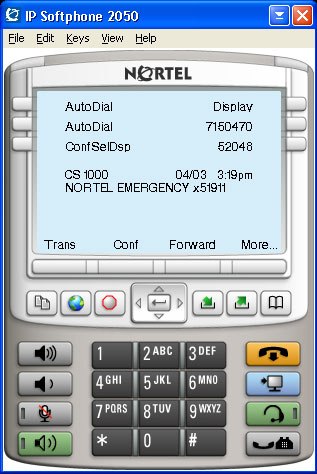
 We recently started deploying the Nortel IP 2050 Softphone v3.x for our work-from-home Contact Center agent pilot. With software release v3.x or higher you need a licensing server somewhere in your network. That means that yes you need to purchase licenses for all your concurrent 2050 users. It’s my understanding that Nortel has licensed various technologies in the 2050 that required it to deploy a licensing server as set forth in the licensing agreements with the various third parties.
We chose to deploy the Nortel IP Softphone 2050 Licensing Server on the same server that where we had the Nortel Enterprise Management System (NMS) application and the Nortel Enterprise Switch Manager (ESM) application already installed.
If your testing out the solution there’s no need to worry about needing a licensing server on day one as each installation of the 2050 comes with a 30 day demo/evaluation license.
After you have installed the License Server you’ll need to replace the file “counted.lic” in C:\Program Files\Nortel\IP Softphone 2050 Licensing Server (or where ever you’ve installed the software) with the license file you received from your reseller.
You can issue a “lmstat -a” from the installation director and it will output the number of total licenses installed and the number of available licenses. When you add licenses you just need to replace the file “counted.lic” and then restart the “Nortel IP Softphone 2050 Licensing Server Service” service.
Cheers!
Why use v3.0? Isn’t v2.0 free? what would be the main motivation/feature pack that would drive my company to move from v2.0 to v3.0?
v2.0 is not free. According to the terms of the RTU, you are supposed to have purchased one copy of the CD for each installation.
That is true. Sometimes i forget i work for a distributor and we have special deals with nortel.
The question is still valid. Why would I want to migrate from v2.0 to v3.0
v3 provides:
– encryption of signaling and media
– Global IP Sound (GIPS) voice engine which removes need to use Nortel Adapter for audio QoS
– support for Bluetooth and Digital Wireless headset profiles
– integrated support for buttons on selected Plantronics headsets
– support for PVQM
– TAPI support
– screen pops for incoming calls
– soft expansion module
– IP Call Recording (Nortel CRQM or 3rd party), Personal Call Recording from Algo
– Accessibility interface which is compliant with U.S. Section 508
Hi Dan,
It’s already been pointed out that the 2.0 release is “not free”. We have a few IT folks running the 2.0 software for quite some time, however, we chose to deploy our remote contact center users with the 3.0 version since we needed support for CRQM (call recording) and PVQM (quality monitoring).
Thanks for sharing those features Gord!
Cheers!
Hi, I have a keycode in a BCM400 for 8 IP Clients. Can i use this license in the licensing server?
Thanks.
Another Question… How can i edit this counted to work with that license..
Hi Jose,
Unfortunately the keycodes you are referring to in your BCM400 only allow you to create IP endpoints (phones). While you need those licenses you also need to license the actual softphone client… if you were just using an i2002/i2004 you wouldn’t need any additional licenses. Since Nortel has technology in their i2050 softphone that is licensed from a third party they must pay royalties to the third party for each and every copy sold. You cannot edit the “counted” license file… it must be generated by your Nortel reseller and is keyed to the server name where the license software is installed. In other words the reseller needs to know the name of the server in order to generate the license file (counted) properly.
Good Luck!
Thank you very much Michael, it was very helpful. I will use an older version that is inside the BCM400. It´s IP Softphone v1.4
We are trying to install the Nortel IP Softphone 2050 with the TAPI TSP version 3.03.0100. We can see the device in the TAPI list and activate it, and even make outbound calls, however no incoming TAPI messages are received. So we have no indication of an incoming call and outbound calls do not indicate when the connect or disconnect.
We can’t get any help from anyone who knows anything. We’ve disabled the windows firewall. The phone network is on a different network than the computer network and I suspect something there with ports or settings, but there would be literally hundreds of things to try. Does anyone know what may be the problem? Thanks!
Hi Fred,
You have me a little confused but that easily accomplished these days.
I’m guessing that you are trying to deploy a third party TAPI application using the i2050 as the telephony device? Does the i2050 function properly itself as an IP phone? Can you place and receive calls? I’m going to assume that the i2050 functions properly and that you’re trying to interface it (through TAPI) with a third party application. What version of Succession are you running on your CS1000 or CS2100? The version of software you’re running on your switch is going to greatly affect the answer. You might also need additional licensing on the Call Server to allow the third party integration. I would advise you to follow-up with your voice reseller although you could probably find someone to give you some hint over on the Tek-Tips forums.
With all that said the i2050 should integrate with applications should as Microsoft Outlook without any additional software/licensing.
Good Luck!
Hi Michael,
You have it right. I am with ExceleTel, we make the leading TAPI development tool for programmers. We have a utility that can diagnose and test just about any feature of a TAPI telephony device. We are working with someone who has a 2050, version 3. My understanding was that they dropped the “i” in front of the 2050 on the new version, but I could be mistaken. They have a CS1000.
The softphone does everything it is supposed to do, which confuses me as to why it does not work properly in TAPI. I seem to have one-way communication with the TSP. I can dial, but receive no call progress events. And while the soft phone will see incoming calls, there is no notification to TAPI. I am trying to find out what version of sucession it is using and trying to get help from Verizon. However, as soon as you start talking developing using TAPI, and not asking about boxed products like “I want to buy another phone” or “how much does your IVR cost”, it is usually very difficult to find anyone who knows anything. It is like the TAPI implementation was developed by gnomes from a fairly land and you aren’t allowed to find out how to talk with them. :)
Hi Fred,
I think your issue here might be the licensing (ISM) and enabled features on the CS1000. I believe Nortel licenses the CTI interaction of their IP phones, unlike the TDM phones. So even though the phone is physically resident on the laptop/computer you might need a SIP CTI or H323 CTI license to enable the functionality your trying to exploit. In their Contact Center (formerly Symposium) solutions they have a lot of CTI integration between an IP phone and the desktop (screen pops, dialing from the PC, etc). I’ll try to reach out to a few Nortel folks and confirm my suspicions.
Unfortunately with any complex subject matter you can have issues finding the right people and resources to work with. I’ve run into the same problem as you and I’m sure there are quite a few other folks that have experienced the same issue.
Cheers!
Hey Mike ~ Got that – Thanks
Now I have a Senior VP trialing the IP 2050 Softphone. Appears to be trilled with the application. However, she receives an error message when she kicks into “Wireless Mode”. Here is the message that pops up at the bottom of her screen
Avaya 2050 IP Softphone
You are now running using a cached license which will expire Wednesday, September 15, 2010 10:39:14 AM
Is there something I need to have added for this profile on the License Server?
Is this normal condition since the users went “wireless” for the short time frame?
Much appreciated
I replied to your thread over on the discussion forums. I don’t think Nortel/Avaya support having the IP address of the PC change while the IP softphone is working? I’m assuming of course that your wireless network and Ethernet network are not in the same Layer 3 network or VLAN.
Cheers!
The IP Softphone 2050 does not send call progress events (for outgoing calls) or CLID (for incoming calls) via the TAPI interface. In order to have those events, you would need to use a 3rd-party (CTI on CS 1000 + AST) implementation.
Ok Gord, I’m a little confused. The 2050 added TAPI support in v3.0. TAPI is a standard. The minimum expected support would be to be able to dial and answer calls and get CLID. So without meaning to be flippant, what good is a TSP like this? It is useless, exept for maybe allowing you to dial call you can’t track our of outlook? Since there is not even an indication of an inbound call and no CLID, we can’t do a lookup in a contact manager either.
Am I correct to assume that this would compete with their 3rd party TSP for the PBX and therefore they purposely crippled the TSP for the soft phone? Thanks!
Is actually a limitation of the information which is provided to the IP Softphone 2050 by the CS 1000 and thus what the 2050 is able to pass on via the TSP.
All I want to be able to do with our 2050 is when I mistype or miskey in a number when dialing to back up erase the last number and move on rather than release the whole thing and start over – is this possible?
Hi
We are facing a peculiar problem. we have cs1000 meridian system. all our phones are 1220 . we are using softphone version 2050 ver 3.0 to connect to our phones after connecting through vpn.
On our licensing server (after 30 days) the keycodes have been entered . IN spite of that, the users who have crossed 30 days after installation of the ip softphone software get message – License failure
and cannot connect to softphone
Users who have just been installed can use the softphone
Where is the counter kept regarding the number of days?
Also, is it possible to revert back to 30 days period in licensing server as some users have to urgently connect using softphone
Pl revert
Mohan
Hi Mohan,
What steps have you taken to troubleshoot the problem? I’m assuming that you’ve configured the IP address of the licensing server in the configuration of the 2050 soft phone, right?
When you issue a ‘lmstat -a’ as suggested in the original article what output do you get? Are there any licenses in use by the client soft phones? On the 2050 soft phone under Help -> Diagnostics -> Licensing Data what does it say.
Please feel free to post additional responses over in the forums and I’ll try to help out; http://forums.networkinfrastructure.info/nortel-ip-telephony/
Good Luck!
Hello Michael,
I am a voice guy and I have a problem.The soft phones installed in the LAN is displayed in the licensing server with a lmstat -a command.
But I dont see the softphones which are installed in another subnet through a 4mb VPN.The customer has a firewall and even after opening the licensing server deafult ports from 27000 to 27009 still I continue to face the issue.
Did you have any similar cases or suggest me some resolution.
Gretafull if you could reply urgent as the 30 days trail amost expiring by another couple of days and about 20 agnets are configured offshore.
Thanks
JT Dubai
Hi JT,
I really want to have these types of discussions (troubleshooting) over the forums, but I’ll try to help you out here.
The IP 2050 Softphone will attempt to probe for a single port to be open to the IP licensing server between 27000 and 27009, so technically you really only need to open 27000. You also need port 1050 open to the IP licensing server.
If you are still having issues with both 1050 and 27000 open to the IP licensing server then I would recommend you perform a packet trace from a problematic client. The packet trace will show you exactly which TCP/UDP ports the client is attempting to connect on.
Good Luck!
what is the need for port 1050 , we have 1049 port opened ?
Hi Ahmed,
I honestly haven’t a clue… I found the information above by running a packet trace against my IP 2050 Softphone using WireShark.
Good Luck!
The port is negotiated. The sequence I observed using windump (based on pcap like Wireshark) was as follows:
First, the 2050 connects to the licensing server on TCP ports 27000 through 27009. In my case, the licensing server refuses the connections on 27001-27009 (TCP RST), and then accepts the connection on 27000. I don’t know if 27001-27009 are actually necessary (e.g. some form of port knocking), or if they are just fallback ports in case 27000 is not available.
Once the connection to 27000 is open, the 2050 sends some identifying information to the licensing server (computer name, logged in username, etc.). The server responds with its own name and the real TCP port to connect to.
After that, the server disconnects 27000, and the client reconnects to the server on the negotiated port. This is the part that usually causes problems, because the server will choose the port dynamically if it is not specified in the license file. In my recent experience troubleshooting a 2050 connecting through a firewall, it appears that the license server chooses a different port each time it is started, but once started, it uses the same port for the life of the process.
My Nortel Softphone cuts off when I receive inbound calls. I need help finding a solution. I have Windows 7 on a VPN 64 bit system. Is there something I can do?!!!
Hi Ariel,
Have you ever been able to place/receive calls? What VPN solution are you using?
Good Luck!
Hey Mike ~
Need some help to your post above:
You can issue a “lmstat -a” from the installation director and it will output the number of total licenses installed and the number of available licenses. When you add licenses you just need to replace the file “counted.lic” and then restart the “Nortel IP Softphone 2050 Licensing Server Service” service.
Newbie here – how do I access the “installation director” on the Licence Server?
You would need to either remotely connect to the server using something like Remote Desktop (if enabled) or you would need to go to the server’s keyboard and monitor.
Login to the server and then launch a “Command Prompt”. Navigate to the directory where you have the application installed and then from there issue the command.
Good Luck!
Michael,
I have a customer with a BCM 400, he has a i2050 softphone v4.0 running on windows 7 and we can’t get Tapi to work with his ACT software.
Any ideas on what we need to do?
Thanks
Hi Sean,
If you read through the thread above it doesn’t appear that the 2050 softphone supports a true TAPI software based interface.
Cheers!
Hi –
I am totally not a computer person, so I need some help with something. I am hoping someone out there can help me with this:
I am going to be using an IP Softphone 2050 remotely from home on a laptop. This is the first time for my company to attempt this. They got me a Nortel Mobile USB Headset Adapter NTEX14MAE6 and I am having problems with it. My first issue is that the green button with a pic of a phone on the headset does not answer a call. All of the other buttons appear to be working correctly. The headset is referred to as “mobile”, but I cannot figure out how to make it “mobile”. I need to be able to walk around wearing the headset without carrying the laptop with me. When I unplug the small USB from the headset adapter, it loses it’s power source and does not work any longer. Am I doing something wrong?
If this cannot be corrected, what do you suggest? I have tried to add a BT headset that I had laying around to see if I could use it to answer calls on the softphone, but I could not figure out how to make it work either.
Thanks for any help you can provide.
– Angie
Hi Angie,
You can’t unplug the USB headset… it’s mobile in the fact that it works with your laptop not mobile in the thought that it works via wireless.
You can get a Bluetooth headset to work (assuming that your laptop has Bluetooth capability) with the Avaya 2050 IP Softphone. There are a number of (technical) steps you must take to accomplish this and only a limited number of headsets are specifically supported by the vendor.
The following Bluetooth headsets are supported by the softphone;
— Plantronics Audio 910 Bluetooth Headset
— Plantronics Voyager 510 Bluetooth Headset
— Plantronics CS55-USB Digital Wireless Headset
— Plantronics CS60-USB Digital Wireless Headset (EMEA DECT version)
You would need to pair the BT headset with your laptop and then you would need to select that headset from within the 2050 configuration as your default headset of choice.
I can tell you that I’ve successfully paired a Plantronics Voyager 510 with my HP EliteBook 8440 and was successfully able to use the Avaya 2050 IP Softphone (release 4.0). Unfortunately, I wasn’t able to remotely answer the call via the button on the Voyager 510, I had to answer calls at the laptop first but I didn’t do much testing it was just a quick proof of concept for a co-worker.
You can find additional information in the .
I would probably advise you to contact your IT department and make sure you work through them.
Good Luck!
Thank you so much for you information. I have one more question about the softphone. I have to press a line and then it asks fir my agent ID and then it will say that I am logged on. For no reason, after a few minutes, it will tell me I am logged out. Then I have to go through the whole thing again to log back on. Is there some type of security feature that is timing me out / logging me off of the softphone? I have read all through the manuals and cannot figure this out. Thanks for any guidance you can provide. – Angie
Hi Angie,
It sounds like your setup as a Contact Center user (formerly Nortel Symposium). You should not have to log back in every few minutes. You should stay logged in until you logout. I would advise you to follow-up with your Telecom/IT staff and advise them of that problem. Perhaps someone else is logging in somewhere else with your agent ID? I believe that might cause you to get logged out.
Good Luck!
Wondering how others are monitoring and/or alerting the concurrent licenses. We have (100) 2050 softphones deployed with 32 concurrent licenses. The LMstat -a will give you the current in use but will not help if you are not constantly running the app. Most of our usage is when associates travel to the other side of the globe and use it when the IT staff is in bed. Would like to be proactive to know when we really need to upgrade the licenses. Any suggestions would be appreciated as we are getting ready to rollout more of these phones.
Hi Trudy,
In all honesty you need to pay up… the license server is designed to allow you the avoid having to hard code a license to a specific asset/device. It’s not intended to be used as a means to “oversubscribe” your license pool. I can see not purchasing licenses for perhaps temporary or test users but in my opinion it seems that you’ve gone way beyond that point.
A suggestion would be to purchase a license for every user you intend to deploy, it’s really that easy.
Cheers!
Does anyone have any experience installing the licensing server on a virtual server?
Hi Perry,
You shouldn’t have any issue… I’m running my licensing server on a virtual Windows 2003 server being hosted by VMware.
Cheers!
Thanks!
Hi. Is it possible to produce realtime AND historical reports from the License Server so we can gauge number of concurrent licenses verses Agents logged in at any one time?
Thanks
Hi Adam,
You could probably collect that data yourself manually from either the Signaling Server or the 2050 License Server and then compare it to the Contact Center statistics.
I don’t believe the information you’re looking for is readily available in any single system.
Cheers!
We have a Nortel BCM 50 system. For several years I have used the Nortel 2050 softphone with my laptop to connect remotely real-time with our phone system while traveling. I recently had a crash with my Windows XP laptop and have now upgraded to a machine running Windows 7. I have loaded Nortel’s 2050 version 3.4 but am unable to activate as it needs a licensing key (activation code). Where do I get this? I’m not technical so I’d appreciate an answer in layman’s terms. Thanks for your help!
I have SSH access to my 1140e but i dont have the option in the menu “License Information”
how can i find out the URL of the license server because i want to replace the broken phone with the softphone version (w7)
is this possible with a command when i connect to the 1140e ?
What version of software are you running on the 1140e? I would try upgrading the software to something recent, something past UNIStim 4.1;
http://blog.michaelfmcnamara.com/2010/03/unistim-firmware-release-4-1-for-avaya-ip-phones/
Good Luck!
When I originally commented I clicked the “Notify me when new comments are added” checkbox aand now
each time a coimment is added I get several emails with the same comment.
Is there any way you can remove mee from that service?
Appreciate it!
You can delete the subscription yourself by following the links in the message.
In any event I removed your subscription to this post.
Cheers!
I have been looking for 6 hours. So, hopefully someone can help me out. I had version 2 of the i2050 from Nortel. I downloaded the 30 day trial of version 4. Loved it. Wanted to buy a license. Messaged Avaya and got nothing back. Today, that trial has expired. It tells me Licensing Failure. I couldn’t find anywhere to get a license. I just want to use this on my personal computer so I can travel and still do some work. Anyway, So, I uninstalled version 4 and when I tried to put version 2 back on it says please stop your ip softphone before installing, or something like that… Ideas?!
Cody
479[599]9050
You need a voice reseller. You can try Roberts Communications, let me know how you heard of him.
Jon Zulick
jzulick@robertscommunications.net
Roberts Communications Services, Inc.
Tel: 215-542-2240
Fax: 215-542-7151
Hi Michael
I have configured a sofphone on my pc, i can make calls and take calls fine… I have made key 0 as part of a call centre group that has M3904’s and M3905’s… i have acquired the tn in symposium but i still cant log into the softphone with an agent ID… do you have any suggestions what I m missing?
It’s been awhile now but the 2050 should support Avaya’s Contact Center (formerly Symposium). I would suggest you check the TN and agent configuration.
Good Luck!