In a previous post entitled, “Ethernet Switch 470 Stack Troubleshooting“, I discussed how to troubleshoot stacking issues between Ethernet Switch 470 switches and I highlighted some caveats that can prevent switches from stacking properly. As I mentioned in that post I wanted to cover the Ethernet Routing Switch 5500 series and provide some basic troubleshooting steps for those.
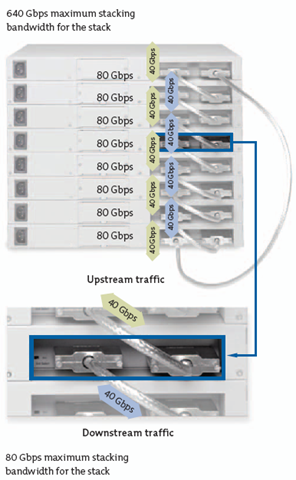 Let me start by telling you (if you don’t know already) that you can’t stack Ethernet Switch 460/470s with the Ethernet Routing Switch 5500. You also can’t use the Ethernet Switch 460/470 cascade cables with the Ethernet Routing Switch 5500 series switches.
The Ethernet Routing Switch 5500 series has the same basic LEDs as the Ethernet Switch 470, Up, Down, Base, etc. A green light indicates that everything is good while an amber or no light indicates a problem. I’ve found the Ethernet Routing Switch 5500 series to be much easier switch to stack for a number of reasons. One long overdue feature that is now available in the ERS 5500 series is automatic firmware/software upgrade. You can add a switch to the stack and the base unit will automatically push the running firmware/software to the recently added switch. You may need to be running at least v4.2 software for this to work although I’ve been unable to confirm as of yet.
Another feature is the ability to run loopback testing of the cascade/stack ports while the switch is running the agent software, there’s no need to reboot the switch and start the diagnostic code. You can also physically test the cable by looping it between the up and down stack ports (on the same switch) and the LEDs for both ports (Up and Down) should turn amber. If they both don’t turn amber you’ve got a problem somewhere, either with the cable or with the cascade module in the switch itself.
I should note that there was also a recall by Nortel on various cascade cables manufactured in 2005. If you have any cascade cables that have an “/05” designation on them you might want to contact Nortel to see if those cables were recalled. As a side note to that I recently discovered 7 cables out of 10 that were defective out of the box. They had the manufactured date of “11212007” on the bag.
5520-48T-PWR#stack loopback-test internal
Testing uplink port ... Ok
Testing downlink port ... Ok
Internal loopback test PASSED

5520-48T-PWR#stack loopback-test external
External loopback test PASSED.
Cheers!
Hi!
I´m wondering how to replace a failed base unit in a stack with two switches, I´m currently working with two 5520 but I also need to figure it out with 5510 or with a mixed stack. I´m currently using 5530_500004_diag.bin and 5530_512034.img. It works fine if the second unit fails and the base unit still works.
/Erik
Hi Erik,
I’ll answer your question but let me warn you about stacking 5510s with 5520/5530s. I strongly advise you to make sure that if you stack those models together that you make sure the 5520/5530 stack is the base unit. I believe Nortel now recommends this configuration as opposed to allowing the 5510 to be the base unit. We recently upgraded a stack which had a 5510 (base) and a 5520 stacked together to 5.1.3 software. After the upgrade was complete the switch started throwing a loop back into the network almost like the MLT was in a disabled state even though it was in an enabled state.
You can certainly replace the defective base switch. If you can take a downtime you can do it pretty easily by jut restoring the configuration from ether a BINARY or ASCII backup (you have a backup of the configuration right?). If you want to try and do it live without rebooting the other switch (or you don’t have a backup of the configuration) then you need to use the auto-unit-replacement (AUR) feature which was introduced in the 4.2.x software or higher.
If you’ve already power cycled the second switch in the stack since the base unit failed then you won’t be able to use the AUR feature.
Here’s some information from Nortel;
Auto Unit Replacement
The Auto Unit Replacement (AUR) feature enables users to replace a unit from a stack while retaining the configuration of the unit. This feature requires the stack power to be on during the unit replacement. The main feature of the AUR is the ability to retain the configuration (CFG) image of a unit in a stack during a unit replacement. The retained CFG image from the old unit is restored to the new unit. Because retained CFG images are kept in the DRAM of the stack, the stack power must be kept on during the procedure.
Note 1: In order for Auto Unit Replacement to function properly, the new unit and the existing units in the stack must all be running the same version of software (Release 4.2 software or later).
Note 2: Auto Unit Replacement does not work on a stack of two units only. In this configuration, if a unit fails, the remaining unit becomes a stand-alone switch and Auto Unit Replacement does not load the configuration of the failed unit if it is replaced.
Other information related to this feature:
The new unit must be the same hardware configuration as the old, including the same number of ports.
If the administrator adds a new unit with a different hardware configuration, the configuration of this unit is used.
If the administrator adds a new unit with the same hardware configuration, the previous configuration of the new unit is lost. It is overwritten with the restored configuration from the stack.
This feature can be disabled/enabled at any time using the CLI. The default mode is ENABLE.
Customer log messages are provided.
Note: After booting a stack, use the CLI command show stack auto-unit-replacement from a unit console to find out if that unit is ready for replacement.
AUR function
The CFG mirror image is a mirror of a CFG image (in FLASH) of a unit in a stack. The mirror image does not reside in the same unit with the CFG image. The unit that contains the CFG image is called the Associated Unit (AU) of the CFG mirror image. The MAC Address of the AU is called the Associated Mac Address (AMA) of the CFG mirror image. An active CFG Mirror Image is a CFG mirror image that has its AU in the stack. An INACTIVE CFG Mirror Image is a CFG mirror image for which the associated AU has been removed from the stack. When a CFG mirror image becomes INACTIVE, the INACTIVE CFG mirror image is copied to another unit.
The stack always keeps two copies of an INACTIVE CFG mirror image in the stack in case one unit is removed — the other unit can still provide the backup INACTIVE CFG mirror image. CFG mirror image process The CFG mirror image process is triggered by specific events. Power Cycle After a power cycle, all the CFG images in a stack are mirrored.
You can find additional information in the documentation, Nortel Ethernet Routing Switch 5500 Series Configuration — System NN47200-500 (217462-C).
Good Luck!
Hi,
I am trying to stack 3 Nortel 5520 switches I upgraded to FW 6.0.0.6 and SW 6.0.0.004 using 55x0_60006_diag.bin however one switch is greyed out in when viewing the stack with device manager. I have reset the stack however even if I only configure 2 switches in the stack one switch is greayed out. If I break the stack all switches operate normally as individuals. I have tried different configurations in stacking and changing the base unit and the linking cables however I cannot seem to get 2 or 3 units to stack and all of them active.
[IMG]http://i327.photobucket.com/albums/k469/ECRX/nortel/3stack.jpg[/IMG]
[IMG]http://i327.photobucket.com/albums/k469/ECRX/nortel/2stack.jpg[/IMG]
HELP :)
Everett
Hi,
I have done the loopback tests and all three switches pass internal and external tests.
Thanks
Hi Everett,
I don’t think I’ve ever seen a switch stack act like that… your picture says a thousands words.
Your sure that they all have the exact same boot and agent software revisions? You realize that 6.0.3.0 software is available for the ERS 5500 series switches and resolves a VLACP issue when connecting to an ERS 8600 switch.
Have you tried to factory reset the entire stack (or the individual switches)? The cascade/stack ports all look good so I don’t think that your problem. Did you try to perform internal/external loopback tests on the cascade/stack ports?
Is there anything in the logs; “show log sort-reverse” from the CLI interface.
Cheers!
Hi Michael,
I have factory reset the switches and the stack several times.
I have restacked them in every combination possible and changed the role of the base to different switches in the stack.
Internal/External loopback tests on cascade/stack ports PASS
There is nothing abnormal in the logs from the CLI interface.
I am still unable to get them stacked correctly
I am unable to locate the 6.0.3.0 software could you assist me with this.
Thanks
That’s truly a strange problem you have there Everett… I’m not sure what to tell you.
Unfortunately you’ll need a maintenance contract to get the latest software from Nortel.
If you suspect this is a hardware problem (same switch is always having the issue regardless of stack order) then you might want to try and have Nortel replace the switch. The ERS 5500 series is covered by a life-time warranty.
Good Luck!
Michael,
The problem is not constant as it is not the same switch. I am trying to get support from the company that supplied the switches however they are taking their own sweet time. I’ll just have to wait and see.
Thanks for the advise and keep up the good work.
Hi,
I downgraded the software version on all the switches to 4.2.1.004 and got them to stack.
So they are running FW 6.0.0.6 and SW 4.2.1.004.
There must be some issue with SW 6.0.0.004 that I was using.
BTW the reason I choose 4.2.1.004 it was the only other SW version I had.
Everett
Hi everyone,
I have a 5520-48T-PWR with firmware 5.0.0.2 and software version 5.0.3.005. This switch recently reboot for no reason. I tried to check the log file but it doesnt register nothing at all about the problem.
So, I was wondering if you guys could please advice me about a troubleshooting guide, commands or anything that could help to find out what the problem was.
I was thinking about may be the software version.
Thanks in advance,
Cinthya.
Hi Cinthya,
Unfortunately there could be any number of reasons the switch reboot itself. Are you sure it actually restarted? I’m assuming you lost connectivity to some device that was connected to it. There have been quite a few software releases since the 5.0.3 software so that might be a good first start if the switch starts rebooting too frequently. If you issue a “show system” you should get some output back that includes something similar to the following, “Last Reset Type: Power Cycle”. Now you need to take this with a grain of salt because it isn’t always correct.
There’s also a command that might be in the 5500 series, try “show system last-exception”.
The log should reflect the fact that the switch rebooted itself. I know that Nortel has been working on the logging parts of the 5500/5600 switches and was suppose to make some changes in the 6.1 software release although I have yet to really kick the tires on the 6.1 software release.
If your switch had been up for a very long time, 495 days, then you should read this post.
Good Luck!
Hi everyone,
I have a stack with two switches 5520-48T. I have stack problem only during the night (not every night, randomly). Up and down led are amber and I need to reboot the two switchs to solve this problem. I replaced the two cascade cables but I have always the same problem.
Thanks in advance,
Vincent
Hi Vincent,
There’s not much to stacking Nortel switches, you just cable them up and your basically done. What version of software are you running? I would suspect a software problem, are there any issues with your power grid? What if any events are in the switch log? (show log sort-reverse).
You might want to post your any future questions on the forums; http://forums.networkinfrastructure.info/nortel-ethernet-switching/
Good Luck!
Hi,
I’m running v5.1.0.014 software release. I didn’t use ups before but with ups I have always the problem. I show nothing in the switch log (log after reboot, nothing before ) :
29 2009-08-14 08:27:29 GMT+02:00 Informational Web server starts service on port 80.
30 2009-08-14 08:27:44 GMT+02:00 Informational IGMP: Unknown Multicast Filter disabled
31 2009-08-14 08:27:46 GMT+02:00 Informational PoE Port Detection Status: Port 16 Status: Delivering Power
32 2009-08-14 08:27:46 GMT+02:00 Informational PoE Port Detection Status: Port 17 Status: Delivering Power
33 2009-08-14 08:27:46 GMT+02:00 Informational PoE Port Detection Status: Port 24 Status: Delivering Power
34 2009-08-14 08:27:46 GMT+02:00 Informational PoE Port Detection Status: Port 39 Status: Delivering Power
35 2009-08-14 08:27:49 GMT+02:00 Informational PoE Port Detection Status: Port 44 Status: Delivering Power
36 2009-08-14 08:27:51 GMT+02:00 Informational DISTRIBUTE_DB event sent, unit mask 0x01, appl mask 0x00000000
37 2009-08-14 08:27:53 GMT+02:00 Informational Join event sent, unit mask 0x01, appl mask 0x0000000F 0xBFFFFFFF
38 2009-08-14 08:27:55 GMT+02:00 Informational Stack Mgr: Ring: B 1/1 – D 2/2
39 2009-08-14 08:29:31 GMT+02:00 Informational SNTP: First synchronization successful.
40 2009-08-14 08:29:46 GMT+02:00 Informational Cold Start Trap
41 2009-08-14 08:29:46 GMT+02:00 Informational Trap: pethPsePortOnOffNotification
42 2009-08-14 08:29:46 GMT+02:00 Informational Trap: pethPsePortOnOffNotification
43 2009-08-14 08:29:46 GMT+02:00 Informational Trap: pethPsePortOnOffNotification
44 2009-08-14 08:29:46 GMT+02:00 Informational Trap: pethPsePortOnOffNotification
45 2009-08-14 08:29:46 GMT+02:00 Informational Trap: pethPsePortOnOffNotification
46 2009-08-14 08:29:46 GMT+02:00 Informational Trap: bsnStackManagerReconfiguration
47 2009-08-14 08:29:46 GMT+02:00 Informational Trap: entConfigChange
48 2009-08-14 08:29:46 GMT+02:00 Informational Trap: bsnConfigurationSavedToNvram
49 2009-08-14 08:29:48 GMT+02:00 Informational Link Up Trap for Unit/Port: 2 / 45
50 2009-08-14 08:29:49 GMT+02:00 Informational Link Up Trap for Unit/Port: 2 / 46
51 2009-08-14 08:29:49 GMT+02:00 Informational Link Up Trap for Unit/Port: 2 / 48
52 2009-08-14 08:30:01 GMT+02:00 Informational Trap: bsnConfigurationSavedToNvram
53 2009-08-14 08:30:06 GMT+02:00 Informational Link Up Trap for Unit/Port: 1 / 45
54 2009-08-14 08:30:06 GMT+02:00 Informational Link Up Trap for Unit/Port: 1 / 46
Hello, thank you for great blog!
does this “stack loopback-test internal/external” command affect normal switch work? Can one use it in production switch with connected IP-phones without having such time-critical traffic interrupted?
I found no clues in Nortel’s docs, so probably it doesn’t; but i’m still not sure
Hi Igor,
Thanks for the comment regarding the blog.
If you have a single switch the loopback test should not cause any issues to your production traffic. If you have multiple switches in a stack configuration then the answer would be “yes”, you are going to have a brief interruption on the stack ports as you test the UP and DOWN ports. In the past you needed to perform this testing from the boot code, thankfully they’ve put the commands/feature into the agent code so you can do it without rebooting the switch.
Cheers!
5530-24TFD#stack loopback-test external
Stack loopback test affects the stack functionality.
You should run this in stand-alone mode
5530-24TFD#stack loopback-test inte
5530-24TFD#stack loopback-test internal
Stack loopback test affects the stack functionality.
You should run this in stand-alone mode
5530-24TFD#
I did stacking of two 5530-24TFD, In Its running Firmware Version is:6.0.0.6 & Software Version is:6.0.3.008 on both the 2 switches, then why am getting the above message?.. and also am not getting access from non-base unit when am power off the Base unit switch. Anyone can help me. Thank you very much for the advance.
Hi Gunasankar,
The later versions of software now check to see if you are already running in a stack configuration and will prevent you from issuing the diagnostic command because it will break the stack.
With that said there are additional commands in the new software releases that make troubleshooting stack issues much easier;
These two commands can help you determine the location of a stack issue (cable or module). You can also use another switch to independently test the stacking/cascade cabling using the command you referred to above.
I would advise you to make both a BINARY and ASCII backup of the configuration before you go playing around, you may need to factory reset the switch and restore your configuration if things get really screwed up.
Good Luck!
hey Michael,
I dont know if this is the right section to post my problem in, but I hope you can help me….
I have 2x 5510 48T Switches here, both had old versions of firm- and software on them. now i updated both to fw:6.0.0.6 and sw:6.0.0.004/005.
One is working fine but the other one comes up with an “PHy Loopback(2) Error! “(cant recv pkt!!!) on Ports 13 -24.
after downgrading to a 5.0 version the error disappears, doing the update again -> the error is back! I allready made an Image of the configuration of the working one but nothing changed. can you help me?
thanks and please excuse my english, I’m german…. ;)
Hi Thorsten,
You might want to post your question in the discussion forums.
I’ve never personally seen that message myself. Do the ports 13-24 function properly on the switch? I’m going to guess the new diagnostics might be detecting a hardware problem. I would probably suggest you contact Avaya/Nortel if you have a maintenance contract.
Good Luck!
Hello Michael,
I have a five stack ERS5500 and I need to test the stack mode.
I was thinking in perform the stack loopback-test internal and
stack loopback-test external
I have a question:
In order to test the stack loopback-test internal, is it possible to disable all the ports of the switches (user ports) and try both commands?
The reason is that the switch its in production and it would take longer to unplug and plug all the cables .
Also,
Do you know how long the test would take??
Kind Regards,
Cinthya
Hi Cinthya,
The only cables you need to be concerned with are the stack cables. You can leave the station cabling connected to the switch/stack. The test doesn’t take long per switch but with five switches it will definitely take some time. The tests will also interrupt the stack and end stations so you’ll definitely need to schedule downtime. If you want to run the external loopback test you need to physically loop a cascade cable between the UP and DOWN ports.
Are you having some issue that is leading you to run these tests?
You might want to browse the discussion forums. We have a few current threads discussing some stacking issues that a few forum members are currently experiencing.
Good Luck!
Hi Michael ,
I have faced issue since last 2 days , I have stack of 2 no of 5530 and 2 no of 5520 switches. running FW : 5.0.0.2 and SW : v5.0.0.010.
i have got E-mails 3 to 4 times a day for stack up – down.
but no user connectivity loss.
MCO stack# show logging sort-reverse
Type Unit Time Idx Src Message
—- —- ———————– —- — ——-
I 4 47:22:28:43 42 PoE Port Detection Status: Unit 4 /
Port 20 Status: Detecting
I 4 47:22:28:40 41 PoE Port Detection Status: Unit 4 /
Port 20 Status: Delivering Power
I 4 46:23:40:26 40 Stack Mgr: Ring: B 1/1 – D 2/3 – D 3
/4 – D 4/2
I 4 46:23:40:25 39 IGMP: Unknown Multicast Filter disab
led
I 4 46:23:40:25 38 Join event sent, unit mask 0x08, app
l mask 0x00000001 0xFFFFFFFF
I 4 46:23:40:25 37 NUQC – Disabled
I 4 46:23:40:24 36 DISTRIBUTE_DB event sent, unit mask
0x08, appl mask 0x00000000
I 4 46:23:39:45 35 Stack port 2 UP
I 4 46:23:39:45 34 Stack port 2 DOWN
I 4 46:23:39:32 33 Stack port 2 UP
I 4 46:23:39:32 32 Stack port 1 UP
I 4 46:23:39:29 31 Stack port 2 DOWN
I 4 46:23:39:29 30 Stack port 1 DOWN
I 4 46:23:39:17 29 Stack port 2 UP
I 4 46:23:39:17 28 Stack port 1 UP
I 4 46:23:37:32 27 Stack port 2 DOWN
I 4 46:23:37:32 26 Stack port 1 DOWN
I 4 46:23:37:31 25 Stack port 2 UP
I 4 46:23:37:31 24 Stack port 1 UP
I 4 46:23:37:31 23 Stack port 2 DOWN
I 4 46:23:37:31 22 Stack port 1 DOWN
I 4 46:23:37:19 21 Stack port 2 UP
I 4 46:23:37:19 20 Stack port 1 UP
I 4 46:23:37:16 19 Stack port 2 DOWN
I 4 46:23:37:16 18 Stack port 1 DOWN
I 4 46:23:37:04 17 Stack port 2 UP
I 4 46:23:37:03 16 Stack port 1 UP
I 4 46:23:36:53 15 Stack Mgr: Ring: B 1/1 – D 2/3 – D 3
/4 – D 4/2
is there problem with stack ? pls help.
Hi K,
You’re running an older version of software and I would suggest that upgrading might help. I would start with a cold boot of the entire stack though before you go too far (or spend too much money).
The logs you’ve provided are from switch 4 (in the stack). Are there any users connected to switch 4? The only devices, servers, desktops, printers, etc that would have seen an issue would have been connected to switch 4. Have you visually inspected the stacking/cascade cables? Are they secure, was there anyone in the area when the problem occurred. I would guess that the switch might have watchdog’d and rebooted itself and it took a little longer than usually for it to sync up with the reset of the stack. Unless you are experience this problem frequently it’s probably safe to ignore.
Cheers!
ok ,
im going to upgrade it into new FW 6.1 , bc’z issue is not resolved yet.
one more thing i want to know is , i have also running OSPF into this with ASBR , and other 4 nos of 5530 with OSPF( FW 5.1 ) , so should i need to upgrade all that switches into 6.1 or not.
and ya i need to first upgrade into 6.0 first . so pls tell me wht other precaution i need to take care about.
Hi K,
You don’t need to upgrade any other switches to 6.1 so long as they are not ‘stacked’ together. If the switches are stacked together they will all upgrade at the same time, there is no option to upgrade one and not the others or vice verse.
You should definitely perform a binary and ASCII backup of the configuration just in case you need to manually rebuild it. Other wise you just need to upgrade to 6.0 first and then 6.1 as you already alluded to.
You might want to check out the discussion forums. There are a few threads that discuss stacking issues and what some folks have done to troubleshoot.
Good Luck!
Hi Michael,
One of the ERS5520 stacks in our office has four switches. However the CLI and JDM show as if there are 5 switches and the fourth switch is down. The firmware version in all the switches is 5.1.0.014. I verified that physical connectivity. It looks fine. What could be the reason for this behavior? Could you suggest a way to rectify this?
Thanks
Siraj
Hi Siiraj,
Was a swtich in the stack recently physically replaced? The software utilizes a combination of the serial number and MAC address of each switch to build the configuration. What you are seeing in JDM and CLI was that there “use” to be a switch with a different MAC address and serial number in the stack. It’s possible that someone replaced a faulty switch but never followed the proper procedure in a stack configuration.
To resolve the issue you need to re-number the stack. There should be a menu option within the CLI menu. When you re-number the stack you’ll be given the option to remove the non-existent switch.
Good Luck!
Thanks for the solution Michael. I renumber the stack and issue was resolved. Since I had to wait for approval, it took few days to perform the activity.
Regards
Siraj
Hi Siraj,
I’m happy to hear that everything worked out.
Cheers!
Hi Michael !
Can you pls help me how to break the stack of 5500 swithes !
I have 4 no of switches . unit 1 : 5530 , unit 2 : 5520 unit 3: 5530 and unit 4 5520 , now i want to remove that 5520 switches from stack !
Thanks,
Kuldip.
Hi Kuldip,
It’s very simple… just remove the switches in question. Put the remain switches back together again and then renumber the stack as Siraj did above.
You’ll obviously need a downtime window and I would highly suggest you document the switch configuration in case you need to manually rebuild the configuration.
Good Luck!
ok !
thanks ,
and yes , i have done that FW upgrade into 6.1 , problem is resolved now , ( post no #25 )
I’m happy to hear that everything worked out. Good Job!
Hi Michael ,
I want help regarding access list on nortel 5530 switches it has running 6.0 SW , i want to create access list to allow l3 to give source based routing. pls help
thanks,
kuldip
Hi kuldip,
I’m not sure what your post has to-do with stack troubleshooting?
Please feel free to post any future questions on the discussion forums, forums.networkinfrastructure.info.
Avaya/Nortel really doesn’t support policy (source) based routing such as Cisco does with their route maps. You may be able to create an IP filter to forward-to-next-hop action.
Good Luck!
Thanks
Hi Michael,
Do you know how to interpret this log?
5520 5.1.1.0.17
Stack Mgr: Ring: B 1/1 – D 2/3 – D 3/2
5520 5.1.1.0.17
Stack Mgr: Ring: B 1/5 – D 2/6 – D 3/1 – D 4/2 – D 5/3 – D 6/4
Thanks!
Hi Gus,
The Ethernet Routing Switch 5520 utilizes a ring topology when connecting the switches in the stack.
The log entries indicate how the switches are stack together. I believe the first number indicates the switch or unit number, the second number indicates which switch or unit is connected to the uplink stacking/cascade port.
Here’s what a stack looks like just stacked together in a straight line 1->2->3->4->5->6->7-8->1;
Stack Mgr: Ring: B 1/1 – D 2/2 – D 3/3 – D 4/4 – D 5/5 – D 6/6 – D 7/7 – D 8/8
In your first example, B 1/1 – D 2/3 – D 3/2
In your second example, B 1/5 – D 2/6 – D 3/1 – D 4/2 – D 5/3 – D 6/4
Let me research this a little more…
Hi Michael,
I have some ERS 55xx stacked switches with various SW (v.5.x) releases and Advanced licenses.
I want to add new 56xx devices with latest SW releases to it. Are there limitation to do it?
1. All switches must be working on the same SW releases (v.6.x or 5.x) in a stack?
2. Can I upgrade ERS 55xx SW to latest releases with no additional cost?
3. Should I acquires a new Advanced license for the new upgraded stacks (v.6.x)?
Thanks!
Hi Alex,
The ERS5600 series is compatible with the ERS5500 series in terms of stacking. I believe the ERS5600 series requires 6.x software or later so you’ll need to upgrade your ERS5500 series switches before you stack them with the ERS5600 series switches.
1) All switches in the stack MUST be running the same software and firmware.
2) Officially you should have a software maintenance contract on your ERS 5500 series switches to upgrade them but if you have the software… (figure it out)
3) You only need a single Advanced License for the entire stack… the license is keyed off the MAC address of the base switch, so as long as you don’t replace the base switch you should be fine.
Good Luck!
Michael,
I have tried to find an answer from the manuals but i’m not having much luck. I have 2 5530-24TFD which were stacked. Some of the fans died on one unit so I have sent this for RMA. Now when I tried to stack a replacement unit I’m having issues. The stack up/down lights just flash and poll (green) occansionly and nether unit can see the other. Now for my question, I was trying to use the stack loopback-test internal/external commands and I get this
“Stack reboot on failure must be disabled before running test!” Do you know how I do this, and why I have never seem this before?
P.S Great blog by the way……always a good place for helpful hints
Hi Shammy,
Are the switches running the same software release? That’s usually the issue when all the light blink. You need to either upgrade or downgrade the replacement switch to the same software that the original stack was running.
What software release are the switches running? I’ve never seen the “stack reboot on failure must be disabled before running test” error.
Have a look at this post for some additional hints;
http://blog.michaelfmcnamara.com/2012/02/stacking-avaya-ethernet-routing-switches-hints-tips-gotchas/
You might want to search the discussion forums; http://forums.networkinfrastructure.info/nortel-ethernet-switching/
Good Luck!
Hi Michael,
Thanks for your quick response!
Both are identical to the original
HW:02
FW:6.0.0.15
SW:v6.2.4.011
I’ll see if I can get answer from Avaya if I can’t find it in the forums.
Cheers
Hello Everybody,
We have a Nortel 5530-24TFD in a stack and it restarts apparently with no reason and without writing something in log. We have replaced the switch and the problem persits. It restarts once a day, or 2. Have any idea of what to do?
Thank you!
Hi,
We required your help in below errors
We have stacked Two nos 5530 with firmware 6.2 . Now we are enabling password Security The error ” Switch RO password not compliant for unit: 2. ” pls suggest
Also we have 4 nos 5520 with stacked configuration . due to power failure in base switch the second unit become temporary base for the entire stack . now how to configure permanent base for entire stack again . we are not in position to reboot entire switch or stack .
Thansk
hi can any help us on below problems ?????
We required your help in below errors
We have stacked Two nos 5530 with firmware 6.2 . Now we are enabling password Security The error ” Switch RO password not compliant for unit: 2. ” pls suggest
Also we have 4 nos 5520 with stacked configuration . due to power failure in base switch the second unit become temporary base for the entire stack . now how to configure permanent base for entire stack again . we are not in position to reboot entire switch or stack .
Hi Micheal,
Last night I was performing a maintanance hard reload on a 5500 hybrid stack. The stack consists of 2 x 5530, 5 x 5510 and 1 x 5520. When the stack reloaded it was as it could not negotiate the base unit back to unit 1 (5530) with the bottom unit (5520) I tried all sorts of ways of bringing the stack back up but the only way I could get it back up was to turn base switch off and the 5530 and turn it on, on the 5520.
Have you ever seen this behaiviour before? It was if the 5520 had to be the base unit for the stack to work. Obviously prior to the reload it was working ok with the 5530 as the base.
Thanks,
Craig
Hi Craig,
What software release are you running? I don’t recommend hybrid stacks, I’ve see all sorts of issues and problems and it usually isn’t worth the little benefit. I would suggest you check both the FW and SW of each switch and make sure they all match. Also the logs from the switch should help give you some idea of what exactly was going on.
Since you are at the maximum number of switches for that stack (8) you might also try a stack renumber to clear out any old switches that might have been replaced at sometime in the past. Although you need to be careful that you have both a BINARY and ASCII backup just in case.
Good Luck!
Thanks Micheal, I do agree with hybrid stacks not being ideal. The customer wanted 10Gb uplinks to the core 8600’s – hence the 5530’s. I may look at swapping the 5520 for a 5510, I dont think the POE requirement is needed anymore.
Once I have defaulted the stack last night I did a re-numbering before I applied the config. What should of been a straight forware reload turned into about 2 hours of work!
The SW version is 6.1.5. Thanks.